
WhatWeather - Weather Station
com.kolov.weatherstation
by kolov.com
Screenshots


Ad slot: Top Leaderboard
About this app
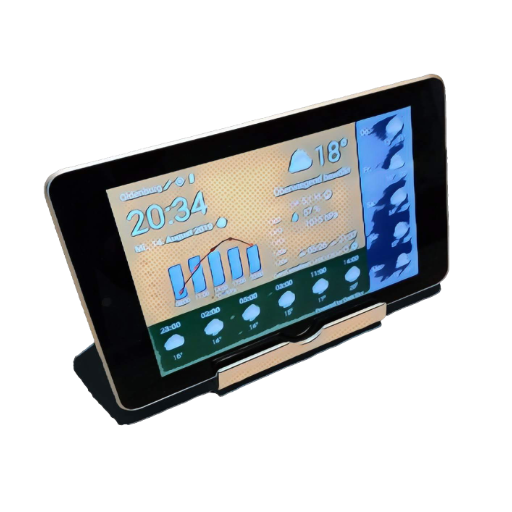
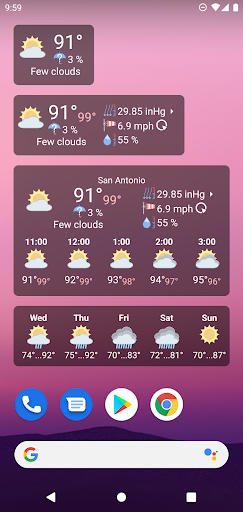
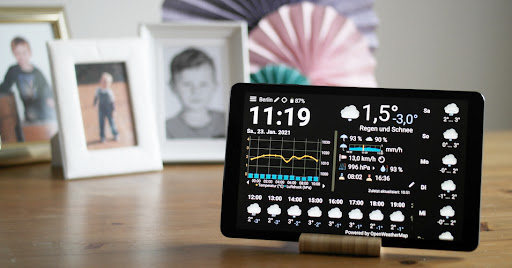
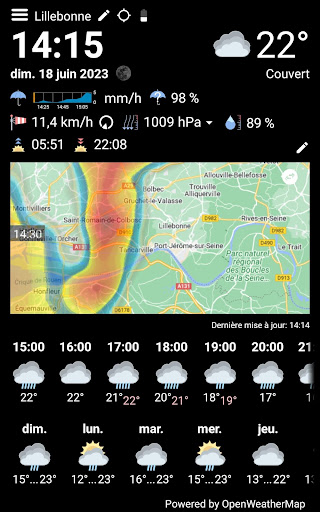
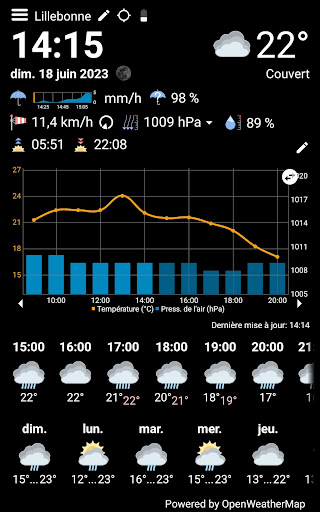
Use your old Android phone or tablet as a weather station. All you need is to install this app. The display stays always on and the content is automatically updated. You can see the current weather, hourly forecasts, daily forecasts and the weather history for up to 3 days at a glance - absolutely free and without annoying ads.
Following additional features can be purchased within the app:
* Free choice of numerous weather data providers: OpenWeatherMap, Weather API, DWD, NOAA, Visual Crossing and WeatherFlow
* Optional integration with your private weather station via Netatmo, Weather Underground or WeatherFlow
* More frequent automatic refresh
* Minutely rain forecast
* Precipitation radar
* Display can be automatically dimmed/switched off
* Icons differentiating cloud cover and amount of rain and snow
* Moon phase
* Feels-like temperature
* History graph always filled
* Additional values: rain probability and intensity, cloud cover, dew point, UV index, ozone and visibility in a popup window
* Variable intervals for hourly forecasts and history
* Switchable full screen
FAQ
What is this app good for?
The initial idea was to revive old tablets, that are still working, but became too slow or too insecure because of the old Android version. Usually these tablets are still good enough to run WhatWeather.
How long can I use the app for free?
As long as you wish. It offers a basic set of features and can be upgraded with in-app purchases.
What is WhatWeather Pro?
WhatWeather Pro has become obsolete since WhatWeather provides the same features as an in-app purchase. You no longer have to install a separate app.
Do I have to purchase upgrades for each device separately?
No. Your in-app purchases are eligible for all devices assigned to your Google account.
Do you offer 24/7 support?
We give our best to check e-mails daily and to answer your requests.
Why is feature XY missing?
To contact us is a better idea, than to write a 1-star review. Give us a chance to put it on the list or to explain, why we don't want to implement it.
There is much empty space on the screen, why don't you fill it up with bigger font or additional data?
There is one layout, that has to fit all the different aspect ratios, time and date formats, languages and optional data, that you can turn on and off. Our reference is an old Google Nexus 7. We are improving the layout continuously, but it will possibly never fit your particular device perfectly.
WhatWeather asks for the GPS permission. What do you use it for?
The weather data providers need your position. WhatWeather tries to locate your device automatically. If you reject the permission or turn off the device's location service, you have to enter the location manually. There are no personal data besides the coordinates, language and app version submitted to the backend server.
Icons from https://icons8.com were used in this app.
Following additional features can be purchased within the app:
* Free choice of numerous weather data providers: OpenWeatherMap, Weather API, DWD, NOAA, Visual Crossing and WeatherFlow
* Optional integration with your private weather station via Netatmo, Weather Underground or WeatherFlow
* More frequent automatic refresh
* Minutely rain forecast
* Precipitation radar
* Display can be automatically dimmed/switched off
* Icons differentiating cloud cover and amount of rain and snow
* Moon phase
* Feels-like temperature
* History graph always filled
* Additional values: rain probability and intensity, cloud cover, dew point, UV index, ozone and visibility in a popup window
* Variable intervals for hourly forecasts and history
* Switchable full screen
FAQ
What is this app good for?
The initial idea was to revive old tablets, that are still working, but became too slow or too insecure because of the old Android version. Usually these tablets are still good enough to run WhatWeather.
How long can I use the app for free?
As long as you wish. It offers a basic set of features and can be upgraded with in-app purchases.
What is WhatWeather Pro?
WhatWeather Pro has become obsolete since WhatWeather provides the same features as an in-app purchase. You no longer have to install a separate app.
Do I have to purchase upgrades for each device separately?
No. Your in-app purchases are eligible for all devices assigned to your Google account.
Do you offer 24/7 support?
We give our best to check e-mails daily and to answer your requests.
Why is feature XY missing?
To contact us is a better idea, than to write a 1-star review. Give us a chance to put it on the list or to explain, why we don't want to implement it.
There is much empty space on the screen, why don't you fill it up with bigger font or additional data?
There is one layout, that has to fit all the different aspect ratios, time and date formats, languages and optional data, that you can turn on and off. Our reference is an old Google Nexus 7. We are improving the layout continuously, but it will possibly never fit your particular device perfectly.
WhatWeather asks for the GPS permission. What do you use it for?
The weather data providers need your position. WhatWeather tries to locate your device automatically. If you reject the permission or turn off the device's location service, you have to enter the location manually. There are no personal data besides the coordinates, language and app version submitted to the backend server.
Icons from https://icons8.com were used in this app.
What's New
* Fixed Netatmo login issues
* Bug fixes
* Bug fixes
App Information
Version Name
1.18.6
Version Code
20244
File Size
13.4 MB
Min SDK
Android 21+
Target SDK
Android 34
Developer
kolov.com
Contact
Content Rating
Everyone
Package Name
com.kolov.weatherstationPermissions Required
This app may request the following permissions:
Recent Reviews

Joseph Thompson-Wilda
5.0★
Great app for those who have home weather stations! I love the customization options with data and graphs. This works great on a tablet in landscape mode. I have a Weatherflow Tempest station, which does not come with a display. I'm using this app on a Fire 7, which works out to be a really affordable, wifi-connected display option. Two suggestions: 1) It would be nice to have the option of a radar map (perhaps in place of the graph). 2) A small area that displays active watches/warnings.

Doug
4.0★
Overall I really like the app. I use it on a few old Fire Tablets that would otherwise not be used for displaying the data from my PWS on Wunderground (bought Pro). I love the customization with the main display; however, I wish I could customize the values displayed on the widgets, so I could get more use from this app on my phone - would make this a 5-star app immediately!

Marty Greg
4.0★
Nice app, pleasant UI. Refreshing design. Pretty much everything shown on a single page (pop-ups instead of scrolling). Would give 5 stars if it were not for very tiny, almost illegible font related to the graph data + arrows. Impossible to read if one does not have perfect eyesight, like myself. Would be nice to be able to customize font sizes.

Malcolm Ellis
4.0★
This app used to give good forecasting but now is rubbish. It indicates rain at times but no rain appears, then it indicates sunshine and it pisses down with rain. I know we have strange weather in the UK, but to get it wrong so many times is rubbish.

christy usa Eris
3.0★
been using happily for about 4 years, but atm for 2 weeks all weather providers seem to be blocked in Russia, so app doesnt work anymore. could you provide a solution?

L Q V
1.0★
What's up with the "automatically paused to conserve resources" feature being added and how do you shut it off? This "feature', assuming it can't be disabled, ruins the app. Edit: 1. It isn't clear, which is why I asked. 2. 1 star to get quick attention when an app loses features or makes a change for the worse. FYI, I can update ratings when addressed. 3. Some people work swing shifts. I am often up at 1am and sometimes get up at 4am 4. You can keep the 1 star now. Uninstalled 2 save u $..
Ad slot: In-Content