
Fake GPS location
com.lexa.fakegps
by Lexa
Screenshots

Ad slot: Top Leaderboard
About this app
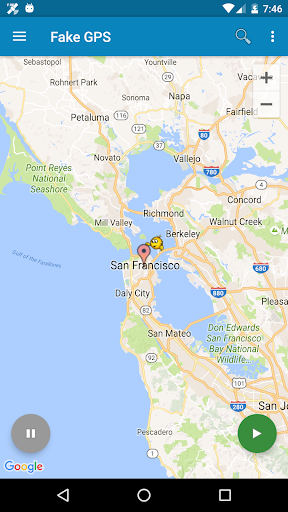
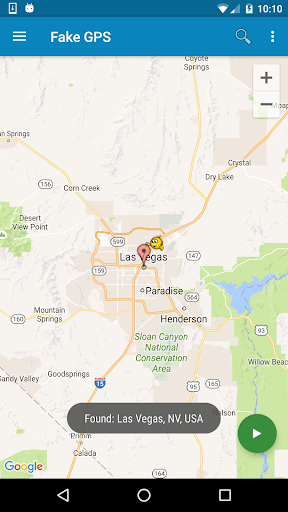
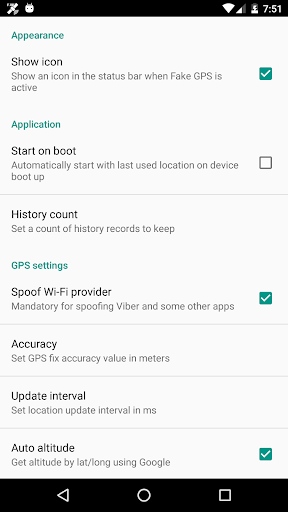
Teleport your phone to any place in the world with two clicks! This app sets up fake GPS location so every other app in your phone belives you are there!
Has Tasker support and can be started/stopped from command line (See FAQ for details)
+++IMPORTANT+++
Be aware that after using FakeGPS you may find your location LOCKED TO THE LAST MOCKED LOCATION EVENT AFTER UNINSTALL FakeGPS!
It's not a bug and your GPS sensor isn't broken. There are two ways to fix this issue:
1. Install "GPS Status" from the Play, launch and get a fresh GPS fix. You may need to repeat it several times with 30 min interval.
2. Start FakeGPS, set your real location and leave it so for several hours.
You may combine these steps. The issue will disappear in one or two days - be patient.
For ROOTED devices you can mock locations without enabling "Allow mock locations" option. To do so please use Root Explorer or other similar app and move /data/app/ru.lexa.fakegps~1.apk to /system/priv-app or to /system/app (for Android 4.3 and older). Then change apk permissions to rw-r-r and reboot your device. If you find apk in /syste/priv-app disappears after reboot it means that your devices has S-ON mode enabled and so restores /system folder aftear each reboot. Please google how to switch your device to S-OFF mode.
If you can't find ru.lexa.fakegps.apk in /data/app you may find it at /mnt/asec/ru.lexa.fakegps/1.apk. In this case you should copy and rename it to /system/priv-app/ru.lexa.fakegps.apk.
END USER LICENSE AGREEMENT
This app is provided "as is" and we can not be held responsible for any usage by the end users of our app. This app is free with limited functionality and is for testing purposes only.
Has Tasker support and can be started/stopped from command line (See FAQ for details)
+++IMPORTANT+++
Be aware that after using FakeGPS you may find your location LOCKED TO THE LAST MOCKED LOCATION EVENT AFTER UNINSTALL FakeGPS!
It's not a bug and your GPS sensor isn't broken. There are two ways to fix this issue:
1. Install "GPS Status" from the Play, launch and get a fresh GPS fix. You may need to repeat it several times with 30 min interval.
2. Start FakeGPS, set your real location and leave it so for several hours.
You may combine these steps. The issue will disappear in one or two days - be patient.
For ROOTED devices you can mock locations without enabling "Allow mock locations" option. To do so please use Root Explorer or other similar app and move /data/app/ru.lexa.fakegps~1.apk to /system/priv-app or to /system/app (for Android 4.3 and older). Then change apk permissions to rw-r-r and reboot your device. If you find apk in /syste/priv-app disappears after reboot it means that your devices has S-ON mode enabled and so restores /system folder aftear each reboot. Please google how to switch your device to S-OFF mode.
If you can't find ru.lexa.fakegps.apk in /data/app you may find it at /mnt/asec/ru.lexa.fakegps/1.apk. In this case you should copy and rename it to /system/priv-app/ru.lexa.fakegps.apk.
END USER LICENSE AGREEMENT
This app is provided "as is" and we can not be held responsible for any usage by the end users of our app. This app is free with limited functionality and is for testing purposes only.
What's New
Fix OpenStreetMap, address some crashes
App Information
Version Name
2.1.2
Version Code
2102
File Size
2.5 MB
Min SDK
Android 21+
Target SDK
Android 32
Developer
Lexa
Contact
Website
Content Rating
Everyone
Package Name
com.lexa.fakegpsPermissions Required
This app may request the following permissions:
Recent Reviews

Henri Daumas
5.0★
Works perfectly. You have to turn on Developer Mode first, and how to do that batteries by Android device. Then you need to set this app as the GPS test app. Once you've done that, move around the app's map to a location of choice and press the play button. This will spoof the phone into thinking that is it's current location. You can save locations as favorites and retrieve them from the menu. Very useful app.

A Google user
4.0★
use this app to place an order at McDonald's so my hubby can pick it up. McDonald's app won't place the order unless you're actually at the location. not very convenient when you're staying at work and need lunch delivered. took away one-star because I had to actually find the location myself every time I entered the address of where I waanted to spoof i got a server error. however if you know the map of the area where you're trying to be it works like a charm.

Ryan Pollom
1.0★
The app works but it's not user friendly. To go to a specific location you can only search via latitude and longitude. The search function needs to allow you to input a street address to find a specific location. The maps are lacking in substance. When search the maps there are a lot of missing street names. There are definitely better apps out there that accomplish the same thing.
A Google user
3.0★
Use it all the time 😂😂 but as others have said, I also wish we could input specific addresses as well. But other than that, it does it's job well, and there is even a notification in my control panel to tell me if my location is still faked! (Edit 11/14/2019: the feature I loved of a notification appearing in my notification panel is now gone, and only reappears after reinstalling the app... and everytime I do, I have to reinput my favorite locations 😕)

L. Raye
5.0★
Works. ¯\_(ツ)_/¯ I mostly use it because I'm disabled and mostly housebound, and some food places require your phone to "be there" when they start the order you put in through the app (like McDonald's once did, though more recently they've made it easier to just say you're there). This way, I can just tell it when someone is there to get my order.

No Name
3.0★
Keeps closing when I minimize other apps. It never used to do this. And when reopening the app, it will have some really random location, like 1000s of miles away but strangely, if I'm set to Atlanta, it remembers that last location. That's the only place it doesn't forget as my last location. No idea why. It's become a nuisance in general.
Ad slot: In-Content