

LIFX
com.lifx.lifx
by Feit Electric Company, Inc.
Screenshots






Ad slot: Top Leaderboard
About this app
Like you, LIFX wants smarter light. This means we care about the way you control your smart lights, as much as we do about the lights themselves. We make it easy to get started with WiFi-enabled, bright, colorful smart lights that need no hub. Yep, you can start with just one device.
LIFX App can not only help give you the best start, but will turn your experience “up to 11”. Automate your wake up Schedule, or set up your movie-watching Scene (then set up voice control so you don’t even have to leave the sofa), or play with Effects next time you’re entertaining.
Features.
The LIFX app is packed full of features like:
- The Basics: on/off, dim, change color, change white temperature.
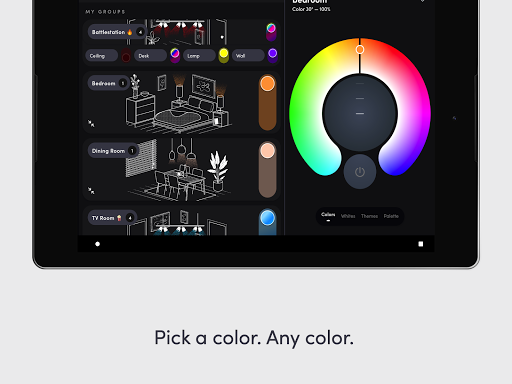
- Groups: control all lights in a group easily, including on/off and dimming with one touch from the Home Dashboard.
- Group personalization: choose a LIFX illustration to suit or personalize Group cards with your own pictures.
- Schedules: automate your lights to fade, change color, and turn on/off, all visible in an easy calendar-style view.
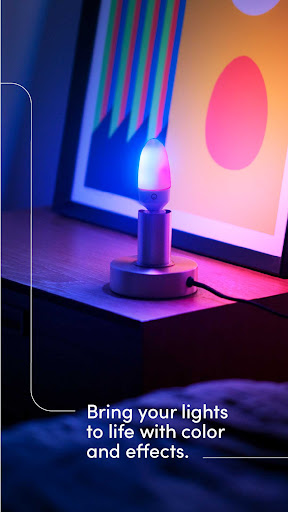
- Effects: play with special effects like the music visualizer, fire, move, candle flicker, strobe, color cycle & more, all in one place.
- Scenes: set your lighting just the way you like it and save it for later.
- Themes: a library of one click color combinations for a Group, from ‘Proud’ to ‘Soothing’.
- Paint: with your finger in the app, paint color live onto your LIFX Z, Beam, Tile and Candle.
- Custom color palettes: add your favorite colors to a custom color palette.
- Discover Tab: find How To guides, learn about integration partners, or shop for LIFX
- Switches: configure switches to control your LIFX lights, groups and scenes, as well as other non-LIFX devices
- and much more.
Example uses from our customers:
- Ambiance: schedule warmer light in the evening - to calm - and whiter light in the morning - to energize.
- “Moccupancy”: set irregular schedules to make it seem like you’re home when you’re not.
- Sleep: set your bedroom lights to deep red just before bed to produce more melatonin which helps you get better quality sleep.
- Stay put: you’ve settled into the sofa for a streaming binge but left the lights on. No need to jump up to the switch, just ask your voice assistant.
- Pet owners: if you're unexpectedly late home from work, turn the lights on for your dog from wherever you are.
- Silent notifications: use partner apps to give you a light flash if… your car is arriving, or the forecast says it will rain, or you are mentioned on social media, and much more.
HomeKit
Best color-changing smart bulb for HomeKit - CNET
Pairing LIFX with Apple HomeKit is easy using the HomeKit onboarding QR code available in the product packaging.
Stay in touch.
Need a helping hand, or want to offer us some advice? We would love to hear from you about your LIFX experience. You can reach us at [email protected].
LIFX lights are available at lifx.com
LIFX App can not only help give you the best start, but will turn your experience “up to 11”. Automate your wake up Schedule, or set up your movie-watching Scene (then set up voice control so you don’t even have to leave the sofa), or play with Effects next time you’re entertaining.
Features.
The LIFX app is packed full of features like:
- The Basics: on/off, dim, change color, change white temperature.
- Groups: control all lights in a group easily, including on/off and dimming with one touch from the Home Dashboard.
- Group personalization: choose a LIFX illustration to suit or personalize Group cards with your own pictures.
- Schedules: automate your lights to fade, change color, and turn on/off, all visible in an easy calendar-style view.
- Effects: play with special effects like the music visualizer, fire, move, candle flicker, strobe, color cycle & more, all in one place.
- Scenes: set your lighting just the way you like it and save it for later.
- Themes: a library of one click color combinations for a Group, from ‘Proud’ to ‘Soothing’.
- Paint: with your finger in the app, paint color live onto your LIFX Z, Beam, Tile and Candle.
- Custom color palettes: add your favorite colors to a custom color palette.
- Discover Tab: find How To guides, learn about integration partners, or shop for LIFX
- Switches: configure switches to control your LIFX lights, groups and scenes, as well as other non-LIFX devices
- and much more.
Example uses from our customers:
- Ambiance: schedule warmer light in the evening - to calm - and whiter light in the morning - to energize.
- “Moccupancy”: set irregular schedules to make it seem like you’re home when you’re not.
- Sleep: set your bedroom lights to deep red just before bed to produce more melatonin which helps you get better quality sleep.
- Stay put: you’ve settled into the sofa for a streaming binge but left the lights on. No need to jump up to the switch, just ask your voice assistant.
- Pet owners: if you're unexpectedly late home from work, turn the lights on for your dog from wherever you are.
- Silent notifications: use partner apps to give you a light flash if… your car is arriving, or the forecast says it will rain, or you are mentioned on social media, and much more.
HomeKit
Best color-changing smart bulb for HomeKit - CNET
Pairing LIFX with Apple HomeKit is easy using the HomeKit onboarding QR code available in the product packaging.
Stay in touch.
Need a helping hand, or want to offer us some advice? We would love to hear from you about your LIFX experience. You can reach us at [email protected].
LIFX lights are available at lifx.com
What's New
Various bug fixes and stability improvements
App Information
Version Name
3.4.1.1
Version Code
3232
File Size
18.7 MB
Minimum OS
Android 8.1+
Target SDK
Android 23
Developer
Feit Electric Company, Inc.
Contact
Website
Content Rating
Everyone
Package Name
com.lifx.lifxPermissions Required
This app may request the following permissions:
Recent Reviews

Anthony Garetto
2.0★
Not very intuitive, and would like to see presets for color temperature for white instead of having to fine tune it every time. Also, ran into issues when more than one user has access to the app, e.g. one user can set an FX and leave, then the next user tries to set the light to normal white light, but it keeps reverting back to the FX mode. Extremely annoying, and making me think of returning the light.

Alex Nelson
1.0★
The notification ads had me questioning whether to uninstall, but fortunately, this app just doesn't let me connect lights anymore anyway. "Light claim failed" every time. As they slowly crash themselves one by one (a weekly occurrence normally) and fall off my network for good, I can rest easy in the knowledge that I will NEVER be buying another one of these stupid $50 bulbs again. There's no way to fix them anymore. It's over. Thank god. I can throw them all in the trash and move on.

Corey Whitworth
2.0★
Some of the most frustrating to setup products I've encountered, but once connected, they're wonderful. Dumbfounded that when I go through an install process, most of my lights/ ceiling units show back up in list of items to add...but I can't distinguish new fixtures from ones already installed. And the app just spins and spins when setting up WiFi . Ceiling fixtures have the worst mounting hardware. Gimme a plate where you can wire in the ceiling and just have quick connect to the fixture!

William Santana
1.0★
I truly regret purchasing these lights, truly. I have never owned anything so fundamentally broken in my life. Even when the lights do connect they take forever to do so, leaving you staring at the "Prepare Device" page for over five minutes. These things should just connect or not but again having to wait so long for anything to happen. And usually it's that it won't connect. I have a Pixel 9, a modern phone with a modern OS, why am I experiencing this? Do not purchase these lights.

william adams
1.0★
originally I would have given a five star review these lights were amazing when I first got them 10 years ago but now all but 2 have completely failed and are now only dummy lights I have purchased well over 20 lights over the years. I recently purchased a few more to see if they have fixed the longevity issue and to find out that the app no longer works and I am unable to connect to any of my new or old lights. I have not tried an older phone but the app does not work on S21 Ultra.

Dennis Mott
1.0★
This is the first review I have bothered to ever write on this account, but dear god it cannot be understated how awful the app is to use now after their last major update. When you select a group of lights you've set up it doesn't pull up options for each light, it just pulls up a color wheel and slider that controls all the lights. There isn't a good way to control an individual light anymore. It shouldn't be so hard to turn one light on or off or set its individual color but it sure is now
Ad slot: In-Content