

Automate
com.llamalab.automate
by LlamaLab
Screenshots






Ad slot: Top Leaderboard
About this app
Android device automation made easy. Let Automate perform your daily routine automatically:
📂 Manage files on device and remote storage
☁️ Backup apps and files
✉️ Send and receive messages
📞 Control phone calls
🌐 Access online content
📷 Take pictures, record audio and video
🎛️ Configure device settings
🧩 Integrate other apps
⏰ Start tasks manually, on a schedule, when reaching a location, starting a physical activity and much more
SIMPLE, YET POWERFUL
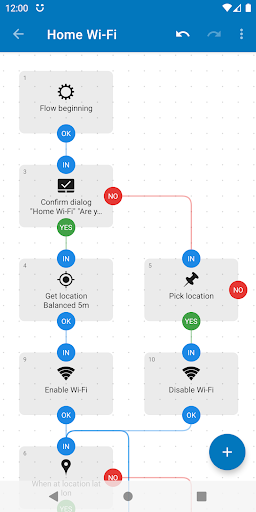
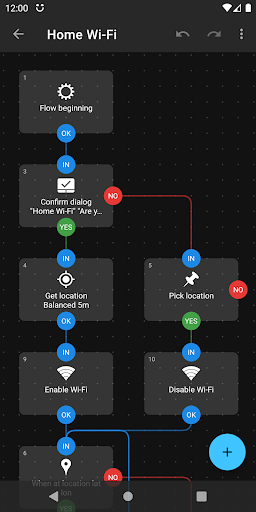
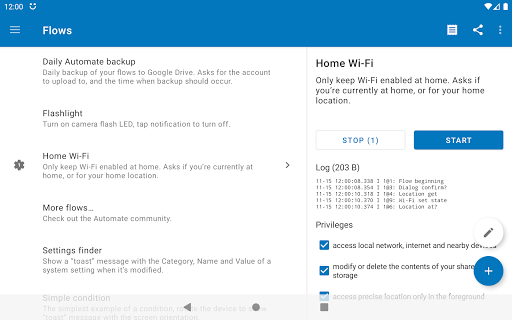
Create your automated tasks by drawing flowcharts, simply add and connect blocks, novices can then configure them with predefined options, while experienced users may use expressions, variables and functions.
ALL-INCLUSIVE
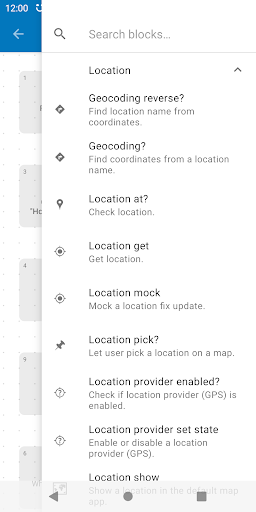
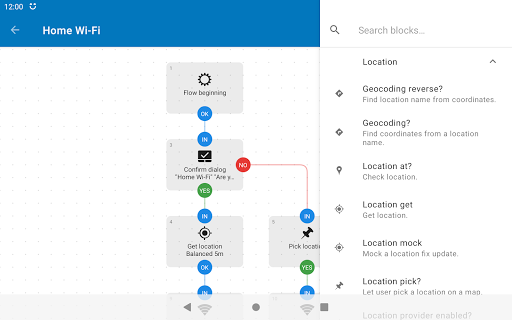
Almost every feature on your Android smartphone or tablet can be controlled using the more than 410 building blocks that’s included:
https://llamalab.com/automate/doc/block/
SHARE YOUR WORK
Save time by downloading complete automation “flows” that other users already made and shared through the in-app community section:
https://llamalab.com/automate/community/
CONTEXT AWARE
Perform recurring tasks based on the time of day, your location (geofencing), physical activity, heart rate, steps taken, events in your calendar, app currently open, connected Wi-Fi network, remaining battery, and hundreds of other conditions and triggers.
TOTAL CONTROL
Not everything needs to be automatic, manually start complex tasks by clicking home screen widgets & shortcuts, Quick Settings tiles, notifications, media buttons on your Bluetooth headset, volume & other hardware buttons, by scanning NFC tags and more.
FILE MANAGEMENT
Delete, copy, move and rename files on your device, SD card and external USB drive. Extract and compress zip archives. Process text files, CSV, XML and other documents.
DAILY BACKUPS
Backup your apps and files to removable SD card and remote storage.
FILE TRANSFER
Upload and download files stored on Google Drive, Microsoft OneDrive, FTP server, and online when accessible through HTTP.
COMMUNICATIONS
Send SMS, MMS, e-mail, Gmail, and other data through the built-in cloud messaging service. Manage incoming phone calls, perform call screening. Accept incoming HTTP requests using a built-in web server.
CAMERA, SOUND, ACTION
Quickly take photos using the camera, take screenshots, and record audio or video. Bulk process images, crop, scale and rotate them then save as JPEG or PNG. Read text in images using OCR. Generate QR codes and scan barcodes.
DEVICE CONFIGURATION
Change most system settings, adjust audio volume, lower screen brightness, control Do Not Disturb, switch mobile network (3G/4G/5G), toggle Wi-Fi, tethering, airplane mode, power save mode and much more.
APP INTEGRATION
Easily integrate apps supporting the Locale/Tasker plug-in API. Otherwise, use every Android capability to do so, start app activities & services, send & receive broadcasts, access content providers, or as a last resort, screen scraping and simulated user inputs.
EXTENSIVE DOCUMENTATION
The full documentation is readily available within the app:
https://llamalab.com/automate/doc/
SUPPORT & FEEDBACK
Please don’t report problems or ask for support through Google Play store review comment, use the Help & feedback menu or the links below:
• Reddit: https://www.reddit.com/r/AutomateUser/
• Forum: https://groups.google.com/g/automate-user
• E-mail: [email protected]
This app uses the Accessibility API to provide features that interact with the UI, intercept key presses, take screenshots, read “toast” messages, determine foreground app and capture fingerprint gestures.
This app uses the Device Administrator permission to provide features that check for failed login attempts and engage screen lock.
📂 Manage files on device and remote storage
☁️ Backup apps and files
✉️ Send and receive messages
📞 Control phone calls
🌐 Access online content
📷 Take pictures, record audio and video
🎛️ Configure device settings
🧩 Integrate other apps
⏰ Start tasks manually, on a schedule, when reaching a location, starting a physical activity and much more
SIMPLE, YET POWERFUL
Create your automated tasks by drawing flowcharts, simply add and connect blocks, novices can then configure them with predefined options, while experienced users may use expressions, variables and functions.
ALL-INCLUSIVE
Almost every feature on your Android smartphone or tablet can be controlled using the more than 410 building blocks that’s included:
https://llamalab.com/automate/doc/block/
SHARE YOUR WORK
Save time by downloading complete automation “flows” that other users already made and shared through the in-app community section:
https://llamalab.com/automate/community/
CONTEXT AWARE
Perform recurring tasks based on the time of day, your location (geofencing), physical activity, heart rate, steps taken, events in your calendar, app currently open, connected Wi-Fi network, remaining battery, and hundreds of other conditions and triggers.
TOTAL CONTROL
Not everything needs to be automatic, manually start complex tasks by clicking home screen widgets & shortcuts, Quick Settings tiles, notifications, media buttons on your Bluetooth headset, volume & other hardware buttons, by scanning NFC tags and more.
FILE MANAGEMENT
Delete, copy, move and rename files on your device, SD card and external USB drive. Extract and compress zip archives. Process text files, CSV, XML and other documents.
DAILY BACKUPS
Backup your apps and files to removable SD card and remote storage.
FILE TRANSFER
Upload and download files stored on Google Drive, Microsoft OneDrive, FTP server, and online when accessible through HTTP.
COMMUNICATIONS
Send SMS, MMS, e-mail, Gmail, and other data through the built-in cloud messaging service. Manage incoming phone calls, perform call screening. Accept incoming HTTP requests using a built-in web server.
CAMERA, SOUND, ACTION
Quickly take photos using the camera, take screenshots, and record audio or video. Bulk process images, crop, scale and rotate them then save as JPEG or PNG. Read text in images using OCR. Generate QR codes and scan barcodes.
DEVICE CONFIGURATION
Change most system settings, adjust audio volume, lower screen brightness, control Do Not Disturb, switch mobile network (3G/4G/5G), toggle Wi-Fi, tethering, airplane mode, power save mode and much more.
APP INTEGRATION
Easily integrate apps supporting the Locale/Tasker plug-in API. Otherwise, use every Android capability to do so, start app activities & services, send & receive broadcasts, access content providers, or as a last resort, screen scraping and simulated user inputs.
EXTENSIVE DOCUMENTATION
The full documentation is readily available within the app:
https://llamalab.com/automate/doc/
SUPPORT & FEEDBACK
Please don’t report problems or ask for support through Google Play store review comment, use the Help & feedback menu or the links below:
• Reddit: https://www.reddit.com/r/AutomateUser/
• Forum: https://groups.google.com/g/automate-user
• E-mail: [email protected]
This app uses the Accessibility API to provide features that interact with the UI, intercept key presses, take screenshots, read “toast” messages, determine foreground app and capture fingerprint gestures.
This app uses the Device Administrator permission to provide features that check for failed login attempts and engage screen lock.
What's New
• File multipart extract block
• HTTP accept block
• HTTP response block
• Duration pick got Title input argument
• HTTP request block got Keychain alias input argument
• Network throughput block got Network interface input argument
• Quick Settings tile show got Flags input argument
• Time zone get got Offset output variable
• urlDecode function got Flags input argument
• HTTP accept block
• HTTP response block
• Duration pick got Title input argument
• HTTP request block got Keychain alias input argument
• Network throughput block got Network interface input argument
• Quick Settings tile show got Flags input argument
• Time zone get got Offset output variable
• urlDecode function got Flags input argument
App Information
Version Name
1.1.11
Version Code
84
File Size
4.2 MB
Minimum OS
Android 4.0+
Target SDK
Android 22
Developer
LlamaLab
Contact
Website
Content Rating
Everyone
Package Name
com.llamalab.automatePermissions Required
This app may request the following permissions:
Recent Reviews

Eric Charles
5.0★
I love this app & have been using it for a number of years now across multiple phones. It's a bit difficult to learn how to do some things, and it takes me a lot of trial & error to get programs working how I want them to, but if you have any node based workflow and coding experience, it's not too difficult to learn. I have flows that turn on a 30 minute sleep timer when I play Spotify or YouTube (when I'm home & my phone is charging), another that makes my phone scream if I throw it, etc.

Trevor Sherwood
5.0★
Exceptional app! Can't recommend it enough. It's ridiculous that I can't set an hourly alarm on Android, and that all available apps with that functionality require payment or subscription, and that all available apps for programming macros require payment to use for more than a few days. This app provides functionality that should be available in the first place and does it FOR FREE! LlamaLab, I don't know you but I would die for you. I would kill for you. I'll actually tell my friends ♥️🦙♥️

A Google user
5.0★
Automate is an extremely flexible automation tool, but it takes a while to learn. If you can follow a flowchart, you should be able to use this app. I moved to Automate when my previous automation app wasn't updated for Android 10. The old tool had canned tasks, which often had some unneeded tasks & quirks. With Automate, I can add in exactly the steps I need. That's more work initially, but the result is a task that does only what I need. I did have to learn to insert some delays & conditions.
A Google user
5.0★
Of all the automation apps out there Automate is the only one which works as I script. Great price, easy to use interface (recently updated), useful help files, and plenty of example flows in the Community. I've been using it for a few years now and it's never let me down, I'd suggest it to anyone. I never leave work without a text to my wife, my car setup is exactly what I need, when I need it, and when significant issues arise at work I get meaningful notifications.
A Google user
5.0★
A couple of the criteria that I use for this kind of apps (i.e., automating tasks) are: - when using location as Event, I want my phone to register only the Entrance and the Exit from that place, instead of constantly checking its position. Automate does that. - the battery consumption. Because of the above point is accomplished, the battery usage is minimal in Automate. Yesterday I had it run all day, entering and exiting the set location several times, and Automate doesn't even show up in the 'battery usage' list. As for the options available, there are plenty of them. I definitely recommend you trying Automate. Spend first a couple of minutes reading the Documentation, this will make it easier for you to understand how it works.

Cj Knowles
5.0★
I have used Automate for just basic stuff and it has worked great! I wanted something to help me do daily goals and Automate has made that so much easier. With goals in my Dialog boxes I can have them repeatedly pop up over anything on my phone until I actually think about what I put in them! (No easy cancel button or swipe away) I think there might be a 30-block limit for using it for free? However, for basic stuff like this, 30 blocks are plenty.
Ad slot: In-Content