

UE | BOOM by Ultimate Ears
com.logitech.ueboom
by Logitech Europe S.A.
Screenshots



Ad slot: Top Leaderboard
About this app
The BOOM app by Ultimate Ears has everything you need to get the most out of your Ultimate Ears speaker. From PartyUp to customizable EQ, unlock even more awesome ways to use your BOOM series speakers.
- PartyUp lets you connect up to 150 speakers to take your parties to a whole new level - wherever, whenever, whatever!
- You control the sound: All about that bass? In a tight space? You control the atmosphere with a couple of built-in EQ and custom options.
- Remote control: Use the app to turn power on/off your speakers and other controls from afar.
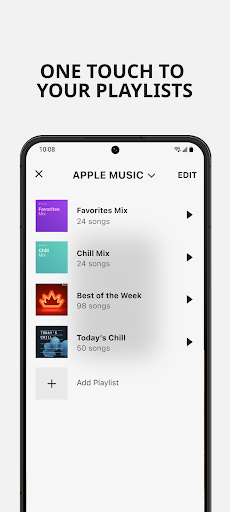
- Much more: personalize your speaker’s name, EQ preferences, and preset playlists (BOOM 3, MEGABOOM 3, BOOM 4,MEGABOOM 4, HYPERBOOM, EPICBOOM and EVERBOOM only)
- Subscribe to updates so you never miss a thing. A simple tap in the app updates your speaker with the latest features in no time.
- Sign-up to subscribe to Ultimate Ears newsletters and special offers.
- PartyUp lets you connect up to 150 speakers to take your parties to a whole new level - wherever, whenever, whatever!
- You control the sound: All about that bass? In a tight space? You control the atmosphere with a couple of built-in EQ and custom options.
- Remote control: Use the app to turn power on/off your speakers and other controls from afar.
- Much more: personalize your speaker’s name, EQ preferences, and preset playlists (BOOM 3, MEGABOOM 3, BOOM 4,MEGABOOM 4, HYPERBOOM, EPICBOOM and EVERBOOM only)
- Subscribe to updates so you never miss a thing. A simple tap in the app updates your speaker with the latest features in no time.
- Sign-up to subscribe to Ultimate Ears newsletters and special offers.
What's New
1. Added volume adjustment for Megaphone, improving sound performance on some Android devices.
2. Added an in-app rating prompt after certain feature experience to make it easier to provide feedback and help us improve the app.
3. Minor bug fixes and overall app optimization.
2. Added an in-app rating prompt after certain feature experience to make it easier to provide feedback and help us improve the app.
3. Minor bug fixes and overall app optimization.
App Information
Version Name
7.15.0.319
Version Code
319
File Size
76.3 MB
Minimum OS
Android 8.0+
Target SDK
Android 34
Developer
Logitech Europe S.A.
Contact
Website
Content Rating
Everyone
Package Name
com.logitech.ueboomPermissions Required
This app may request the following permissions:
Recent Reviews

Caleb Eloy Mares
5.0★
The app allows you to turn off/on speakers remotely, tells you their battery life, allows you to control various function like their volume, bass/treble/mid, lets you talk through the speakers, and has extra features like making your speaker an alarm clock that can play your playlist, and the speaker doesnt need to be on for most of these functions to apply to it. Great app, compatible with most UE speakers from what ive seen but my Wonderboom 3 does not show up.

Bro Beans
1.0★
it can't identify my speakers I've had for years. all of a sudden it is "unavailable" and not able to pair until I close the app a few dozen times and then it still won't work so I gotta shut off one speaker and then start the other to try and pair them that way and bam, the speaker it was just connected to is all of a sudden "unavailable". please fix this. disconnecting the bluetooth completely and trying to re-pair them doesn't work cause the app can't find anything it's ment to control

A Google user
3.0★
Previous version was fine. Now it's completely useless. What's the purpose of this app if it's so buggy to a point where it's core functions of remote controlling the speaker don't work? Now it is much faster to walk to my speaker and turn it on or adjust the volume than the several minutes it takes to get the app to work. 2018/09/26 Edit: Turning on the speaker remotely works most of the time now. So I returned a few stars. However, the volume function is extremely laggy and sometimes doesn't work at all. There seems to be some kind of weird tethering effect between the speaker volume control and my phone's media volume control. They should be separate but sometimes adjusting one would also change the other on the app.

Laura Pierce
1.0★
The speaker works great, sound quality is impeccable. One star because I can't figure out how to stop the speaker from interrupting my music or video content at the beginning, telling me to make sure the app is running and can access the Internet. Doesn't matter if the app is open and able to access the Internet, I will get interrupted at every start up. Please tell me there is a way to turn it off! Old UE Boom never did this... Make it stop!!!

Kavon
1.0★
Take the speaker outside for 20 minutes and it starts glitching out like crazy. What good is a portable speaker that can't handle regular summer conditions? Especially at $200. The app continuously pauses my music to tell me it needs me to connect to the internet. There is NO REASON to need an internet connection or to interrupt my audio. Next, the speaker pauses frequently for no reason on it's own once it gets warm as well. Let me turn your stupid app voice off and stop interrupting my music.

Bridget Erlikh
3.0★
bought 2 boom 2 speakers last xmas. one we configed to be his, one mine, but mostly we listen to Pandora on both in stereo. sound is good, much better than phone (both of us have note 9s). but there's a lot to be desired from the app, programming, and pairing. For example each of us needs to connect to the other's speaker after the initial labeling, can't connect to our own. the tap-skipping features don't work on either speaker. And with these devices, there should be much more. EG:Megaphone
Ad slot: In-Content