

Mad Contacts Widget Pro
com.madapps.madcontacts
by Mad_Apps
Screenshots

Ad slot: Top Leaderboard
About this app
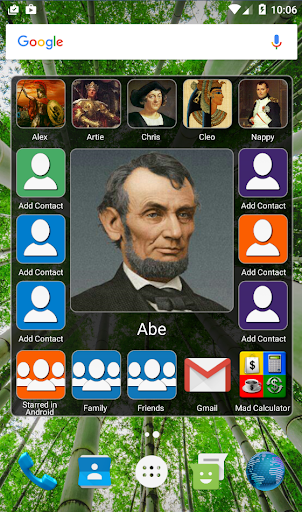
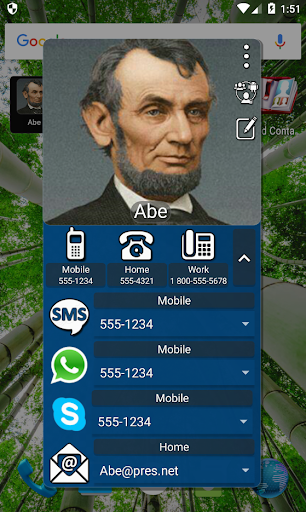
Mad Contacts Widget is a great looking contacts / call widget. You can call, sms, email, send skype, whatsapp or viber messages or edit your selected contacts straight from your home screen!
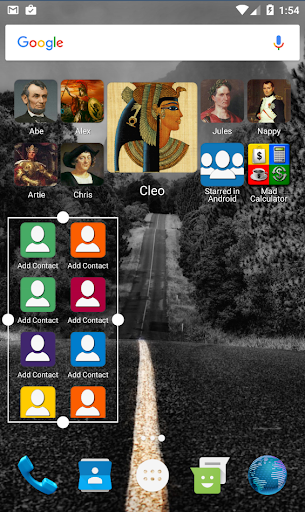
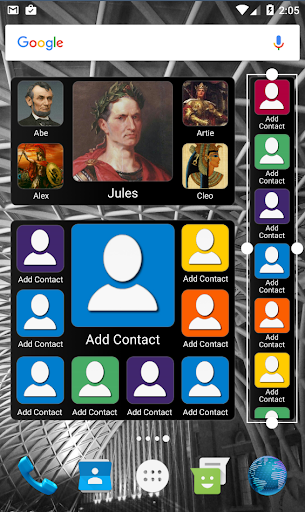
- Choose from multiple widget sizes and more than 10 tailored layouts with both small and big contact pictures. Or choose a fully resizable widget, sized from 1x1 up to 8x6 on bigger devices! (2 to 999 contacts!)
- Quick Actions to reach your contacts with a single click! (Can be set to call, sms, email, whatsapp or viber. You can add a contact multiple times with different quick actions).
- Scrollable layouts with 10 different contact photo sizes to choose from!
- Different contact photo shapes (square, rounded square or round)
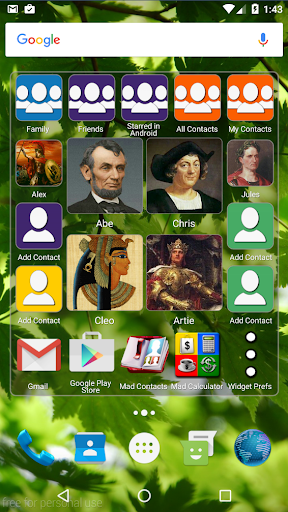
- Add shortcuts to any apps on your phone. Resize your widget to fill your screen to have a scrolling home screen with both contacts and apps!
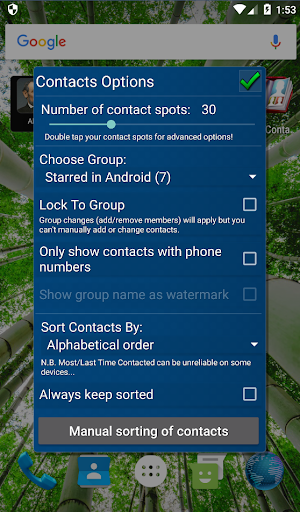
- Fill your widget with any of your contact groups (favorite contacts, friends, family, etc.) and sort them by alphabetical order or most times/last time contacted.
- Add shortcuts to multiple contact groups and sort them independently from each other's.
- Edit your contact groups with Mad Contact Groups directly from your widget!
- Group Photos set in Mad Contact Groups will sync with mad contact widget.
- Supports Skype, WhatsApp and Viber (Show or hide Call, Sms, Skype, WhatsApp, Viber and Email buttons in widget preferences/contact screen options.)
- Pick any color for the text, the border and the background of your widget(s). Widget background transparency from 0-100%. You can make the background fully transparent if you wish!
- Some layouts contain both small and big contact photos. Or, with scrollable layouts, choose from 10 different contact photo sizes!
- Keep the last selected phone number, sms number, whatsapp number, viber number and email address of all your contacts.
- Big phone icons at the top of the contact screen to quickly call your desired number.
- Compatible with tablets. (You need telephony services and a sim card if you want to place calls or sms)
Notes ---------------------------------------
- This is a widget. To add it to your home screen, on Android 5 and up, long press the background and choose widgets. On Android 4 go to your apps screen and choose the widgets tab at the top.
Contact Info -------------------------------------
Please contact us for any question or problem. We are there to help!
[email protected]
Facebook page (with promotions on mad apps!): https://www.facebook.com/madapps4android
- Choose from multiple widget sizes and more than 10 tailored layouts with both small and big contact pictures. Or choose a fully resizable widget, sized from 1x1 up to 8x6 on bigger devices! (2 to 999 contacts!)
- Quick Actions to reach your contacts with a single click! (Can be set to call, sms, email, whatsapp or viber. You can add a contact multiple times with different quick actions).
- Scrollable layouts with 10 different contact photo sizes to choose from!
- Different contact photo shapes (square, rounded square or round)
- Add shortcuts to any apps on your phone. Resize your widget to fill your screen to have a scrolling home screen with both contacts and apps!
- Fill your widget with any of your contact groups (favorite contacts, friends, family, etc.) and sort them by alphabetical order or most times/last time contacted.
- Add shortcuts to multiple contact groups and sort them independently from each other's.
- Edit your contact groups with Mad Contact Groups directly from your widget!
- Group Photos set in Mad Contact Groups will sync with mad contact widget.
- Supports Skype, WhatsApp and Viber (Show or hide Call, Sms, Skype, WhatsApp, Viber and Email buttons in widget preferences/contact screen options.)
- Pick any color for the text, the border and the background of your widget(s). Widget background transparency from 0-100%. You can make the background fully transparent if you wish!
- Some layouts contain both small and big contact photos. Or, with scrollable layouts, choose from 10 different contact photo sizes!
- Keep the last selected phone number, sms number, whatsapp number, viber number and email address of all your contacts.
- Big phone icons at the top of the contact screen to quickly call your desired number.
- Compatible with tablets. (You need telephony services and a sim card if you want to place calls or sms)
Notes ---------------------------------------
- This is a widget. To add it to your home screen, on Android 5 and up, long press the background and choose widgets. On Android 4 go to your apps screen and choose the widgets tab at the top.
Contact Info -------------------------------------
Please contact us for any question or problem. We are there to help!
[email protected]
Facebook page (with promotions on mad apps!): https://www.facebook.com/madapps4android
App Information
Version Name
1.25
Version Code
30
File Size
4.1 MB
Minimum OS
Android 4.4+
Target SDK
Android 22
Developer
Mad_Apps
Contact
Website
Content Rating
Everyone
Package Name
com.madapps.madcontactsPermissions Required
This app may request the following permissions:
Recent Reviews

Dr Mark Helfand
5.0★
UPDATE: I've been using this widget for years and for the first time I needed support. I got an answer within 24 hours. It's great too. The best contact widget around. Works great, extremely customizable and easy to use. You can definitely have it your way. I did a lot of searching and this one is the best by far. AND IT KEEPS GETTING BETTER! They just added caller ID. Try it, you'll like it!

A Google user
5.0★
This widget is exactly what I needed. Scalable, pic sizes adjustable, and paid version includes color customization, though free version also works great. Developer is *extremely* responsive - answered several questions immediately even about the free version and fixed a bug as soon as I pointed it out. Recommended.

Attila Altan
5.0★
The greatest app EVER ! Not only it is a great widget to have on its homepage to list the most used contacts. But it can also be used as an application launcher where you can stack up dozens of apps in a tiny space on your homepage. Definitely a "must have" for any android phone...
A Google user
5.0★
Very Nice! I have one question, the option of sorting seems to have stop...I was using "the most contacted as top going down" Was working when first downloaded, but last update or has stopped working now...please look at - Thank you in advance.

Loribeth Clark
1.0★
I can't get it to work. I wanted to have individual widget icons for calling, but I can't seem to figure out how to get the contacts I want in the widget. It puts whatever one it wants in the widget and only seems to give me the option of doing groups. I don't want groups. The screen shots looked like I could do what I wanted, but there's no way to try before you buy. What a waste of money.
A Google user
4.0★
Dont get me wrong this app has been amazing. As of past week. Every morning at 4am (uk time) the widget/app resets my last contacted and most frequently contacted back to alphabetical order. To the point where i have to end up actually having to go into my contacts to make calls/messages because my mates names start later down the alphabet
Ad slot: In-Content