
Screenshot touch
com.mdiwebma.screenshot
by Daejeong Kim
Screenshots

Ad slot: Top Leaderboard
About this app
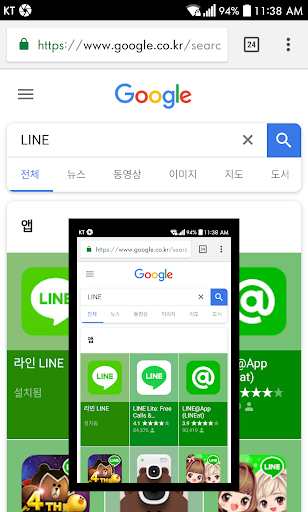
Tap once on the icon floating on the screen to capture. Edit and share freely. Capture entire pages of websites in the in-app web browser. You can also stitch together multiple images to create a seamless one.
* Certain secure apps (e.g. banking, DRM apps) cannot be captured. *
[ Basic features ]
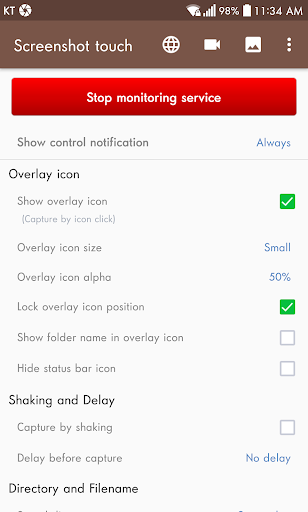
• Capture by touch (Notification area, overlay icon, shaking the device)
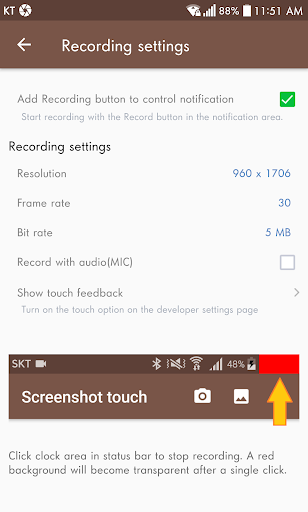
• Record video cast of screen to mp4 with options (Resolution, Frame rate, Bit rate, audio)
• Web page whole scroll capture (with an in-app web browser)
• There are two ways to scroll capture. One is to share the url in a web browser and select Screenshot Touch. The second is to call the in-app browser directly by pressing the globe icon on the settings page.
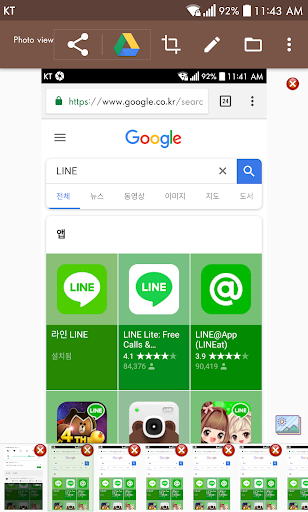
• Photo viewer(memo, hashtag, slide show, share by zip)
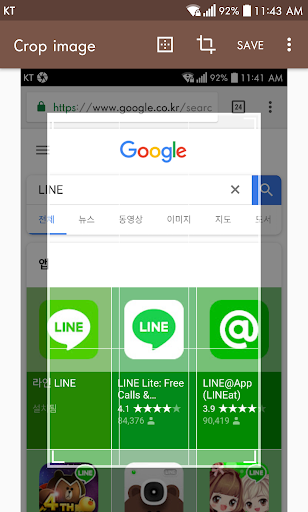
• Image cropper(Crop ratio, rotate, Text recognition)
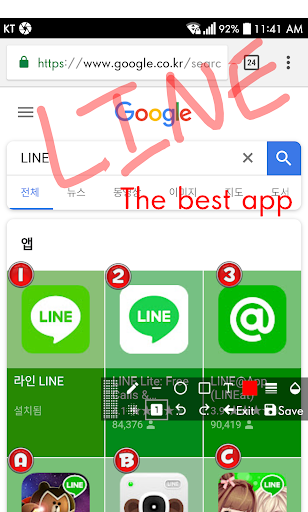
• Image Editor(Pen, Text, Rectangle, Circle, Sticker, Emoji, Opacity and so on)
• Stitching images
• Images to pdf
• Sharing screenshot images to other installed apps (user controlled)
[ Dynamic features ]
• Capture options (choose the save directory, optional subfolders, file format, jpeg quality, capture delay and so on)
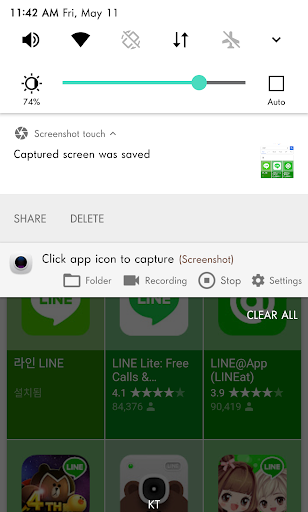
• Persistent notification (optional): This allows the notification to always remain present which cannot be swiped away. It quickens the accessibility of Screenshot touch.
• Multiple saving folders: This allows you to create subfolders in a categorising manner for grouping your screenshots. This especially helps when taking a series of screenshots of different screen activities by organizing what gets saved where avoiding having to use a file manager afterwards. For example; you might not want your Facebook screenshots mixed up in the same folder with your screenshots of your favourite app, game or homescreen.
[ Notice ]
• Media Projection Service is an Android OS function for sharing screen activity. The screen capture function uses this service, so a confirmation window is displayed to obtain user consent.
[ Ads and Purchasing ]
• This app contains ads (advertisements)
• In-app purchasing can: “Remove all ads” + “Unlock full Multiple saving folders” + “Using Webp, HEIF image format”.
[ Privacy and Permissions ]
1) Required access permissions
- Files and media(Photos and videos)
Save and manage captured images or recorded videos as files.
- Display over other apps
Display an icon that allows you to capture the screen on top of all screens.
- Recording or casting
Permission is required to capture and record. App can request permission again if it is reset.
2) Optional access permissions(Even if optional permissions are not allowed, you can still use other services.)
- Notifications
Display the status of the screen capture service and displays screen capture results as notifications.
- Microphone
Screenshot touch requires the Microphone permission to record the user's voice whilst recording the screen. This is a useful feature when creating any tutorial using video from a mobile phone. The sound recording function using the microphone is turned off by default.
INTERNET permission is required for error log transfer and ads module. User’s images and videos remain private and are not automatically shared to anywhere or anyone outside of this app.
[ Information about using the Accessibility Services API ]
This app captures using the Media Projection API on Android 5 and higher. However, Android 11 and higher also supports screen capture using the Accessibility Services API to allow users to capture screens more easily. This app is not an accessibility tool. It uses only minimal features, the capture function.
This app does not collect or share any data using accessibility services. No capture without explicit user action.
The app also performs its functions with the user's explicit consent. For detailed instructions, see https://youtu.be/eIsx6IIv1R8.
* Certain secure apps (e.g. banking, DRM apps) cannot be captured. *
[ Basic features ]
• Capture by touch (Notification area, overlay icon, shaking the device)
• Record video cast of screen to mp4 with options (Resolution, Frame rate, Bit rate, audio)
• Web page whole scroll capture (with an in-app web browser)
• There are two ways to scroll capture. One is to share the url in a web browser and select Screenshot Touch. The second is to call the in-app browser directly by pressing the globe icon on the settings page.
• Photo viewer(memo, hashtag, slide show, share by zip)
• Image cropper(Crop ratio, rotate, Text recognition)
• Image Editor(Pen, Text, Rectangle, Circle, Sticker, Emoji, Opacity and so on)
• Stitching images
• Images to pdf
• Sharing screenshot images to other installed apps (user controlled)
[ Dynamic features ]
• Capture options (choose the save directory, optional subfolders, file format, jpeg quality, capture delay and so on)
• Persistent notification (optional): This allows the notification to always remain present which cannot be swiped away. It quickens the accessibility of Screenshot touch.
• Multiple saving folders: This allows you to create subfolders in a categorising manner for grouping your screenshots. This especially helps when taking a series of screenshots of different screen activities by organizing what gets saved where avoiding having to use a file manager afterwards. For example; you might not want your Facebook screenshots mixed up in the same folder with your screenshots of your favourite app, game or homescreen.
[ Notice ]
• Media Projection Service is an Android OS function for sharing screen activity. The screen capture function uses this service, so a confirmation window is displayed to obtain user consent.
[ Ads and Purchasing ]
• This app contains ads (advertisements)
• In-app purchasing can: “Remove all ads” + “Unlock full Multiple saving folders” + “Using Webp, HEIF image format”.
[ Privacy and Permissions ]
1) Required access permissions
- Files and media(Photos and videos)
Save and manage captured images or recorded videos as files.
- Display over other apps
Display an icon that allows you to capture the screen on top of all screens.
- Recording or casting
Permission is required to capture and record. App can request permission again if it is reset.
2) Optional access permissions(Even if optional permissions are not allowed, you can still use other services.)
- Notifications
Display the status of the screen capture service and displays screen capture results as notifications.
- Microphone
Screenshot touch requires the Microphone permission to record the user's voice whilst recording the screen. This is a useful feature when creating any tutorial using video from a mobile phone. The sound recording function using the microphone is turned off by default.
INTERNET permission is required for error log transfer and ads module. User’s images and videos remain private and are not automatically shared to anywhere or anyone outside of this app.
[ Information about using the Accessibility Services API ]
This app captures using the Media Projection API on Android 5 and higher. However, Android 11 and higher also supports screen capture using the Accessibility Services API to allow users to capture screens more easily. This app is not an accessibility tool. It uses only minimal features, the capture function.
This app does not collect or share any data using accessibility services. No capture without explicit user action.
The app also performs its functions with the user's explicit consent. For detailed instructions, see https://youtu.be/eIsx6IIv1R8.
What's New
- Improved image editor:
* Can enter multi-line text.
* Added menu (in more-menu) to select and edit image from OS Gallery
* When share image from OS Gallery, it opens with Image editor
- Fixed: Last crop ratio setting was not saved when cropping
- Fixed: Invalid KEY-I-FRAME settings for mp4 when recording screen.
[2.5.2]
- NEW: Stitching images(Main settings > 3 dot menu or in-app photo viewer) (also Export to PDF, Combine images)
- Improved image editor. (Recent emoji, Neon type text)
* Can enter multi-line text.
* Added menu (in more-menu) to select and edit image from OS Gallery
* When share image from OS Gallery, it opens with Image editor
- Fixed: Last crop ratio setting was not saved when cropping
- Fixed: Invalid KEY-I-FRAME settings for mp4 when recording screen.
[2.5.2]
- NEW: Stitching images(Main settings > 3 dot menu or in-app photo viewer) (also Export to PDF, Combine images)
- Improved image editor. (Recent emoji, Neon type text)
App Information
Version Name
2.2.7
Version Code
227
File Size
7.8 MB
Minimum OS
Android 7.0+
Target SDK
Android 33
Developer
Daejeong Kim
Contact
Website
Content Rating
Everyone
Package Name
com.mdiwebma.screenshotPermissions Required
This app may request the following permissions:
Recent Reviews

Lester Latkowski
1.0★
I am a busy guy, I use this everyday, mostly when doing electrical, PC work, Ubering, helps lots when researching. It's like a backup cam when I am searching the 'net and when an app misfires. This is installed on 2 androids as well as 2 tablets. Great work, devs. 08/13/25-update dropped 5 star to 1. Now it shows 2 full page adverts and can't close out. Drop notification bar to tap on another app to get around it. Pure heck to use now. Won't work on my new android tablet. I'm very disappointed!

Paula Rodgers
4.0★
So easy to use and navigate the app. It takes clear shots. I recommend. Update: I still like the app, however, I don't know if it's my phone or I don't know if there's been a change in the app, but, now the little icon that floats around your screen when you're ready to take a picture, stays constantly on my screen, no matter if I turn it on or off. It's always there and it really becomes irritating wen ur trying to type something or trying to read something and havng to move it out of the way.

Patrick Lilley
5.0★
Easiest way to to record web. Always works. How much easier can any app get !? A small icon will appear on the screen and remain there. Anytime you want a screen shot, just touch the small icon and the app will do the rest !! Including putting the screen shot in a file or in photos, your choice. No other app anywhere can be easier than that to use.

Bart Cox
5.0★
I've used this app for years. Easy to annotate screenshots in numerous ways...add text, arrows, freehand, etc. If you take lots of screenshots, you can turn on the floating icon so you can capture almost any screen w/o having to swipe to Quick Access/notifications for each one. I just recently noticed the "text recognition" / extract text from an image (OCR).

Geoffrey Hale
5.0★
Awesome service. This is by far the easiest and most convenient app for screenshots ever made. It's so simple to use. Literally takes two clicks and done! No complicated commands or trying to press three buttons at the same time, a two year old could figure this out. It almost makes it too easy to use! It will even capture still shots from video with ease. Pure simplistic genius! This is a service I would gladly pay for if it wasn't free.

PotatoBear
4.0★
Very nice screenshot app. Only shows small background ads, so that is excusable. It slows down my phone a lot, but that's probably because it is an old, slow phone. There is also no way that I have found to stop the icon from being there and slowing down my phone from the photo editor besides closing and reopening the app. Also, I would really appreciate it if an update came out that allowed you to draw on the screenshots. 9/10 would recommend.
Ad slot: In-Content