

Circle Parental Controls App
com.meetcircle.circle
by Aura Sub LLC
Screenshots




Ad slot: Top Leaderboard
About this app
Keep kids safe and focused with the most comprehensive and easy to use parental control app for devices in home and on the go.
Circle Parental Controls App gives parents screen time control whether kids are playing their favorite online game, connecting with friends or doing schoolwork. Circle goes beyond setting Screen Time Limits and Filters with additional parental control features like Pause, History, Rewards and Bedtime. Parents can customize screen time and WiFi control based on their kids’ ages and their own family preferences, and even limit or block social media.
SCREEN TIME PARENTAL CONTROL APP
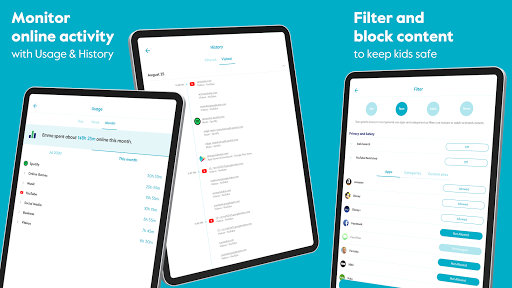
• Filter: Choose appropriate (or block inappropriate) content by age with web filters. Even block social media.
• Time Limits: Set daily screen time limits for popular apps and sites.
• Pause the Internet®: Make the Internet stop for every family member (or just one).
MONITOR AND KEEP TRACK OF ONLINE TIME
• History: Check out sites kids visited (or tried to visit) throughout the day. Or go back as far as you’d like for screen monitoring and phone monitoring.
• Usage: Get a complete picture of your family’s Internet use, across all devices
• Location: Keep track of your kids through their mobile devices. Monitor kids’ phones to keep them safe.
BALANCE TIME ONLINE AND OFFLINE
• Bedtime: Ensure your kids get the sleep they need. Set a bedtime for connected devices.
• Rewards: Celebrate good behavior by giving a little extra online time just for the day.
• Focus Time: Schedule distraction-free Internet time for school, homework or offline time.
Start managing your family’s online screen time today with a free trial to access all the parental control app features like WiFi blocker, app blocker and other premium parental control app and screen time control features. Circle’s WiFi manager, Internet and website blocker, and mobile device management make for the most robust screen time parental control app available.
Kids can use the Circle parental control app to keep track of their own screen time online with a personalized dashboard.
THE ULTIMATE PARENTAL CONTROL APP
Over 90% of Circle parental control app users say it helps keep their kids safe online and makes it easier to manage screen time in their family. Read more below to find out why!
————
Circle’s parental control features use a local VPN installed on a child's device to apply Circle features like content blocking and time limits to individual apps and categories of apps.
Circle Home Plus — sold separately
Need an in-home device to manage online screen time on smart TVs, video game consoles, and computers? Manage all Wi-Fi connected devices in your home with the Circle Home Plus parental control device - universal parental control at home and away! Learn more: meetcircle.com
The Circle Parental Controls App is not for use with Circle with Disney or Circle on Netgear routers.
————
Need Help?
If you have any parental control app questions, need help with the Circle parental control app, or want to provide feedback, please contact our Support Team:
[email protected]
support.meetcircle.com
————
Subscription Terms
A Circle Parental Controls App subscription is required and gives your family access to every parental control feature.
Circle Subscription comes with a FREE trial period (for new premium members only.)
The Circle subscription is an automatic renewing subscription. Your subscription will be charged to your Google Play account at confirmation of purchase and will automatically renew unless auto-renewal is disabled at least 24 hours before the end of the current period. Subscriptions are billed at the start of each period and cannot be refunded. Subscribers can manage subscriptions and disable auto-renewal by visiting their Google Play Account Settings after purchase.
Privacy policy: https://meetcircle.com/legal/privacy/
Terms of use: https://meetcircle.com/license/
Circle Parental Controls App gives parents screen time control whether kids are playing their favorite online game, connecting with friends or doing schoolwork. Circle goes beyond setting Screen Time Limits and Filters with additional parental control features like Pause, History, Rewards and Bedtime. Parents can customize screen time and WiFi control based on their kids’ ages and their own family preferences, and even limit or block social media.
SCREEN TIME PARENTAL CONTROL APP
• Filter: Choose appropriate (or block inappropriate) content by age with web filters. Even block social media.
• Time Limits: Set daily screen time limits for popular apps and sites.
• Pause the Internet®: Make the Internet stop for every family member (or just one).
MONITOR AND KEEP TRACK OF ONLINE TIME
• History: Check out sites kids visited (or tried to visit) throughout the day. Or go back as far as you’d like for screen monitoring and phone monitoring.
• Usage: Get a complete picture of your family’s Internet use, across all devices
• Location: Keep track of your kids through their mobile devices. Monitor kids’ phones to keep them safe.
BALANCE TIME ONLINE AND OFFLINE
• Bedtime: Ensure your kids get the sleep they need. Set a bedtime for connected devices.
• Rewards: Celebrate good behavior by giving a little extra online time just for the day.
• Focus Time: Schedule distraction-free Internet time for school, homework or offline time.
Start managing your family’s online screen time today with a free trial to access all the parental control app features like WiFi blocker, app blocker and other premium parental control app and screen time control features. Circle’s WiFi manager, Internet and website blocker, and mobile device management make for the most robust screen time parental control app available.
Kids can use the Circle parental control app to keep track of their own screen time online with a personalized dashboard.
THE ULTIMATE PARENTAL CONTROL APP
Over 90% of Circle parental control app users say it helps keep their kids safe online and makes it easier to manage screen time in their family. Read more below to find out why!
————
Circle’s parental control features use a local VPN installed on a child's device to apply Circle features like content blocking and time limits to individual apps and categories of apps.
Circle Home Plus — sold separately
Need an in-home device to manage online screen time on smart TVs, video game consoles, and computers? Manage all Wi-Fi connected devices in your home with the Circle Home Plus parental control device - universal parental control at home and away! Learn more: meetcircle.com
The Circle Parental Controls App is not for use with Circle with Disney or Circle on Netgear routers.
————
Need Help?
If you have any parental control app questions, need help with the Circle parental control app, or want to provide feedback, please contact our Support Team:
[email protected]
support.meetcircle.com
————
Subscription Terms
A Circle Parental Controls App subscription is required and gives your family access to every parental control feature.
Circle Subscription comes with a FREE trial period (for new premium members only.)
The Circle subscription is an automatic renewing subscription. Your subscription will be charged to your Google Play account at confirmation of purchase and will automatically renew unless auto-renewal is disabled at least 24 hours before the end of the current period. Subscriptions are billed at the start of each period and cannot be refunded. Subscribers can manage subscriptions and disable auto-renewal by visiting their Google Play Account Settings after purchase.
Privacy policy: https://meetcircle.com/legal/privacy/
Terms of use: https://meetcircle.com/license/
What's New
This release includes some minor bug fixes. If you have questions, please visit support.meetcircle.com.
App Information
Version Name
2.31.6.2
Version Code
171054593
File Size
21.9 MB
Minimum OS
Android 6.0+
Target SDK
Android 33
Developer
Aura Sub LLC
Contact
Website
Content Rating
Everyone
Package Name
com.meetcircle.circlePermissions Required
This app may request the following permissions:
Recent Reviews

Sheila Garrett
3.0★
When it actually loads, it works fine, but it often takes upwards of 5 minutes to load. My biggest complaint is that when devices are being used during "focus time" it always uses up their regular time limit, even though it's not supposed to. For example, we have focus time set from 7am-12pm, with certain apps allowed. If they listen to audiobooks (which are allowed!) for 3 hours during focus time, it won't allow them to play games/watch videos during the hour I have given. It's frustrating!

Lisa Rhodes
1.0★
Absolutely garbage product. It filtered only half the time Didn't alert me to when it went offline. The customer service is awful. I paid $99 for the year. I have had an issue and have not had the home filter working for the past two months. The customer service team still hasn't fixed it. I keep providing the same info and even took pics, and they couldn't figure it out for almost months. Finally, someone seems to understand, but it has been 10 days since our last email. This is so ridiculous

Garen Burdick
2.0★
The restrictions work, but as a 14 year old, I have some problems / recommendations for the child side of the app. I use a samsung phone, and half of the time when I open the app, the internet I use doesn't update on the app. Sometimes it doesn't even give me the 15 minutes left and the out of time notification. On the topic of notifications, I feel that u should be able to choose when it notifies me. There could be a settings tab where I could choose it to notify me when I have 30-60 mins left.

Andrew Maughan
1.0★
The device hasn't kept up with technology in general. The Circle device is supposed to identify the devices on my network, but it couldn't identify most of them. So I wasn't sure which devices I was working with and didn't know which settings to establish. It was such a mess. The few devices it did identify still didn't have finding and other settings working after I established them. At one point the app finally crashed and wouldn't open again. I never was able to open again.

Raven
1.0★
This app is terrible and barely works. Why am I paying for it? I haven't been able to connect to the circle app for a while now, it gives an error saying cannot connect to circle... Also, anyone who can't login using their email address, the login is case sensitive. I had the same issue until I made my entire email lowercase. Hope that helps someone.

Kristi Bee
1.0★
This app sounds like a great idea, but it consistently FAILS! Just like others say, it works fine for a couple of days and then it will not work! We have spent more time being frustrated and wasting money and time than we have actually being able to use this app! It's TERRIBLE!!!! Edit after company response: We would love to get help from the company, but we have reached out repeatedly to you, and we have not gotten through and we get no technical assistance. This app is worthless 😟👎
Ad slot: In-Content