

Mobile Gamepad
com.mmh.mobilegamepad
by Leapile
Screenshots


Ad slot: Top Leaderboard
About this app
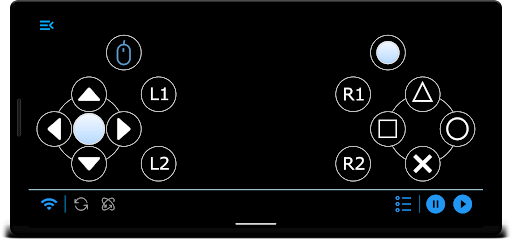
Turn your mobile into a virtual multi-touch gamepad for pc games, through WiFi or Bluetooth connection.
*IMPORTANT*
This app requires a windows application to be installed on your pc, so the mobile app can connect, Please download it from here
https://bit.ly/2tjZjFZ
Features:
1- Easy to use traditional buttons
2- Access the games list and run games from the mobile app, each game with its own custom keys.
3- Ability to use device accelerometer
4- Use your device volume buttons to control windows volume
5- Mouse movements & clicking emulation
Notes:
* Server application is available only for windows
* Use dark mode to save battery as much as you can
*IMPORTANT*
This app requires a windows application to be installed on your pc, so the mobile app can connect, Please download it from here
https://bit.ly/2tjZjFZ
Features:
1- Easy to use traditional buttons
2- Access the games list and run games from the mobile app, each game with its own custom keys.
3- Ability to use device accelerometer
4- Use your device volume buttons to control windows volume
5- Mouse movements & clicking emulation
Notes:
* Server application is available only for windows
* Use dark mode to save battery as much as you can
What's New
Minor Enhancements
App Information
Version Name
1.1.2
Version Code
19
File Size
1.8 MB
Minimum OS
Android 7.0+
Target SDK
Android 21
Developer
Leapile
Contact
Website
Content Rating
Everyone
Package Name
com.mmh.mobilegamepadPermissions Required
This app may request the following permissions:
Recent Reviews

Alex
1.0★
Link to server is dead both in about text here and same link from within the app. Can't try this out.

MMK21
1.0★
Doesn't work as intended :/ Asks you to install "server" software on your PC (which is BS; Bluetooth should work with no extra software). This alone suggests that it's a scam app designed to get you to install malware. UI is horrible, with an ad always covering up some of the buttons, drop-down lists that you can't see, nonsensical buttons at the bottom... The list goes on. Not recommended.

Lourd Sydmont Roque
4.0★
I am giving it 3 and half stars. I am using the bluetooth version and it works well with PCSX2. You need to download the server so it will connect properly. But since it's for xbox, I think, they don't have the same controls, but it is good enough for me to play Onimusha Warlords. I will test PPSSPP Gold later. The controls respond but it's a bit clunky. Maybe that's just the PS2 environment.

Haithm EL-Watany
5.0★
Very smooth and low input lag, for those who doesn't know how technology works, it's obvious that you need some sort of application on your PC so that the application get connected with your PC and start controlling it.. I don't know what people is thinking about how connecting 2 devices works .. by magic?!!

FracturedExperiment330
2.0★
Ok, the thing works well since I tested it on PCSX2 while playing Ace Combat Zero. Some things though: Missing button mapping settings - I can't set the correct buttons to shoot missiles using the square button; Missing 3 buttons (start, select, and analog): yeah, couldn't figure out how to even pause without crashing and dying unless I used the keyboard

Dennis Kirsch
1.0★
To be fair I do not even know IF or how well the controller even works because I cannot download the app on my PC to connect it due to a 522 server error appearing EVERY time I attempt to access the link provided for the download. Does not matter what I do. I want to give it a real try, and will revise my review IF I am able to actually use the app. Until then, O reccomend not wasting your time.
Ad slot: In-Content