

JINA Drawer - Apps Organizer
com.mobeedom.android.jinaFS
by MobeedoM
Screenshots


Ad slot: Top Leaderboard
About this app
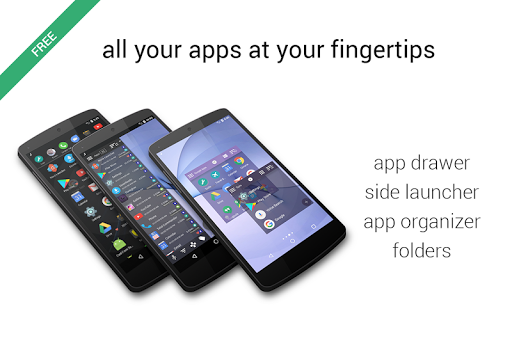
JINA helps you manage and find the apps installed on your phone or your tablet, when you need them and in the way you like.
Replace your old App Drawer, take advantage of the smart AZ letter bar, create Dynamic Folders, Organize your apps automatically by tags, choose the Favorites you want to have at your fingertips, use the Sidebar or the Drawer Everywhere ... you choose, JINA will adapt to your needs.
Install it now and find out what JINA can help you do, you'll have lots of tools available to organize apps and shortcuts like a pro, just decide which ones to use!
FULL DESCRIPTION
App Drawer
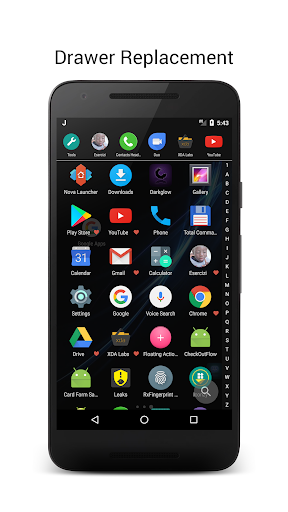
Use the first letter of the app name with the smart A-Z letter bar or use the keypad (also T9) to search for words within the full name or within the aliases that you can define.
Mark the favorite apps to keep at the top of the list.
Take advantage of the App Organizer with the automatic categories or define your personal tags to filter apps.
Sort the lists by usage frequency, by date of installation, update or uninstall, by name, size or manually.
Hide unwanted apps, rename those with strange names, or define your own aliases to find them more easily using the keypad.
There are endless possibilities, you decide from time to time which is the most convenient. No need to change the launcher, JINA will replace the stock App Drawer leaving your Home screen intact.
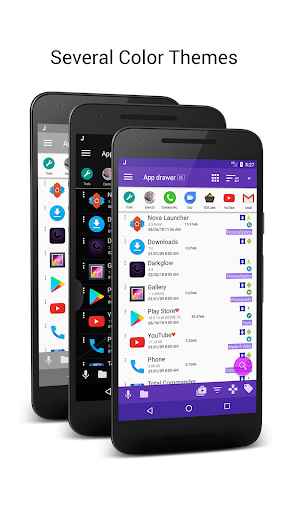
Of course you can choose between color themes and apply an icon pack, appearance is important too!
Sidebar and Drawer Everywhere
You are no longer forced to press the Home button...unless you really need it.
JINA can show apps and Folders inside a Sidebar, above any other app you are using.
Drag the hotspots to the sides of the screen, choose the shape and color and enjoy: just slide your finger from any screen, and your apps will appear, ready to be launched.
You can use two Sidebars at the same time: one is for the Favorites Apps and Folders, the other Sidebar is a full Side Launcher with all the search and classification capabilities of the App Drawer.
Use the Drawer Everywhere hotspot to open the App Drawer swiping your finger upward, as in stock launchers, but now you can do it from any screen, not just from the home.
App Organizer
JINA analyzes and automatically classifies your apps using different criteria and in various categories. You can always define your own labels or tags and use them, either to filter apps, or to create Live Folders that update automatically.
The App Organizer is the heart of JINA: Folders, Categories, Labels, Tags and all the search features, exploit the engine of the Organizer.
Folders Organizer and Live Folders
Use Folders to better organize your apps, you can add them wherever you want: as a widget on the home screen, in the Drawer or in the Sidebar of your favorite apps.
Create your own sub-folders or use the Live Folders, preset to group apps according to certain rules: every folder can contain apps, other sub-folders or shortcuts eg. contacts, PDFs, web URLs etc.
App Manager
You have complete control over what is installed on your device, JINA provides you with a wealth of information about the individual apps: changelog, store listing, size, time of use, alternative entry points etc.
You can access system information on apps and you can stop them with a tap.
You can save your notes, export the apks and share them, export the icons, uninstall multiple apps at the same time (if you have root, even the pre-loaded apps to free up space).
There's a lot more but the best thing is to discover the functions a little at a time. Install JINA now and in a short time you'll realize you can not do without it anymore.
Site: https://www.jinadrawer.com
Support forum: https://www.jinadrawer.com/xda
Replace your old App Drawer, take advantage of the smart AZ letter bar, create Dynamic Folders, Organize your apps automatically by tags, choose the Favorites you want to have at your fingertips, use the Sidebar or the Drawer Everywhere ... you choose, JINA will adapt to your needs.
Install it now and find out what JINA can help you do, you'll have lots of tools available to organize apps and shortcuts like a pro, just decide which ones to use!
FULL DESCRIPTION
App Drawer
Use the first letter of the app name with the smart A-Z letter bar or use the keypad (also T9) to search for words within the full name or within the aliases that you can define.
Mark the favorite apps to keep at the top of the list.
Take advantage of the App Organizer with the automatic categories or define your personal tags to filter apps.
Sort the lists by usage frequency, by date of installation, update or uninstall, by name, size or manually.
Hide unwanted apps, rename those with strange names, or define your own aliases to find them more easily using the keypad.
There are endless possibilities, you decide from time to time which is the most convenient. No need to change the launcher, JINA will replace the stock App Drawer leaving your Home screen intact.
Of course you can choose between color themes and apply an icon pack, appearance is important too!
Sidebar and Drawer Everywhere
You are no longer forced to press the Home button...unless you really need it.
JINA can show apps and Folders inside a Sidebar, above any other app you are using.
Drag the hotspots to the sides of the screen, choose the shape and color and enjoy: just slide your finger from any screen, and your apps will appear, ready to be launched.
You can use two Sidebars at the same time: one is for the Favorites Apps and Folders, the other Sidebar is a full Side Launcher with all the search and classification capabilities of the App Drawer.
Use the Drawer Everywhere hotspot to open the App Drawer swiping your finger upward, as in stock launchers, but now you can do it from any screen, not just from the home.
App Organizer
JINA analyzes and automatically classifies your apps using different criteria and in various categories. You can always define your own labels or tags and use them, either to filter apps, or to create Live Folders that update automatically.
The App Organizer is the heart of JINA: Folders, Categories, Labels, Tags and all the search features, exploit the engine of the Organizer.
Folders Organizer and Live Folders
Use Folders to better organize your apps, you can add them wherever you want: as a widget on the home screen, in the Drawer or in the Sidebar of your favorite apps.
Create your own sub-folders or use the Live Folders, preset to group apps according to certain rules: every folder can contain apps, other sub-folders or shortcuts eg. contacts, PDFs, web URLs etc.
App Manager
You have complete control over what is installed on your device, JINA provides you with a wealth of information about the individual apps: changelog, store listing, size, time of use, alternative entry points etc.
You can access system information on apps and you can stop them with a tap.
You can save your notes, export the apks and share them, export the icons, uninstall multiple apps at the same time (if you have root, even the pre-loaded apps to free up space).
There's a lot more but the best thing is to discover the functions a little at a time. Install JINA now and in a short time you'll realize you can not do without it anymore.
Site: https://www.jinadrawer.com
Support forum: https://www.jinadrawer.com/xda
What's New
- stability improvement
- support for Android 15
- folders widgets default label size reduced
- support for Android 15
- folders widgets default label size reduced
App Information
Version Name
2.0.0ga531.1605222113
Version Code
531
File Size
7.9 MB
Minimum OS
Android 5.0+
Target SDK
Android 23
Developer
MobeedoM
Contact
Website
Content Rating
Everyone
Package Name
com.mobeedom.android.jinaFSPermissions Required
This app may request the following permissions:
Recent Reviews

Willsp1983 -
5.0★
This app continues to amaze me. I sometimes accidentally delete my folders and then have to go and manually make the folders again, but with those app, i can make folders, and just add the folder that's already created. Just select add to home screen, and it's done in a second. Plus you can share the settings and folders with other devices. But I have 2 suggestions, the first is when you're adding apps to a folder, please add a search option. And the second is, please make a jina drawer for pc.

Appes
5.0★
This is the best one for eink devices! The included purple theme, paired with a monotone icon set (like monoic, amexia, banded) makes it all look perfectly black and white. And fast, even on a basic android e-ink e-reader. And obviously this works a treat on regular devices too. It's extremely well thought-out, with a plethora of options and customizations. AND NO ADS. That's so rare, especially with the amount of work that went into this. And you can backup the settings, thank goodness.

A Google user
4.0★
It's great, it really is, however it is KILLING me that folders aren't all set to the same size. It's close, but it's not correct. I want to shrink all folders to the size that the default Samsung folder sizes are, but it's never precise. Having to do each folder is a painstaking process. Maybe a "Set default zoom" button? Great customization btw, great app.

Matthew Paul
5.0★
This was EXACTLY what I've been searching for all these years! I wanted simple, customizable folders so I can access my main and secondary apps really fast. The side bars are great. I've got games on the left and everything else on my right, leaving my home screen without all the clutter so I can see my cool wallpaper. It's a bit trial and error for some features but they're there. Really well done.

Gilbert Anthony Bedia
5.0★
This app has made things a lot simpler. Because of how this app works I can easily find any app on my phone. As cellphones begin to replace laptops and desktops in general, apps like this one make it easier to manage your digital life. I have multiple phones with this app installed. On the phone I'm using I have over 500 apps installed, trust me when I say it has changed the way I view digital clutter as I call it. No longer have to have multiple apps sprawled across my home screen.

Rose Terry
5.0★
I just want to thank you soon much for your wonderful app! I'ma senior and I don't know much about computers, but I was shocked to discover half of my apps mysteriously disappeared from my app library. I lost my You Tube and Gmail apps in particular which I rely on and I had them on my home screen for easy access...gone! I tried all advice that I found on Google . I tried to reset it several times with no luck! Then I decided to go to Play Store , installed your app and got instant results!!;😁
Ad slot: In-Content