

MobileFence - Parental Control
com.mobilefence.family
by Mobile Fence
Screenshots
Ad slot: Top Leaderboard
About this app
Mobile Fence Parental Control protects children from accessing harmful contents (websites, apps, videos) through smart devices and limits usage time to prevent smartphone addiction.
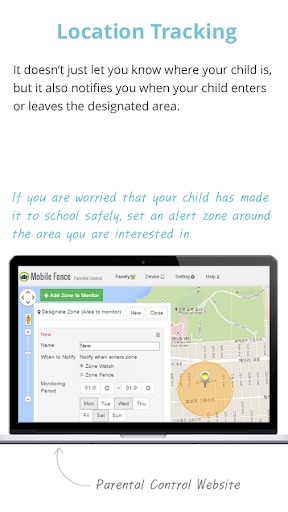
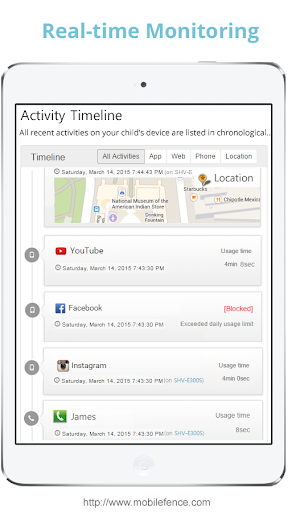
Also, parents can monitor their children’s location in real time and is notified when their children enters or leaves safety zone set by the parents.
"Help your children enjoy their mobile device safely!"
Child Protection Software.
Main Functions
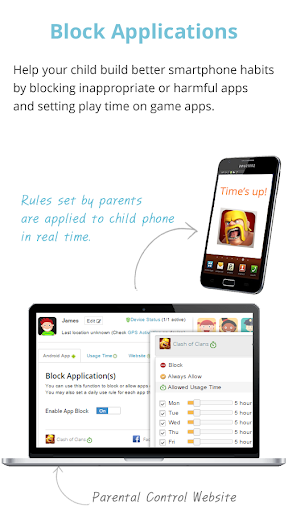
✔ App Blocking - Protect your child against harmful apps. Parents can control and block unwanted apps(adult, dating, pornography, games, SNS..) or set time limits.
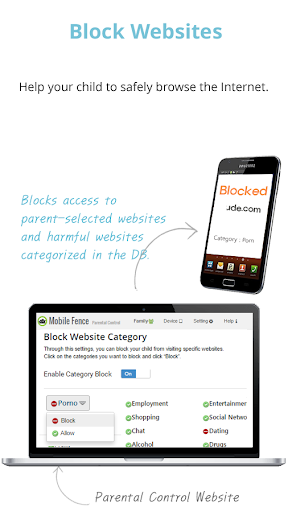
✔ WebSite Blocking (Safe Browsing) - Protect your child from unsuitable web content. Parents can block access to harmful contents or inappropriate sites, such as adult/nude/pornography websites, and monitor list of websites they visited.
✔ Game Play Time - Protect your children from game addiction. Parent can set how long your child can play games in a day.
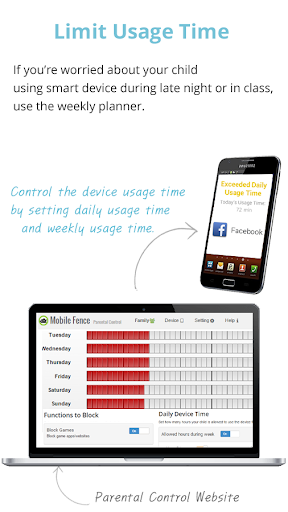
✔ Planning Device Time - Protect your children from smartphone addiction. Plan a specific time limit for each day of the week to prevent your kids from late-night games, web browsing, SNS.
✔ Geo Fencing - Parents can track location of their kids in case of kidnapping and receive notification when a child enters or leaves the safety zone set by the parents.
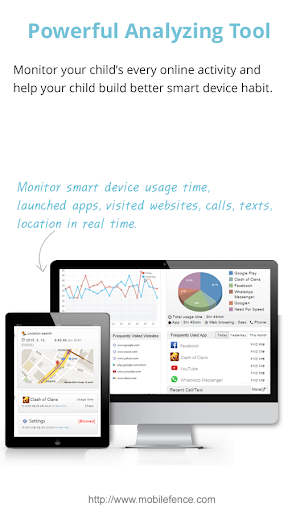
✔ Monitor all activities - Parents can view their child’s entire online activities, such as device usage time, frequently launched apps, app usage time, visited website, calls & SMS
✔ Call Block - Block unwanted calls, set a list of allowed callers
✔ Keyword Alerts - When a child receives a text including a key words parents have set, it notifies parents immediately so that parents can actively respond to violence and bullying at school.
✔ Block while walking (Prevent Smart Phone Zombie)
How to use
1) Install Mobile Fence on parent’s smart device
2) Create account and login
3) Link the smart device to Mobile Fence
4) Installation complete
5) Launch Mobile Fence and set family rules.
How to install and link Mobile Fence Parental Control to child’s device
1) Install Mobile Fence to child’s device
2) Login with parent’s account
3) Link Mobile Fence with child’s device
Functions
• Blocking Service - Block apps, Block website(Safe Browsing), Location tracking, game time limiting, harmful content block(Child Protection), Call Block
• Monitoring Service - Launched app, Visited Website, Blocked website, Usage time report, Frequently used app report
• Call/Text Service - Call block, Text message monitoring, Keyword Alert, Adult/International call block
• Location Tracking - Child location tracking, Lost device tracking, Remote factory reset, Remote device control, Geo Fencing, Geo Watching
# This app uses the Device Administrator permission.
# This app uses Accessibility services.
# Fitness information: The app does not provide health features. This app collects "Health" information for the "Step Monitoring" and "Smartphone Blocking While Walking" functions.
# This app collects and transmits the following personal information to the server, processes this information and provides it to parents: phone number, device ID, device location, device app list, fitness information, visited website.
# Notice of use of Accessibility Service API
The Mobile Fence app uses Accessibility Service API for the following purposes. The monitored data is sent to the server to provide data to parents.
- Monitor your child's visited websites
- Block harmful adult sites
• Fitness Information: Step/Running body information for the "Step Monitoring" and "Smartphone Blocking While Walking" functions.
- Collection of location information for child location reporting function
- A device unique identifier
# Our website : www.mobilefence.com
Also, parents can monitor their children’s location in real time and is notified when their children enters or leaves safety zone set by the parents.
"Help your children enjoy their mobile device safely!"
Child Protection Software.
Main Functions
✔ App Blocking - Protect your child against harmful apps. Parents can control and block unwanted apps(adult, dating, pornography, games, SNS..) or set time limits.
✔ WebSite Blocking (Safe Browsing) - Protect your child from unsuitable web content. Parents can block access to harmful contents or inappropriate sites, such as adult/nude/pornography websites, and monitor list of websites they visited.
✔ Game Play Time - Protect your children from game addiction. Parent can set how long your child can play games in a day.
✔ Planning Device Time - Protect your children from smartphone addiction. Plan a specific time limit for each day of the week to prevent your kids from late-night games, web browsing, SNS.
✔ Geo Fencing - Parents can track location of their kids in case of kidnapping and receive notification when a child enters or leaves the safety zone set by the parents.
✔ Monitor all activities - Parents can view their child’s entire online activities, such as device usage time, frequently launched apps, app usage time, visited website, calls & SMS
✔ Call Block - Block unwanted calls, set a list of allowed callers
✔ Keyword Alerts - When a child receives a text including a key words parents have set, it notifies parents immediately so that parents can actively respond to violence and bullying at school.
✔ Block while walking (Prevent Smart Phone Zombie)
How to use
1) Install Mobile Fence on parent’s smart device
2) Create account and login
3) Link the smart device to Mobile Fence
4) Installation complete
5) Launch Mobile Fence and set family rules.
How to install and link Mobile Fence Parental Control to child’s device
1) Install Mobile Fence to child’s device
2) Login with parent’s account
3) Link Mobile Fence with child’s device
Functions
• Blocking Service - Block apps, Block website(Safe Browsing), Location tracking, game time limiting, harmful content block(Child Protection), Call Block
• Monitoring Service - Launched app, Visited Website, Blocked website, Usage time report, Frequently used app report
• Call/Text Service - Call block, Text message monitoring, Keyword Alert, Adult/International call block
• Location Tracking - Child location tracking, Lost device tracking, Remote factory reset, Remote device control, Geo Fencing, Geo Watching
# This app uses the Device Administrator permission.
# This app uses Accessibility services.
# Fitness information: The app does not provide health features. This app collects "Health" information for the "Step Monitoring" and "Smartphone Blocking While Walking" functions.
# This app collects and transmits the following personal information to the server, processes this information and provides it to parents: phone number, device ID, device location, device app list, fitness information, visited website.
# Notice of use of Accessibility Service API
The Mobile Fence app uses Accessibility Service API for the following purposes. The monitored data is sent to the server to provide data to parents.
- Monitor your child's visited websites
- Block harmful adult sites
• Fitness Information: Step/Running body information for the "Step Monitoring" and "Smartphone Blocking While Walking" functions.
- Collection of location information for child location reporting function
- A device unique identifier
# Our website : www.mobilefence.com
What's New
One star, as which the children rated, proves the value of this app.
App Information
Version Name
5.4.8
Version Code
447
File Size
13.7 MB
Minimum OS
Android 5.0+
Target SDK
Android 33
Developer
Mobile Fence
Contact
Website
Content Rating
Everyone
Package Name
com.mobilefence.familyPermissions Required
This app may request the following permissions:
Recent Reviews

Kristen Kristen
1.0★
Downgraded to 1 star. Started as 5, then to 4 a couple of years ago.. the kids can hop right into the Mobile Fence settings by hitting "forgot password." Then they get a new, temp one you might not have if they delete the email and from there they just change whatever setting they want. When I wrote customer service about this, they blamed me for kids being able to get into the email address. They acted like they thing we log into email on our phones everytime. Very bad customer service.

Tyrie
2.0★
This app is not blocking websites! ever snice the android 16 update, if i keep trying to enter any website that is not allowed, it goes through?! Sometimes it blocks and sometimes it doesn't. The website filtering is not 100% working on the Chrome app.

A Google user
1.0★
This app is a WASTE OF MONEY! When I first got the app it worked great at blocking incoming and outgoing calls, but then about 5-6 months ago it stopped blocking both, even with the option to block all incoming and outgoing calls selected. After ensuring all updates were done it still won't block incoming calls. I emailed for help and was told that the only way to block incoming calls was to keep my child from touching the screen to answer calls when they come in. Why pay for you to tell me that?
A Google user
2.0★
I loaded the free trial of the app the other day, and I love the interface. It's all clean and well formed. My only issue, I can't get any SMS text content to show in my reports! According to their functionality, you need to enter Keywords in order for the app to display text context. Nothing shows! Even after I loaded a host of keywords and used my daughter's linked device to test it....nothing! I even loaded keywords that are considered "suspect", and still don't see anything logged in my app. It shows activity that the SMS messaging app is being used, which is great, but I want to see the actual text! I can't use this app if saved "keywords" are never detected. I sent a notification and haven't heard any feedback from the developers. I really want to use this app to the fullest and become a premium member, but not if I never see text message content! Sorry.....

정이든
1.0★
It's a scam because if u use like 1y the app gets lazy and can't block other apps and the loading screen u can't even call or message the phone gets paralyzed for 30sec and there is many bugs like if didn't do anything the app kicks u out other apps when u have time and when u want to connect to wifi and u need to put the pw the app kicks u from the setting bro I just wanna use wifi

Tricia Jackson
1.0★
The app has suddenly taken over my phone. If I click on the app, Google Play store opens on loop. I am unable to use the app or click on the play store. It's useless to me and very frustrating as my daughter is locked out of features in her phone that I would like to give access to but now I cannot.
Ad slot: In-Content