

ZenDay: Calendar, Tasks, To-do
com.mobisysteme.zime
by Arnaud Guyon
Screenshots


Ad slot: Top Leaderboard
About this app
ZenDay: Plan smarter. Live better.
ZenDay helps you stay organized, improve your work/life balance, and fight procrastination — all in a beautifully fluid, 3D timeline.
Forget endless task lists. Start managing your time instead.
ZenDay schedules your tasks directly into your day based on your real availability, using customizable Time Slots. No more fake calendar events — just real planning that adapts to your life.
Your tasks float forward with time. If you don’t complete them, ZenDay reschedules them automatically.
Upcoming and overdue tasks change color, so you can take action before it’s too late.
With new Quick Actions, you can instantly add preset actions to any task or event.
Use multiple task lists, each with their own Time Slots, to keep your work and personal life in sync.
You can even self-evaluate your activity to track your progress over time.
All of this happens in a unique 3D view that feels like a GPS for your time — helping you move forward, toward your goals.
Key Features
• Smart scheduling of tasks and meetings
• Automatic rescheduling as time moves forward
• Multiple task lists with custom Time Slots
• Quick Actions for faster task entry
• Improved self-evaluation and weekly debriefing
• Syncs with all your calendars
• Intuitive 3D timeline: zoom, scroll, focus
• Clean, modern interface
ZenDay is not just another planner — it’s your personal time assistant.
Requires Android 5.0 and up
🚫 Tablet support has been removed in this version.
*** Featured on Samsung's S Suggest ***
*** Featured on Google Play: App to watch, Play Pick ***
*** Selected by Google India as Best App for Everyday Life for 2013 *** http://bitly.com/zenday-indiatimes
ZenDay helps you stay organized, improve your work/life balance, and fight procrastination — all in a beautifully fluid, 3D timeline.
Forget endless task lists. Start managing your time instead.
ZenDay schedules your tasks directly into your day based on your real availability, using customizable Time Slots. No more fake calendar events — just real planning that adapts to your life.
Your tasks float forward with time. If you don’t complete them, ZenDay reschedules them automatically.
Upcoming and overdue tasks change color, so you can take action before it’s too late.
With new Quick Actions, you can instantly add preset actions to any task or event.
Use multiple task lists, each with their own Time Slots, to keep your work and personal life in sync.
You can even self-evaluate your activity to track your progress over time.
All of this happens in a unique 3D view that feels like a GPS for your time — helping you move forward, toward your goals.
Key Features
• Smart scheduling of tasks and meetings
• Automatic rescheduling as time moves forward
• Multiple task lists with custom Time Slots
• Quick Actions for faster task entry
• Improved self-evaluation and weekly debriefing
• Syncs with all your calendars
• Intuitive 3D timeline: zoom, scroll, focus
• Clean, modern interface
ZenDay is not just another planner — it’s your personal time assistant.
Requires Android 5.0 and up
🚫 Tablet support has been removed in this version.
*** Featured on Samsung's S Suggest ***
*** Featured on Google Play: App to watch, Play Pick ***
*** Selected by Google India as Best App for Everyday Life for 2013 *** http://bitly.com/zenday-indiatimes
What's New
improved bubble info in timeline: add "go to" icon even when there is no quick action but there is a location in the event.
App Information
Version Name
2.4.0
Version Code
6010
File Size
4.8 MB
Minimum OS
Android 5.0+
Target SDK
Android 22
Developer
Arnaud Guyon
Contact
Website
Content Rating
Everyone
Package Name
com.mobisysteme.zimePermissions Required
This app may request the following permissions:
Recent Reviews

A Google user
2.0★
Great idea, but useless without support for multiple task lists with different 'working hours'. Otherwise it's only suitable for work tasks. It's no good having tasks automatically move to the next available slot if where that slot is depends on the type of task (which it usually does).

Abhinav Dhere
3.0★
The clean and flexible interface is great. However, often slight movement of phone triggers the switch to month mode, and sometimes switches to previous year (I assume this is some movement based shortcut to change year). There must be some option to set the app to not switch mode on rotation and instead allow switching manually. It gets really irritating to have the year or mode switched while you're adding tasks or viewing tasks for the day.

Natalie Kinnick
2.0★
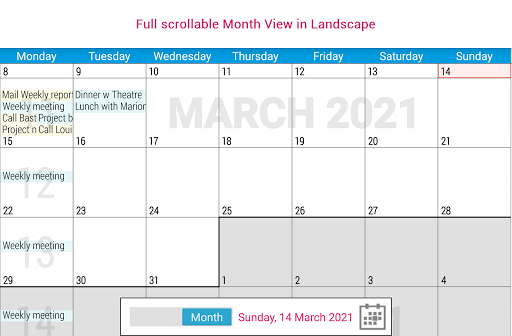
Downloaded and almost immediately deleted it. I hate hate hate the toggle between day and month, there doesnt seem to be an option to show the month where you phone isnt sideways. They visual of everything bending as it scrolled was also very aggravating. If I cant bear to look at the basic functions of the app I can't use it

Andrea Johnson
3.0★
Love the floating tasks but need different work hours for different days. I would also like to be able to create a separate task list for non-work tasks that could populate to a different set of hours.

Nyssa
3.0★
I really love this app, but I am so sorry to uninstall, it is routinely crashing and sucking battery power as a result. Just need more stability.

Paul James Schuback
3.0★
I keep coming back to this proto-app after years! Because the psychology of its format is so classical, tho' f(x) is yet to be really developed. So much good work here.
Ad slot: In-Content