
Perfect AppLock(App Protector)
com.morrison.applocklite
by Morrison Software
Screenshots




Ad slot: Top Leaderboard
About this app
★ Google TOP 20 application.
** All Features of FREE version are same as Pro version! (no limit!) **
Perfect AppLock! lets you protect any applications you want with PIN, Pattern or Gesture. You can lock: Whatsapp, Facebook, Twitter, Skype, SMS, Email, Gallery, Camera, USB connection, Settings and any apps you choose.
Like us ? Hit the +1 button.
* FREE version (version w/ ads)
# Features
1. Lock any apps by using pin,pattern or gesture.
2. Screen Filter support: Effectively manage screen brightness of individual apps
3. Rotation Lock support: Prevents unwanted screen rotation on each apps
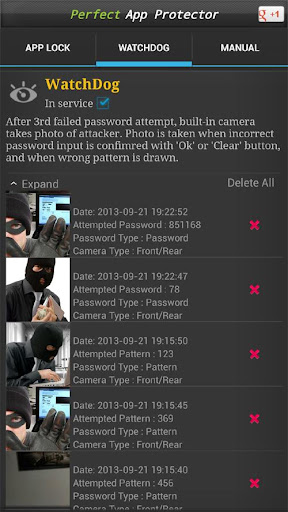
4. Watchdog : After 3rd failed password attempt, built-in camera takes photo of attacker.
5. Lock WiFi, 3G data, Bluetooth, Sync, USB (MTP is not supported)
6. Lock Home Screen, Lock Outgoing Calls, Lock Incoming Calls, Lock App Install/Uninstall
7. Time, WiFi based locking policy supported.
8. Fake Popup : Displays fake error message when locked app is launched.
9. Minimum resource used.
10. Remotely start AppLock service using SMS command.
11. Gesture, Pin, Pattern, Text password supported.
Permissions
- Call permission : for Stealth Mode feature. (Stealth Mode hides a launch icon)
- SMS permission : for Remote Control feature (You can start AppLock service via SMS)
- Take Picture permission : for WatchDog feature
* AppLock Service restarting is required after each updates
* 'Phone calls' permission is required for Stealth Mode
* If you have two or more launcher, you must select one as default
* Perfect AppLock does not support smaller screen sized phones such as HTC wildfire
* If you need bulk purchasing (100 - 200 copies or more), please contact us via email. We will send execution AppLock file (apk) once payment transaction is completed using Paypal. AppLock apk file allows simple installation on many devices.
* If you would like to support in translating (Eng to your language) this app, feel free to contact us. Also, please let us know if there are any incorrect English use on our AppLock.
** Android 5.1.1 Lollipop 100% Compatibility.
** This app uses the Device Administrator permission.
** All Features of FREE version are same as Pro version! (no limit!) **
Perfect AppLock! lets you protect any applications you want with PIN, Pattern or Gesture. You can lock: Whatsapp, Facebook, Twitter, Skype, SMS, Email, Gallery, Camera, USB connection, Settings and any apps you choose.
Like us ? Hit the +1 button.
* FREE version (version w/ ads)
# Features
1. Lock any apps by using pin,pattern or gesture.
2. Screen Filter support: Effectively manage screen brightness of individual apps
3. Rotation Lock support: Prevents unwanted screen rotation on each apps
4. Watchdog : After 3rd failed password attempt, built-in camera takes photo of attacker.
5. Lock WiFi, 3G data, Bluetooth, Sync, USB (MTP is not supported)
6. Lock Home Screen, Lock Outgoing Calls, Lock Incoming Calls, Lock App Install/Uninstall
7. Time, WiFi based locking policy supported.
8. Fake Popup : Displays fake error message when locked app is launched.
9. Minimum resource used.
10. Remotely start AppLock service using SMS command.
11. Gesture, Pin, Pattern, Text password supported.
Permissions
- Call permission : for Stealth Mode feature. (Stealth Mode hides a launch icon)
- SMS permission : for Remote Control feature (You can start AppLock service via SMS)
- Take Picture permission : for WatchDog feature
* AppLock Service restarting is required after each updates
* 'Phone calls' permission is required for Stealth Mode
* If you have two or more launcher, you must select one as default
* Perfect AppLock does not support smaller screen sized phones such as HTC wildfire
* If you need bulk purchasing (100 - 200 copies or more), please contact us via email. We will send execution AppLock file (apk) once payment transaction is completed using Paypal. AppLock apk file allows simple installation on many devices.
* If you would like to support in translating (Eng to your language) this app, feel free to contact us. Also, please let us know if there are any incorrect English use on our AppLock.
** Android 5.1.1 Lollipop 100% Compatibility.
** This app uses the Device Administrator permission.
What's New
Reported bugs fixed.
App Information
Version Name
8.1.1
Version Code
181
File Size
10.7 MB
Minimum OS
Android 4.4+
Target SDK
Android 33
Developer
Morrison Software
Contact
Website
Content Rating
Everyone
Package Name
com.morrison.applocklitePermissions Required
This app may request the following permissions:
Recent Reviews

Jen
3.0★
Fingerprint scanner is complete GARBAGE. For some dumbass reason it doesn't even use the phone's own fp scanner... which makes no sense. Has some scanner square bs in the middle of the screen . . . and it doesn't even work. I don't think it really even scans, bcuz no matter how you place your finger on the scanner, it always says "access denied". *** Rest of the app is fine and good (so far... this is a new version than I used to have). Get rid of the bs scanner and just use the phone's.

A Google user
3.0★
Everything is fine but one problem is there, if any app is minimised after unlocking it and then if we lock the phone then after unlocking the phone that app does not ask for password even when the setting is done to lock the app everytime the phone is locked. And one more thing, if we press the home screen button then also it doesn't go to the home screen.
A Google user
1.0★
This app use to be perfect as the name implies. But lately the app is behaving erratically. When you unlock an app, the app comes back locked you have to unlock it 2 or 3 times ti get to it. Sometimes when you open an app that's not locked, Perfect app will just flash the screen. I paid for this app but I just downloaded another app to try it. And the company doesn't have any contact info
A Google user
2.0★
I've had this App 2 years, was working great, then it quit. I kept getting messages that said it wasn't running. I'd try to open it, but said it wasn't responding. The App gave two options, restart or send a report. Neither has worked. The NEW Update did not even come close to fixing this issue. I gave it 2 stars because it worked well when I got it. Gonna look for a new App. If ya'll get this fixed message me... I'll give it another try!!
A Google user
3.0★
It's an okay app. It's got some issues though. It's not as secure as you make it seem. For example, I add a lock to my Facebook messenger and the chat head pops up on the lock screen, which you can click on and bypass the password. Also, it's a bummer that it doesn't work for folders or shortcuts that I create and/or add to my home screen.

Dohraymee Fasolati
5.0★
I like that you can use four different methods to unlock and can put in longer than four digit pin codes. I hope the developer will add unlocking by fingerprint, as well. The watchdog feature and remote activation are handy. BTW, thanks for having a dark theme. That conserves battery on phones with AMOLED screens, which are becoming more prevalent.
Ad slot: In-Content