

Movavi Clips - Video Editor
com.movavi.mobile.movaviclips
by Movavi
Screenshots



Ad slot: Top Leaderboard
About this app
☆ Free movie maker with intuitive interface
☆ Quick and precise cutting
☆ All the essential features
Movavi Clips is an advanced video editor with slideshows for your mobile device! It has everything you need to create an epic video or engaging Stories: intuitive controls and a user-friendly interface, combined with powerful tools and HD-quality export. You get multiple editing tools, like cropping, rotating, plus you can enhance your movies with unique color filters, transitions, and themed stickers. Create a fabulous slideshow with music tracks from the free built-in library and pictures from your albums. It’s so easy – you can become a real videostar with the power of video editing software on your mobile device!
🌟VIDEO EDITING🌟
☆ Edit footage on the handy timeline of the video maker
☆ Split and combine videos
☆ Cut videos and remove unwanted sections with a swipe
☆ Merge videos in any order to create stories
☆ Adjust brightness and saturation to make your images perfect
☆ Insert smooth transitions between clips
☆ Add and edit pictures: apply automatic pan and zoom effect to create stylish slideshows
☆ Overlay cool and unique stickers
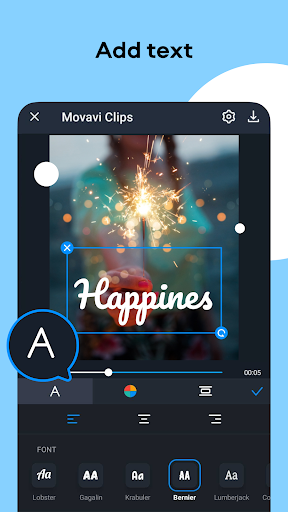
☆ Add text to a photo or clip. Adjust the position, font, size, and color.
☆ Duplicate segments – insert comic moments in your video montage multiple times
☆ Rotate videos – now you can correct footage that was accidentally shot in the wrong orientation
☆ Add fade-in and fade-out effects – make your movie look more professional
☆ Speed up humorous videos to make them even funnier
☆ Slow down your clips and create a stunning slow motion video effect
☆ Add exquisite color filters to any picture and video to create a special atmosphere
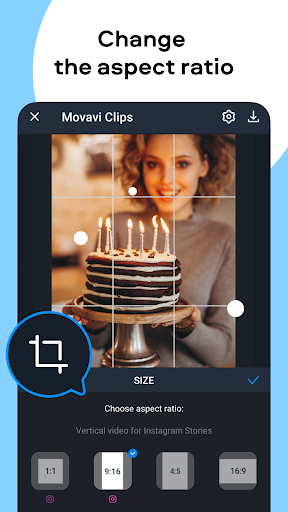
☆ Crop videos and photos to emphasize important elements
☆ Add your own logo to make your videos truly exclusive
☆ Record voiceover to add audio commentaries
🌟AUDIO ADJUSTMENT🌟
☆ Overlay music from your device library or use the built-in collection
☆ Adjust music volume
☆ Mute original sound
☆ Create a vivid slide show with music
🌟EXPORT AND SHARING🌟
☆ Preview the result in the built-in player of the video maker
☆ Save the movie to your device
☆ Share it with your friends and relatives by uploading your creation to Instagram, Facebook, YouTube, and other social networks right from the app
If you’re looking for the easiest way to edit videos and create your own movie or a slideshow, Movavi Clips is just what you need. With this video editor, you can add music to your video, split clips and splice videos together, adjust audio and video speed, and more.
No experience in editing? Don’t worry! With the Movavi Clips video editing app, you don’t need any special knowledge or skills to create movies for your vlog or family archive. When you open the app, you will see valuable tips that will help you master our video clip maker in minutes.
Create memorable films about your family and friends or make videos for your daily vlog – Movavi Clips is a universal editing tool. Shoot some videos with your smartphone or tablet cam, download our movie editor for free, and edit videos like a pro!
☆ Quick and precise cutting
☆ All the essential features
Movavi Clips is an advanced video editor with slideshows for your mobile device! It has everything you need to create an epic video or engaging Stories: intuitive controls and a user-friendly interface, combined with powerful tools and HD-quality export. You get multiple editing tools, like cropping, rotating, plus you can enhance your movies with unique color filters, transitions, and themed stickers. Create a fabulous slideshow with music tracks from the free built-in library and pictures from your albums. It’s so easy – you can become a real videostar with the power of video editing software on your mobile device!
🌟VIDEO EDITING🌟
☆ Edit footage on the handy timeline of the video maker
☆ Split and combine videos
☆ Cut videos and remove unwanted sections with a swipe
☆ Merge videos in any order to create stories
☆ Adjust brightness and saturation to make your images perfect
☆ Insert smooth transitions between clips
☆ Add and edit pictures: apply automatic pan and zoom effect to create stylish slideshows
☆ Overlay cool and unique stickers
☆ Add text to a photo or clip. Adjust the position, font, size, and color.
☆ Duplicate segments – insert comic moments in your video montage multiple times
☆ Rotate videos – now you can correct footage that was accidentally shot in the wrong orientation
☆ Add fade-in and fade-out effects – make your movie look more professional
☆ Speed up humorous videos to make them even funnier
☆ Slow down your clips and create a stunning slow motion video effect
☆ Add exquisite color filters to any picture and video to create a special atmosphere
☆ Crop videos and photos to emphasize important elements
☆ Add your own logo to make your videos truly exclusive
☆ Record voiceover to add audio commentaries
🌟AUDIO ADJUSTMENT🌟
☆ Overlay music from your device library or use the built-in collection
☆ Adjust music volume
☆ Mute original sound
☆ Create a vivid slide show with music
🌟EXPORT AND SHARING🌟
☆ Preview the result in the built-in player of the video maker
☆ Save the movie to your device
☆ Share it with your friends and relatives by uploading your creation to Instagram, Facebook, YouTube, and other social networks right from the app
If you’re looking for the easiest way to edit videos and create your own movie or a slideshow, Movavi Clips is just what you need. With this video editor, you can add music to your video, split clips and splice videos together, adjust audio and video speed, and more.
No experience in editing? Don’t worry! With the Movavi Clips video editing app, you don’t need any special knowledge or skills to create movies for your vlog or family archive. When you open the app, you will see valuable tips that will help you master our video clip maker in minutes.
Create memorable films about your family and friends or make videos for your daily vlog – Movavi Clips is a universal editing tool. Shoot some videos with your smartphone or tablet cam, download our movie editor for free, and edit videos like a pro!
What's New
Caught and killed some annoying bugs.
App Information
Version Name
4.22.3
Version Code
111
File Size
282.9 MB
Minimum OS
Android 8.0+
Target SDK
Android 33
Developer
Movavi
Contact
Website
Content Rating
Everyone
Package Name
com.movavi.mobile.movaviclipsPermissions Required
This app may request the following permissions:
Recent Reviews

Tory
3.0★
ehh the editor is pretty easy to use. I don't like that when you purchase the premium version it will only work on that specific device. you will not be able to log onto your subscription using any ofter device. so now my husband had to buy the premium version for his phone so we can both edit videos. also the subscription and app are different for android and iPhone. I have android and the subscription price was a lot cheaper than it was for the iPhone. also his app looks a lot newer than mine.

TLH Gmail
3.0★
A few years ago, Movavi was great. I purchased it and was able to upload a song and my personal videos and make an amazing tribute to my wife. Fast-forward three years, and movavi is complete and utter garbage. Shame on them. I can't upload a song anymore, I can only choose from their garbage selection of stock music. I can't login anymore. I can't access Movavi anymore. Lots more

A Google user
3.0★
Pretty featureless compared to other video editing apps. Watermark unless you pay and their fee is way too high for what you get (only transition is fade to black etc.). If you're looking for a full featured video editor for a reasonable price try PowerDirector, it's worth every penny. Tried this one out because I'm considering purchasing the Movavi desktop software and was hoping this would be more than it was. Making me rethink purchasing the desktop version.

Claire Toth
3.0★
I'm currently using Movavi, and honestly, it's pretty mobile friendly, and all around super handy and simple. HOWEVER.... I'm not sure if it's for other people as well, but I've been waiting for over an hour and a half for a video to save. I just wonder if it's normal for a 45 mb video to take that long to save. If it's an issue, please fix it!

Jennifer Hyman
1.0★
ZERO STARS!!! The app sucks. There is no place to log in when using the app on your phone so I can't access the benefits that I have paid for, just the basic editing software that leaves you with the watermark. I have un-installed this app so many times as it is often the only way to start a new project. We want our money back!

K A
1.0★
App crashes on new phone, contacting support is like going back to school. Too difficult to find the right avenue. I have a paid subscription, and I'm not liking the fact that I cannot seem to contact support. I reported through the app and got 2 emails referring me to a support site. One was only for computers and the other was completely unresponsive. I believe I am now going to cancel my subscription since I can't open the app at all because it crashes as soon as I open it.
Ad slot: In-Content