

Mahavitaran
com.msedcl.app
by Maharashtra State Electricity Distribution Co.Ltd.
Screenshots



Ad slot: Top Leaderboard
About this app
Mahavitaran Services now at your Fingertips
The Official App for Consumer by Mahavitaran ( M.S.E.D.C.L.). Mahavitaran Consumer App enables consumers to avail Mahavitaran services at his/her fingertips. The app is simple and easy to use. It provides transparency in delivering services to consumers.
►Features :
*View and Pay bill
*Register and Track complaints
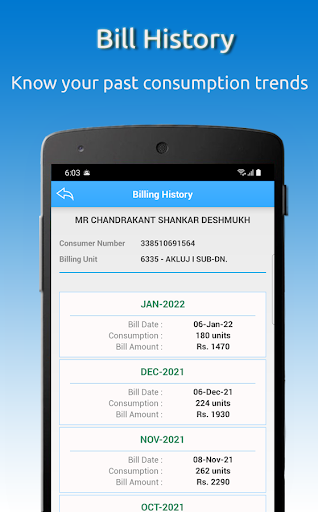
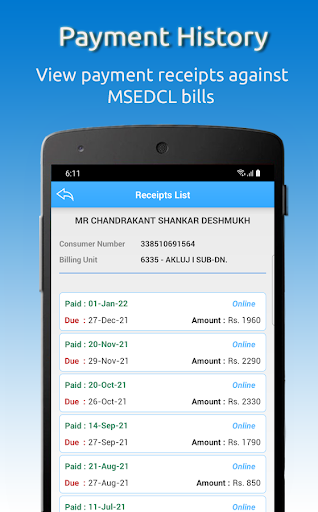
*View Bill and Payment history
*Manage Multiple Electricity Connections
*Contact 24 x7 MSEDCL Call Center
*Apply for New Connection
* Know the status of New Connection Application and Pay Estimate Charges
*Submit Meter Reading to avoid average billing
*Provide Feedback about Mahavitaran Services
*Update Contact Details ( Mobile Number & E-mail ID ) of consumer
*Find MSEDCL offices and collection centers near you
*Estimate your monthly electricity consumption and bill amount
*Get Information about the Feeder from where the power supply is provided to your connection
*Apply for the change of name
*Submit an application for addition/reduction in load
►Functionalities available in Mobile App :
1.Apply for new connection : Apply for New Electricity Connection in just 4 steps
2.Track New Connection Request : Status of New Connection application can be tracked using unique Application Id and estimate charges can be paid
3.Submit Reading : Submit own meter reading along with meter photo to avoid average billing, after receipt of SMS from Mahavitaran. Mahavitaran will send SMS, if meter reading is not made available by meter reader
4.Feedback: Submit ratings of Mahavitaran services in the scale of 1 to 5, where 5 means Outstanding and 1 means poor service
5.View/Pay Bill: View and Pay Electricity Bills using different payment options like
a.Net banking
b.Debit Card
c.Credit Card
d.Cash Cards
e.Mobile Wallets
f.Paytm
6.Update Contact details: Update Mobile Number,E-Mail ID & AadharCard No. of consumer
7.Register & Track Complaint: Register & Track Power Failure and Billing Complaints etc
8.History: View Electricity Bill history and Payments history
9.Add & Remove connection: Manage multiple electricity connections from registered account.
10.Customer Care: Call 24*7 MSEDCL Call Center
11.Nearest Locations : Find MSEDCL offices and collection centers near you
12.Estimate consumption and bill amount : Estimate consumption in KWH by providing details about usage of appliances. Also, know the approx. monthly bill amount for that estimate.
13.Get Information about the Feeder : Feeder is a line which transfers power to the consumer through a transformer. Know technical details about this feeder and outages planned in the future, if any.
14.Report Power Theft : Inform any suspected electricity theft activity in your area
15.Apply for change of name: Submit application for changing the registered name of electricity connection
16.Add/Reduce Load: Submit application for increasing/decreasing the load of electricity connection
►Other Features :
1.Consumer Registration: Sign up to Mahavitaran Consumer portal through mobile app
2.Guest Login: View and Pay Electricity Bills without signing up
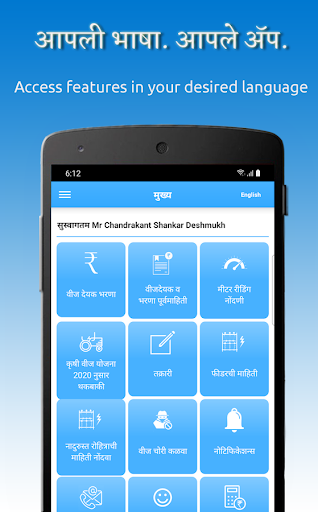
3.App is available in English as well as Marathi Language
4.Forgot Login Name / Password: Recover forgotten account details
►For using Mahavitaran Mobile App, all you need :
• A smart phone with Android Operating System (OS 4.0 or above).
• Internet connectivity like GPRS/EDGE/3G/Wi-Fi/4G etc.
[ Note: For queries related to your online mobile payment transactions, please email to [email protected]]
For feedback & suggestions about this app, kindly email us at [email protected]
The Official App for Consumer by Mahavitaran ( M.S.E.D.C.L.). Mahavitaran Consumer App enables consumers to avail Mahavitaran services at his/her fingertips. The app is simple and easy to use. It provides transparency in delivering services to consumers.
►Features :
*View and Pay bill
*Register and Track complaints
*View Bill and Payment history
*Manage Multiple Electricity Connections
*Contact 24 x7 MSEDCL Call Center
*Apply for New Connection
* Know the status of New Connection Application and Pay Estimate Charges
*Submit Meter Reading to avoid average billing
*Provide Feedback about Mahavitaran Services
*Update Contact Details ( Mobile Number & E-mail ID ) of consumer
*Find MSEDCL offices and collection centers near you
*Estimate your monthly electricity consumption and bill amount
*Get Information about the Feeder from where the power supply is provided to your connection
*Apply for the change of name
*Submit an application for addition/reduction in load
►Functionalities available in Mobile App :
1.Apply for new connection : Apply for New Electricity Connection in just 4 steps
2.Track New Connection Request : Status of New Connection application can be tracked using unique Application Id and estimate charges can be paid
3.Submit Reading : Submit own meter reading along with meter photo to avoid average billing, after receipt of SMS from Mahavitaran. Mahavitaran will send SMS, if meter reading is not made available by meter reader
4.Feedback: Submit ratings of Mahavitaran services in the scale of 1 to 5, where 5 means Outstanding and 1 means poor service
5.View/Pay Bill: View and Pay Electricity Bills using different payment options like
a.Net banking
b.Debit Card
c.Credit Card
d.Cash Cards
e.Mobile Wallets
f.Paytm
6.Update Contact details: Update Mobile Number,E-Mail ID & AadharCard No. of consumer
7.Register & Track Complaint: Register & Track Power Failure and Billing Complaints etc
8.History: View Electricity Bill history and Payments history
9.Add & Remove connection: Manage multiple electricity connections from registered account.
10.Customer Care: Call 24*7 MSEDCL Call Center
11.Nearest Locations : Find MSEDCL offices and collection centers near you
12.Estimate consumption and bill amount : Estimate consumption in KWH by providing details about usage of appliances. Also, know the approx. monthly bill amount for that estimate.
13.Get Information about the Feeder : Feeder is a line which transfers power to the consumer through a transformer. Know technical details about this feeder and outages planned in the future, if any.
14.Report Power Theft : Inform any suspected electricity theft activity in your area
15.Apply for change of name: Submit application for changing the registered name of electricity connection
16.Add/Reduce Load: Submit application for increasing/decreasing the load of electricity connection
►Other Features :
1.Consumer Registration: Sign up to Mahavitaran Consumer portal through mobile app
2.Guest Login: View and Pay Electricity Bills without signing up
3.App is available in English as well as Marathi Language
4.Forgot Login Name / Password: Recover forgotten account details
►For using Mahavitaran Mobile App, all you need :
• A smart phone with Android Operating System (OS 4.0 or above).
• Internet connectivity like GPRS/EDGE/3G/Wi-Fi/4G etc.
[ Note: For queries related to your online mobile payment transactions, please email to [email protected]]
For feedback & suggestions about this app, kindly email us at [email protected]
What's New
• Bug fixes
App Information
Version Name
10.50
Version Code
62
File Size
14.6 MB
Minimum OS
Android 4.0.3+
Target SDK
Android 33
Developer
Maharashtra State Electricity Distribution Co.Ltd.
Contact
Website
Content Rating
Everyone
Package Name
com.msedcl.appPermissions Required
This app may request the following permissions:
Recent Reviews

Desh Premee
2.0★
after installing smart metres, metre reading units is not displayed in the bill. only consumption is shown. why? if there is nothing to hide, why not show the reading as before. if you show consumption, you have both readings with you. show them in the bill. and since we have chosen go green, please give option to download the printable copy of thr bill from app.

Prakash Prabhat
1.0★
Any issue you raise gets closed by the end of the day irrespective of whether the issue is resolved or not. I have been raising a complaint for 8-9 months about a faulty meter they close it saying the meter was replaced. The correct bill will be received from next month but nothing has been fixed. Now I have come to know that you have to contact the agent to pay them 3000-3500 and only then will this be resolved.

Sandesh Gharatkar
1.0★
the payment option of upi id is hard to do. I have paid my bill using upi id and the money is deducted from my bank account but in the app the page directly shows that the check for the transaction failure. after I press there is no option to check what happened with that transaction. there is no help option. how should I raise the complaint.
abhishek joshi
1.0★
Complaints raised on app are not being addressed, worst service, fake closure of complaints, no one analysing issues being faced by the consumers. Feedback option in the app is not working, can't submit feedback. Most of the time shows error unable to connect, can't give zero so 1 star

Amit Sharma
1.0★
this is a glitch in the app as I'm using the 11.50 which is the latest version and unable to raise a complaint for the power supply issue. only one error keeps on popping up - unable to connect. please try again later.

Vaseem Qureshi
1.0★
Continuously power supply cuts, No Parament Resolution post multiple complaints raised and Follow-up, Very bad experience, Bill amount related timely reminder received but no proactive approach and resolution on problem, due to frequent power supply cuts my home appliances are impacted
Ad slot: In-Content