
mysms - Remote Text Messages
com.mysms.android.sms
by mysms - SMS App - SMS Texting from Computer
Screenshots



Ad slot: Top Leaderboard
About this app
★★★Featured on Google Play in 130+ countries.★★★
As seen on by The Times, PCWorld, TheNextWeb, Gizmodo, All Things Digital, Android Central and many more.
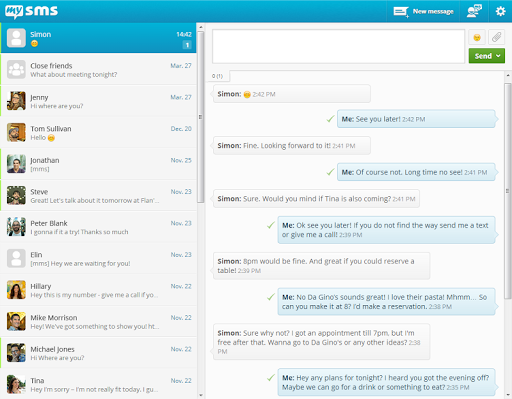
SMS & calls on your PC or tablet in perfect sync with your Android phone.
● Text from computer and tablet (real SMS and MMS) using your Android #
● Call notifications on your computer - when you receive a call on your phone
● The only remote texting app with native apps for Android tablet, Windows 7/XP, Windows 8 desktop & tablet and Chrome
● Complete call log history from your Android on your PC & tablet
● MMS Group Chat (group messaging)
● Multimedia messages (picture messages and files)
● Support for any browser (Chrome, Internet Explorer, Firefox, Safari, Opera …)
● Sync your contacts and messages from your phone to the mysms cloud to text from any device
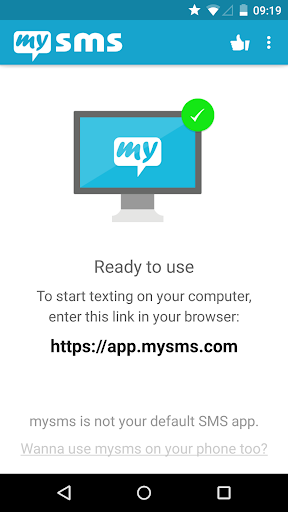
To connect your computer or tablet to your Android phone, download this app on your phone and register for an account. When you then start texting from your computer at https://app.mysms.com or use one of our native apps, you will find all existing SMS messages and contacts synchronized from your Android to your computer/tablet. There is no additional charge from what your carrier charges when you text from your computer.
HOW TO GET STARTED:
1) Install this mysms app on your Android phone
2) Start texting on your computer at https://app.mysms.com or download one of our native desktop and tablet apps at https://www.mysms.com/apps
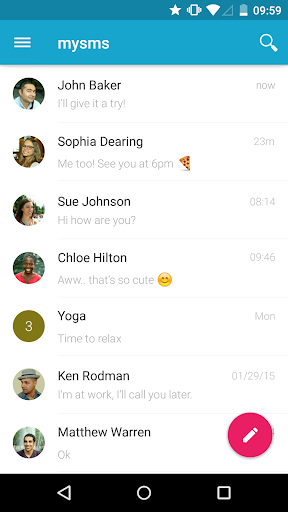
mysms enables you to manage your Android SMS notifications on your computer and tablet. You also have the choice to use mysms as default SMS app on your Android phone offering you great customization options, expandable notifications and many more features that your preinstalled stock SMS app cannot beat.
When you are in the office, leave your phone in your pocket and send and receive text messages using your full computer keyboard. During meetings you can use mysms as your personal assistant and respond with text to incoming calls from your computer.
If you want even more you can upgrade to Premium for advanced management of your messages. Price: Only USD 9.99 per year. You can also try out mysms Premium free of charge for 14 days.
mysms Premium offer:
● Backup SMS and restore SMS to a new smartphone, or after a reset
● Sync messages and calls between your business phone and private smartphone (-> download mysms mirror)
● Archive SMS & MMS messages in your Evernote, Dropbox or Google Drive or email account
● Full SMS export of your messages to a .CSV file
● No attachment of "via mysms.com" text at the end of the message
We’d love to hear from you! Do you have a suggestion, question or comment? Just contact us at http://support.mysms.com.
As seen on by The Times, PCWorld, TheNextWeb, Gizmodo, All Things Digital, Android Central and many more.
SMS & calls on your PC or tablet in perfect sync with your Android phone.
● Text from computer and tablet (real SMS and MMS) using your Android #
● Call notifications on your computer - when you receive a call on your phone
● The only remote texting app with native apps for Android tablet, Windows 7/XP, Windows 8 desktop & tablet and Chrome
● Complete call log history from your Android on your PC & tablet
● MMS Group Chat (group messaging)
● Multimedia messages (picture messages and files)
● Support for any browser (Chrome, Internet Explorer, Firefox, Safari, Opera …)
● Sync your contacts and messages from your phone to the mysms cloud to text from any device
To connect your computer or tablet to your Android phone, download this app on your phone and register for an account. When you then start texting from your computer at https://app.mysms.com or use one of our native apps, you will find all existing SMS messages and contacts synchronized from your Android to your computer/tablet. There is no additional charge from what your carrier charges when you text from your computer.
HOW TO GET STARTED:
1) Install this mysms app on your Android phone
2) Start texting on your computer at https://app.mysms.com or download one of our native desktop and tablet apps at https://www.mysms.com/apps
mysms enables you to manage your Android SMS notifications on your computer and tablet. You also have the choice to use mysms as default SMS app on your Android phone offering you great customization options, expandable notifications and many more features that your preinstalled stock SMS app cannot beat.
When you are in the office, leave your phone in your pocket and send and receive text messages using your full computer keyboard. During meetings you can use mysms as your personal assistant and respond with text to incoming calls from your computer.
If you want even more you can upgrade to Premium for advanced management of your messages. Price: Only USD 9.99 per year. You can also try out mysms Premium free of charge for 14 days.
mysms Premium offer:
● Backup SMS and restore SMS to a new smartphone, or after a reset
● Sync messages and calls between your business phone and private smartphone (-> download mysms mirror)
● Archive SMS & MMS messages in your Evernote, Dropbox or Google Drive or email account
● Full SMS export of your messages to a .CSV file
● No attachment of "via mysms.com" text at the end of the message
We’d love to hear from you! Do you have a suggestion, question or comment? Just contact us at http://support.mysms.com.
What's New
• Performance improvements and bug fixes
App Information
Version Name
7.1.1
Version Code
291
File Size
8.1 MB
Minimum OS
Android 6.0+
Target SDK
Android 30
Developer
mysms - SMS App - SMS Texting from Computer
Contact
Website
Content Rating
Everyone
Package Name
com.mysms.android.smsPermissions Required
This app may request the following permissions:
Recent Reviews

Ken Mundy
2.0★
It was okay- sometimes it doesn't sync or download multimedia, but it was good enough that I had a subscription. But it was impossible to renew recently even though I tried multiple payment methods that work with other subscriptions without issue. Contacted support and no response. If they don't care about collecting my money, they sure won't care about technical issues. I

A Google user
4.0★
It's great that you can reply from your computer. However, on the phone it's somewhat slow to open a message, old or new. Also, it's not very friendly with group message notifications. Don't hit the notification ribbon, it will say "message not found." Instead, go to the actual messages and open it there.
A Google user
2.0★
I want to like this app, but I'm having quite a few problems. The 3 biggest issues that I'm having are: individual text messages, both sms and mms, are showing up in the wrong threads (only on mysms on my computer - they are correct in Textra on my phone), known contacts will suddenly appear as unknown, and the left column in the browser that shows all recent threads/conversations is showing messages from ages ago with a date within a couple of days ago. I tried using the desktop app and that was problematic as well - didn't show pictures from mms messages, didn't always sync with my phone...going to keep searching for an alternative.
A Google user
2.0★
$10 - wasted. Does not work well at all. Messages don't sync between phone and app. Tried using the app on the phone and I was receiving notifications of new messages but they weren't on the MySMS app. Switched back to the stock messaging app and there they were. Tried using the FAQ on thier site but nothing worked. Signed in and out multiple times, reinstalled the application several times, cleared the cache on my phone several times - it just doesn't seem to work right. Disappointed to say the least as I really like using my PC for text messaging. Subscription cancelled.
A Google user
4.0★
Love the way i can sync messages between devices. However, the block feature only blocks 1-on-1 messages. A blocked user can still message you if its part of a group text. Also, the app can be slightly sluggish on PC and it lacks some of the features that more popular messaging apps have. But for me, syncing is a must, so i suggest the premium version. Despite its flaws, this is still my favorite SMS app by far.
A Google user
4.0★
Very convenient, easy to compose, edit, or search messages using computer keyboard instead of tiny phone screen. Discreet, can send/reply to SMS during company meetings, other times when it might not seem appropriate to be staring at your phone and/or typing on it. IMPROVEMENTS needed: the feature to make separate notifications for group messaging does not work on my galaxy s7 phone, very important to me. WANTED: connect via bluetooth!
Ad slot: In-Content