

WiFi Mouse
com.necta.wifimousefree
by WiFi Mouse
Screenshots

Ad slot: Top Leaderboard
About this app
🚀 Your Phone = Ultimate PC Remote: Mouse, Keyboard, Trackpad & MORE! 🚀
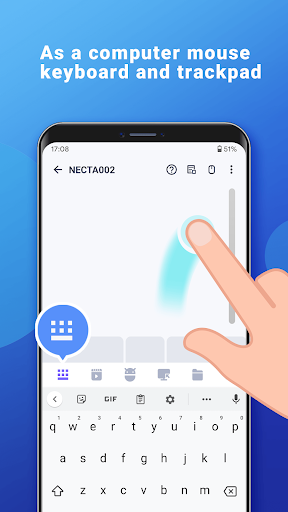
Tired of jumping up to control your PC or Mac? Transform your Android phone into a powerful wireless mouse, keyboard, trackpad, and command center! Effortlessly control your Windows, macOS, or Linux computer from your couch, bed, or across the room – all over your local WiFi.
🌟 NEW! Game-Changer: Remotely Shutdown or Restart Your Computer from ANYWHERE (via internet)!
Unlock the Full Potential of Your Phone:
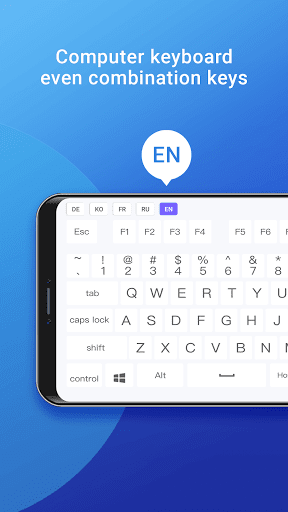
Precision Control: Smooth touchpad, Air Mouse (gyro!), & full keyboard (emoji 😂 included!). Supports any Android keyboard.
Power User Features:
NEW Internet Remote: Shutdown/Restart PC from anywhere!
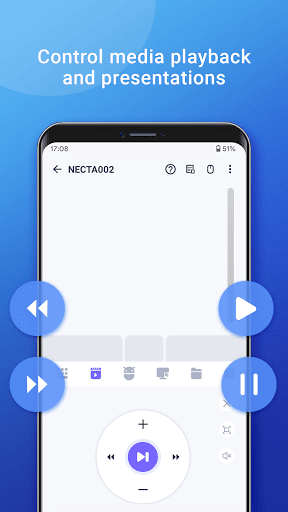
Media Master: Control Spotify, VLC, YouTube (web), Netflix (web), QuickTime & more! (Unlock Premium)
Present Like a Pro: Remote PowerPoint/Keynote control.
Voice to Text: Dictate directly to your PC!
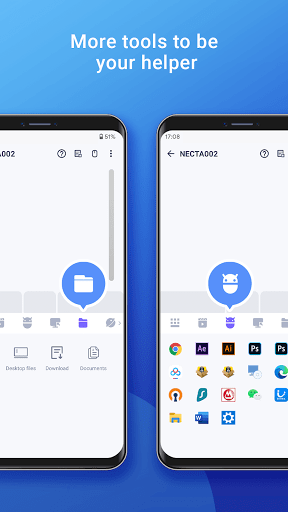
App Launcher & File Browser: Start apps & find files instantly.
Game Pad Mode: Play Roblox & other PC games remotely! (Unlock Premium)
Remote Desktop (RDP): See your PC screen on your phone. (Unlock Premium)
Universal Remote: Control IR TVs (Samsung, LG, Apple TV, TCL) with your phone's IR blaster! (Requires hardware)
Seamless Compatibility: Works flawlessly with Windows 7/10/11, macOS, and Linux (Ubuntu, Debian, Raspberry Pi, Mint & more).
Smart & Secure: Password protection & Dark Mode (Android 10+).
✅ Super Simple Setup in Seconds:
1. Download the FREE Mouse Server for your PC/Mac/Linux: [http://wifimouse.necta.us](http://wifimouse.necta.us)
2. Install & Run it (ensure firewall allows port 1978).
3. Connect your phone & computer to the SAME WiFi.
4. Open the app & control instantly!
🔐 Permissions Explained:
Full Network Access: Essential for connecting to your computer.
Control Vibration: Provides tactile feedback for key presses (feels real!).
Transmit Infrared: Only needed if using the TV remote feature (requires IR blaster).
👉 Ditch the Dongles & Extra Remotes! Download WiFi Mouse NOW and Turn Your Phone into the Ultimate Control Hub!
Tired of jumping up to control your PC or Mac? Transform your Android phone into a powerful wireless mouse, keyboard, trackpad, and command center! Effortlessly control your Windows, macOS, or Linux computer from your couch, bed, or across the room – all over your local WiFi.
🌟 NEW! Game-Changer: Remotely Shutdown or Restart Your Computer from ANYWHERE (via internet)!
Unlock the Full Potential of Your Phone:
Precision Control: Smooth touchpad, Air Mouse (gyro!), & full keyboard (emoji 😂 included!). Supports any Android keyboard.
Power User Features:
NEW Internet Remote: Shutdown/Restart PC from anywhere!
Media Master: Control Spotify, VLC, YouTube (web), Netflix (web), QuickTime & more! (Unlock Premium)
Present Like a Pro: Remote PowerPoint/Keynote control.
Voice to Text: Dictate directly to your PC!
App Launcher & File Browser: Start apps & find files instantly.
Game Pad Mode: Play Roblox & other PC games remotely! (Unlock Premium)
Remote Desktop (RDP): See your PC screen on your phone. (Unlock Premium)
Universal Remote: Control IR TVs (Samsung, LG, Apple TV, TCL) with your phone's IR blaster! (Requires hardware)
Seamless Compatibility: Works flawlessly with Windows 7/10/11, macOS, and Linux (Ubuntu, Debian, Raspberry Pi, Mint & more).
Smart & Secure: Password protection & Dark Mode (Android 10+).
✅ Super Simple Setup in Seconds:
1. Download the FREE Mouse Server for your PC/Mac/Linux: [http://wifimouse.necta.us](http://wifimouse.necta.us)
2. Install & Run it (ensure firewall allows port 1978).
3. Connect your phone & computer to the SAME WiFi.
4. Open the app & control instantly!
🔐 Permissions Explained:
Full Network Access: Essential for connecting to your computer.
Control Vibration: Provides tactile feedback for key presses (feels real!).
Transmit Infrared: Only needed if using the TV remote feature (requires IR blaster).
👉 Ditch the Dongles & Extra Remotes! Download WiFi Mouse NOW and Turn Your Phone into the Ultimate Control Hub!
What's New
Fix bugs
App Information
Version Name
3.0.1
Version Code
134
File Size
7.5 MB
Minimum OS
Android 8.1+
Target SDK
Android 23
Developer
WiFi Mouse
Contact
Website
Content Rating
Everyone
Package Name
com.necta.wifimousefreePermissions Required
This app may request the following permissions:
Recent Reviews

Jamin Crystal
5.0★
This app is amazing! Even after shutting off your phone, after simply clicking your on button, the mouse is ready to use! I have a pretty decent gaming PC and a decent phone so experiences may be different with lesser technology. I do have to say to the developers that this app should only be the beginning and that people would be willing to pay if there was more! Make it a video controller, add the ability to do more like choose different PC apps such as Netflix, Hulu, prime, ect. Also ,.......

Grant Adams
5.0★
Hands down the best remote mouse/keyboard app in the store (yes I've tried them all). Don't look anywhere else, these guys are the only ones maintaining frequent updates of their app. It has dark mode, full simulated keyboard that supports shortcuts, the mouse even has a scroll wheel and a setting for the sensitivity. I've used this app every single day for over 5 years now to control my computer from across my room. 10/10 IGN.

Michael Cooney
2.0★
The app works well, for the most part. However, their website has been flagged as having a trojan by Malwarebytes, and it won't let me update the mouse server. However, Malwarebytes does not show the mouse server files as Trojans when I scan what I already have on my computer. I'm not sure whether this is real or a false alarm, but I'll probably delete until they get it figured out. Apps are changing owners all the time who then add malicious code.

Bryan Smith
3.0★
up until a few months ago, it was great. Now, i can't use some features as the app doesn't adjust to the screen with my home/back button enabled, functions properly if i switch to gestures, but i dont like that.

A Google user
2.0★
This app worked well for a week, the tools this app provides for free are great. Then I noticed my cursor would stop moving for a couple of minutes and then it would go back to moving. My WiFi never gets switched off and the app recognises my computer and it's connection. Unfortunately I uninstalled. It's a nice app but it needs a bit of work still.

vishal patil
1.0★
It was best till today but when installed last update dated 03/08/25, unable to click on keyboard tab in app and hence keyboard is not opening and due to which cannot use it... just able to use mouse.
Ad slot: In-Content