

네이버 - NAVER
com.nhn.android.search
by NAVER Corp.
Screenshots






Ad slot: Top Leaderboard
About this app
A wealth of information optimized for mobile! Experience the NAVER app, refreshed daily.
The NAVER app offers five spaces tailored to different content types. Your favorite is in “Home Feed,” short and quick entertainment can be found in “Clip,” and “Content” provides news and various reading materials. “NAVER Plus Store” offers a personalized shopping experience, with deals, rewards, and benefits, and “MY” is where you check your activity logs as well as authentication and payments. Download the NAVER app now for your everyday convenience!
1. Browse content tailored to your interests by topic.
From sports and entertainment to fashion and beauty to tech, NAVER continuously recommends personalized content across various subjects at the bottom of the search home.
2. Clip – Your Personal Reviews in Photos and Videos
Enjoy short moments by watching Clips, and create your own special ones with photos and videos. Follow your favorite creators and keep all your clips neatly archived in your personal space. Discover the joy of both watching and creating.
3. NAVER Plus Store, where you save more and earn more
A wealth of shopping content with tailored products and offers at the bottom of Home will help you explore and discover the joy of shopping. Experience a unique shopping journey that lets you save, earn, and collect more through hyper-personalized deals that include today’s discounts, various promotions, and trending items.
4. Authentication, payments, and activity logs — all at once in MY
MY brings together your scattered activities, including on-site wallet alternatives, payment solutions, checkout/pre-order lists, favorite items, and saved locations.
5. Make your daily life convenient with the Green Dot AI Search
Enjoy various search functions more conveniently, including Lens that searches for information based on images, music search that finds the music you’re curious about, voice search for hands-free searching, and location-based search for information about neighborhoods, such as restaurants.
※ Supporting Wear OS devices.
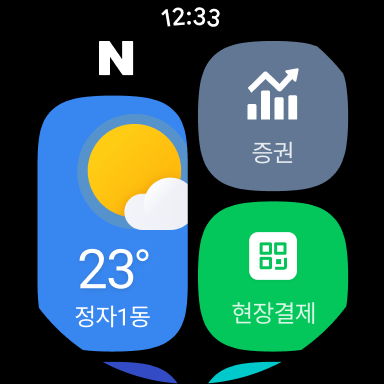
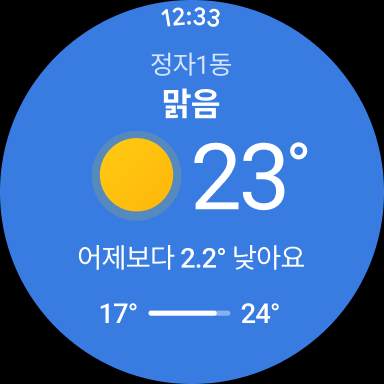
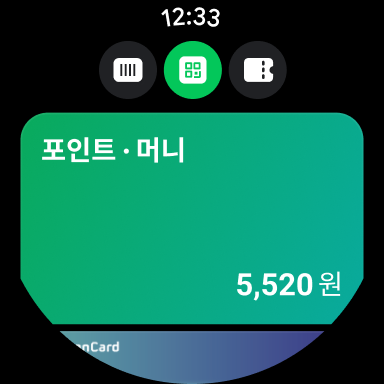
Use the NAVER app from Wear OS devices to check information that changes in real-time, such as the weather and stock prices, and use membership, coupons, and the on-site payment feature. Additionally, you can immediately access frequently-used tools, such as weather and Pay, through tiles and complications.
-The weather information is provided only in Korea.
※Details of required access permission
- Location: You can use features, including location-based information navigation and search, and attach your current location.
- Camera: Record Clip videos, add photos, or search for information using QR codes or images.
- Files and media(photo, video, audio): Use files on your device to access features like creating Clip videos and searching for images.
- Microphone: Record Clip videos, search for voices and music, translate voice, and attach voice files.
- Contacts: The contact information stored on your device can be used for features, such as wire transfer, gifting, and address book.
- Phone: Access permission is required to verify the mobile phone number on the device you are currently using when using features such as NAVER certification, login without password, and NAVER Pay.
- Physical activity: Access permission is required to count the number of steps on NAVER’s pedometer service.
- Notification: Access permission is required to receive information on key announcements, events, and promotions, or check the number of steps counted by the pedometer service on the device notification center (Only available on devices with OS version 13.0 or higher).
※ NOTE
For the best experience with NAVER app, we recommend installing it on Android OS 8.0 or higher. If you have problems while using the app, please send your inquiries via NAVER app’s Settings - Customer Center.
----
Contact information:1588-3820
NAVER 1784, 95, Jeongjail-ro, Bundang-gu, Seongnam-si, Gyeonggi-do
The NAVER app offers five spaces tailored to different content types. Your favorite is in “Home Feed,” short and quick entertainment can be found in “Clip,” and “Content” provides news and various reading materials. “NAVER Plus Store” offers a personalized shopping experience, with deals, rewards, and benefits, and “MY” is where you check your activity logs as well as authentication and payments. Download the NAVER app now for your everyday convenience!
1. Browse content tailored to your interests by topic.
From sports and entertainment to fashion and beauty to tech, NAVER continuously recommends personalized content across various subjects at the bottom of the search home.
2. Clip – Your Personal Reviews in Photos and Videos
Enjoy short moments by watching Clips, and create your own special ones with photos and videos. Follow your favorite creators and keep all your clips neatly archived in your personal space. Discover the joy of both watching and creating.
3. NAVER Plus Store, where you save more and earn more
A wealth of shopping content with tailored products and offers at the bottom of Home will help you explore and discover the joy of shopping. Experience a unique shopping journey that lets you save, earn, and collect more through hyper-personalized deals that include today’s discounts, various promotions, and trending items.
4. Authentication, payments, and activity logs — all at once in MY
MY brings together your scattered activities, including on-site wallet alternatives, payment solutions, checkout/pre-order lists, favorite items, and saved locations.
5. Make your daily life convenient with the Green Dot AI Search
Enjoy various search functions more conveniently, including Lens that searches for information based on images, music search that finds the music you’re curious about, voice search for hands-free searching, and location-based search for information about neighborhoods, such as restaurants.
※ Supporting Wear OS devices.
Use the NAVER app from Wear OS devices to check information that changes in real-time, such as the weather and stock prices, and use membership, coupons, and the on-site payment feature. Additionally, you can immediately access frequently-used tools, such as weather and Pay, through tiles and complications.
-The weather information is provided only in Korea.
※Details of required access permission
- Location: You can use features, including location-based information navigation and search, and attach your current location.
- Camera: Record Clip videos, add photos, or search for information using QR codes or images.
- Files and media(photo, video, audio): Use files on your device to access features like creating Clip videos and searching for images.
- Microphone: Record Clip videos, search for voices and music, translate voice, and attach voice files.
- Contacts: The contact information stored on your device can be used for features, such as wire transfer, gifting, and address book.
- Phone: Access permission is required to verify the mobile phone number on the device you are currently using when using features such as NAVER certification, login without password, and NAVER Pay.
- Physical activity: Access permission is required to count the number of steps on NAVER’s pedometer service.
- Notification: Access permission is required to receive information on key announcements, events, and promotions, or check the number of steps counted by the pedometer service on the device notification center (Only available on devices with OS version 13.0 or higher).
※ NOTE
For the best experience with NAVER app, we recommend installing it on Android OS 8.0 or higher. If you have problems while using the app, please send your inquiries via NAVER app’s Settings - Customer Center.
----
Contact information:1588-3820
NAVER 1784, 95, Jeongjail-ro, Bundang-gu, Seongnam-si, Gyeonggi-do
What's New
- 검색창 디자인이 캡슐형의 둥근 모양으로 새 단장되었어요.
- 홈피드 콘텐츠 내용을 요약해서 볼 수 있는 AI 미리보기가 더 깔끔해졌어요.
- 그 외 눈에 잘 띄지 않지만 불편하셨을 부분들을 손봤어요.
- 홈피드 콘텐츠 내용을 요약해서 볼 수 있는 AI 미리보기가 더 깔끔해졌어요.
- 그 외 눈에 잘 띄지 않지만 불편하셨을 부분들을 손봤어요.
App Information
Version Name
12.4.40
Version Code
12044004
File Size
345.4 MB
Min SDK
Android 24+
Target SDK
Android 33
Developer
NAVER Corp.
Contact
Website
Content Rating
Everyone
Package Name
com.nhn.android.searchPermissions Required
This app may request the following permissions:
Recent Reviews

Alba Hernandez
1.0★
This has to be one of the most unhelpful apps, and customer service, I have ever experienced. I created my account, and for whatever reason, I was unable to receive a verification code. I sent an inquiry to Naver, and the answer made it seem they didn't read what I sent. I finally verified, but now it says my ID and password do not match. Recovery protocols are useless, and customer service is non-existent.

A Google user
2.0★
While the details of the map itself and the real-time subway/bus information warrant 5 stars, the search engine optimization is awful for the English language version of this app in my specific use case. This review is primarily for the English language version, although no matter if I write a location in English or hangul (the Korean alphabet), I keep receiving the "No results" display, even when choosing from Naver's own list of auto-complete options! Furthermore, because phonetization of Korean into English letters can be spelled in various ways, it's difficult to search for a specific place if you're typing in English, which is probably the most common use-case for foreign visitors who are not familiar with hangul. Naver needs to improve their algorithm to allow for variances in the English spelling of Korean place-names. The only way I can get directions for a specific location is if I tap on the location on the map, but that presumes I already know the general location of the place I'm looking for. Without a much better search engine for English users, this app only rates a 2 out of 5 for me.

Jennifer Cote
2.0★
After submitting the paperwork to Naver for "real name" in support for QR code, I was updated to the latest version which does not have an English setting like the previous version (unless they are hiding it really well). It used to be on the logon page and most of the content was translated. Now, having to press the bird on EVERY SINGLE PAGE is a pain and time consuming. That is IF the page has it. The redesign could be pretty nifty if it was in English but you aren't able to use the new navigation until you figure out what each one is because there is no ability to translate the landing page. I still use it, it just takes me 10x longer to accomplish what I need to do. Thinking about finding an APK for an older version.

U
1.0★
This has to be the worst app out there. For all those saying it is a foreign app and therefore your experience on it as an English speaker isn't justified is actually insane. I've used tons of foreign apps while traveling and I've never had one so unintuitive that seems to purposely hurt your experience like this one before. I can't wait for the day Google maps to include korea so this app can be forever be deleted off my phone.

Astral Trinity
1.0★
I just downloaded the app to read my favorite novel, but whenever I try to create an account, it keeps giving me "Account Suspended due to suspicious location" error. I can't read the novel without having an account, so both the app and the website are completely useless to me. Please fix this error quickly!

Stefni Yeshenya
4.0★
I don't have trouble using the app much The only problem is I could sign in with only a username but when I try to set up a password and give my details I can only go to the mobile number step They say they failed to send an auth number and try again later I'm a foreigner (South asian) so I understand it may take time but I've waited for days (Nothing wrong with my details) I just want to read a comic I missed 😭 There's no english transition but to sign into Webtoon I need a damn password 😒
Ad slot: In-Content