
SnapBridge
com.nikon.snapbridge.cmru
by Nikon Corporation
Screenshots

Ad slot: Top Leaderboard
About this app
High-quality photos taken with Nikon camera can be shared via e-mail or social media just as you would photos taken with your smart device.
Does the camera offer a WPA2-PSK/WPA3-SAE authentication/encryption option?
The camera may be unable to connect to the smart device if WPA2-PSK/WPA3-SAE is selected for authentication/encryption.
In this event, switch the camera authentication/encryption setting to WPA2-PSK-AES.
See the camera documentation for information on changing Wi-Fi connection settings.
Supported Digital Cameras as of May 2025
Z9, Z8, D6, Z7II, Z6III, Z6II, Z7, Z6, Z5II, Z5, Zf, Zfc, Z50II, Z50, Z30, D850, D780, D500, D7500, D5600, D3500, D3400, COOLPIX P1100, P1000, P950, A1000, A900, A300, B700, B500, B600, W300, W150, W100, KeyMission 80
D750, D7200, D7100, D5500, D5300, D3300, Df, J5, P900, S7000, S3700, AW130
The foregoing may include models not available in some regions.
Be sure to update the camera firmware to the latest version.
Use a computer to download the latest camera firmware from the Nikon Download Center. * According to your camera's model, you can download your camera's firmware via the SnapBridge app.
http://downloadcenter.nikonimglib.com/
Principal Features
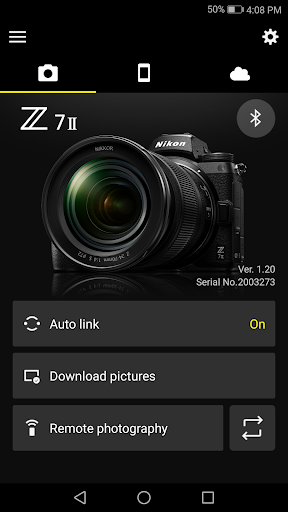
- Once the camera is paired with your smart device, new photos can be downloaded automatically.
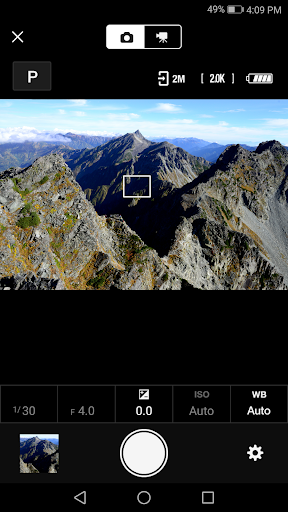
- Adjust camera settings and take photos.
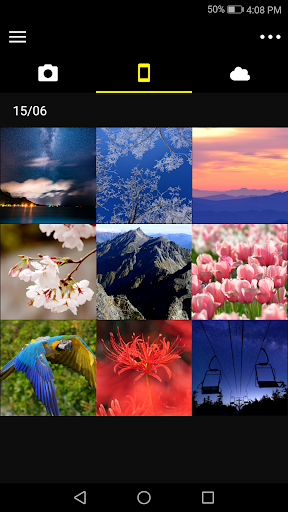
- View the pictures on and download photos from the camera.
- Use the app to pair the device with up to five cameras.
- Automatically upload pictures taken with the camera to NIKON IMAGE SPACE (Note 1).
- View downloaded photos or share them via e-mail or social media.
- Add photo info or text to uploaded photos.
- Download location data to the camera (Note 2) or set the camera clock to the time reported by the smart device.
- Receive notifications of firmware updates for paired cameras.
System Requirements
Android 11.0 or later
A device with Bluetooth 4.0 or later (i.e., a device that supports Bluetooth Low Energy) is required.
There is no guarantee that this app will run on all Android devices.
Notes
- Note 1: Upload to NIKON IMAGE SPACE requires a Nikon ID.
- Note 2: The GPS function runs continuously in the background, increasing the drain on the battery. The drain on the battery can be reduced by choosing power-saving mode.
- If you are unable to download images or connect via Bluetooth or Wi-Fi after pairing, try one or more of the following solutions:
- Turn the paired camera off and then on again.
- Switch tabs in SnapBridge.
- Exit and relaunch SnapBridge.
- Users can register for a Nikon ID using this app.
- Enable Bluetooth and Wi-Fi when using this app.
- Remote movie recording is not supported on some cameras.
- Movies can be downloaded by switching to Wi-Fi and selecting the files manually. Download is not available with AVI files.
- Enable NFC on the smart device before attempting to launch the app or connect via NFC.
- Remote photography and movie download are available only if the camera has Wi-Fi (some cameras only).
- The app may not perform as expected depending on your environment and network conditions.
- A smart device with a display resolution of WVGA (960 × 540 pixels) or better is required.
- The app cannot be used to view movies. Use a movie-viewing app.
- The app requires a 100 MB or more of free memory on the smart device.
Using the App
For more information, use the app "Help" option.
Does the camera offer a WPA2-PSK/WPA3-SAE authentication/encryption option?
The camera may be unable to connect to the smart device if WPA2-PSK/WPA3-SAE is selected for authentication/encryption.
In this event, switch the camera authentication/encryption setting to WPA2-PSK-AES.
See the camera documentation for information on changing Wi-Fi connection settings.
Supported Digital Cameras as of May 2025
Z9, Z8, D6, Z7II, Z6III, Z6II, Z7, Z6, Z5II, Z5, Zf, Zfc, Z50II, Z50, Z30, D850, D780, D500, D7500, D5600, D3500, D3400, COOLPIX P1100, P1000, P950, A1000, A900, A300, B700, B500, B600, W300, W150, W100, KeyMission 80
D750, D7200, D7100, D5500, D5300, D3300, Df, J5, P900, S7000, S3700, AW130
The foregoing may include models not available in some regions.
Be sure to update the camera firmware to the latest version.
Use a computer to download the latest camera firmware from the Nikon Download Center. * According to your camera's model, you can download your camera's firmware via the SnapBridge app.
http://downloadcenter.nikonimglib.com/
Principal Features
- Once the camera is paired with your smart device, new photos can be downloaded automatically.
- Adjust camera settings and take photos.
- View the pictures on and download photos from the camera.
- Use the app to pair the device with up to five cameras.
- Automatically upload pictures taken with the camera to NIKON IMAGE SPACE (Note 1).
- View downloaded photos or share them via e-mail or social media.
- Add photo info or text to uploaded photos.
- Download location data to the camera (Note 2) or set the camera clock to the time reported by the smart device.
- Receive notifications of firmware updates for paired cameras.
System Requirements
Android 11.0 or later
A device with Bluetooth 4.0 or later (i.e., a device that supports Bluetooth Low Energy) is required.
There is no guarantee that this app will run on all Android devices.
Notes
- Note 1: Upload to NIKON IMAGE SPACE requires a Nikon ID.
- Note 2: The GPS function runs continuously in the background, increasing the drain on the battery. The drain on the battery can be reduced by choosing power-saving mode.
- If you are unable to download images or connect via Bluetooth or Wi-Fi after pairing, try one or more of the following solutions:
- Turn the paired camera off and then on again.
- Switch tabs in SnapBridge.
- Exit and relaunch SnapBridge.
- Users can register for a Nikon ID using this app.
- Enable Bluetooth and Wi-Fi when using this app.
- Remote movie recording is not supported on some cameras.
- Movies can be downloaded by switching to Wi-Fi and selecting the files manually. Download is not available with AVI files.
- Enable NFC on the smart device before attempting to launch the app or connect via NFC.
- Remote photography and movie download are available only if the camera has Wi-Fi (some cameras only).
- The app may not perform as expected depending on your environment and network conditions.
- A smart device with a display resolution of WVGA (960 × 540 pixels) or better is required.
- The app cannot be used to view movies. Use a movie-viewing app.
- The app requires a 100 MB or more of free memory on the smart device.
Using the App
For more information, use the app "Help" option.
What's New
We look forward to making still more improvements based on your feedback!
Started using Adobe Analytics to enhance the user experience.
Changed some elements of the user interface.
Made some minor bug fixes.
Started using Adobe Analytics to enhance the user experience.
Changed some elements of the user interface.
Made some minor bug fixes.
App Information
Version Name
2.11.0
Version Code
2933001
File Size
53.2 MB
Minimum OS
Android 6.0+
Target SDK
Android 33
Developer
Nikon Corporation
Contact
Website
Content Rating
Everyone
Package Name
com.nikon.snapbridge.cmruPermissions Required
This app may request the following permissions:
Recent Reviews

Kayleigh Ildiko
3.0★
I was really hoping this would work better. I wanted to use it for iNaturalist photos, but the location data doesn't show up at all, or shows up as the location I'm in when the photos transfer over from the camera, which is not useful when I return home and they all transfer over. It feels like something that would have really wowed me in 2015, but disappointing currently

Brittney Graham
2.0★
Connection between phone and camera is terrible. Every time I want to download pictures from my Coolpix B500 I have to be standing in just the right spot at the right time. The app doesn't seem to remember how to connect to my camera every time I use it, rendering any of the options to download or connect unavailable, forcing me to disconnect and start over. Wifis fine and works great otherwise so thats not my issue. Even when I use NFC it's spotty and the camera is in perfect condition.

kerry puckett
4.0★
seems the bugs are fixed. I had my z6 and z6 2 for a few years. Up until a month or so ago I could not use this app. It would crash after I would take a photo. this last weekend I used it for 8 hours controlling my z62 remotely. worked like a champ. Took about 900 shots with the app. it's best to set the camera on a focus point that is a box so you can touch the phone screen to tell it where to focus. Eye detect did not work very well with the app.

D B
1.0★
Finally seems to work. i fought and fought this app in the past. after struggling to get it to connect, it wouldn't reconnect a second time without more struggles. Now, after updating the app and more importantly, the firmware to 1.10 made all the difference, connects perfectly, everytime, without any hassles. update, now its back to NOT working

Steph Bishop
1.0★
When I purchased my camera just over a year ago, I downloaded Snapbridge on my phone. Worked great up until 2 months ago. All I had to do was turn on Bluetooth and open the app. Then it crashed, mid download, neve to work again. Tried tech support 3 times. Hours of my life I'll never get back. They tried to say it's my phone. It isn't. Their update is a giant screw up. The app is now completely worthless. It no longer functions, will not pair or connect. Don't waste your time. Buy a card reader.

Aldrich Gamboa
3.0★
For the most part the application works well enough. I have a Z6iii, and it let's me use the remote camera feature well. It will sync with the camera over Wi-Fi easily as well. Where it seems to do poorly is Bluetooth. Since it uses Bluetooth Low Energy, it doesn't consistently connect and send photos, do the firmware update or even the remote camera features. When it works, it's great and allows me to quickly and easily upload photos to my phone or control the camera. Otherwise, frustration.
Ad slot: In-Content