

Nintendo Switch Parental Cont…
com.nintendo.znma
by Nintendo Co., Ltd.
Screenshots


Ad slot: Top Leaderboard
About this app
Nintendo Switch Parental Controls™ is a free app that allows you to easily monitor your child's use of the Nintendo Switch 2 or Nintendo Switch system.
◆ A Nintendo Switch 2 or Nintendo Switch system is required to use this app.
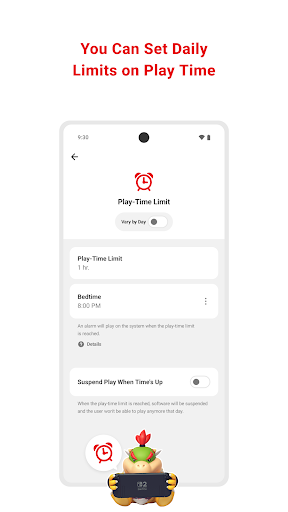
■ Set a daily play-time limit
You can set a timer for how long your child can play for each day. You can select different settings for each day of the week, and even set it so that the game is suspended on the system as soon as the play-time limit is reached.
■ Manage your child's GameChat settings
If you allow your child to use GameChat, you can manage which friends they're approved to chat with and decide when they can use video chat.
◆ The GameChat feature can only be used on Nintendo Switch 2 systems.
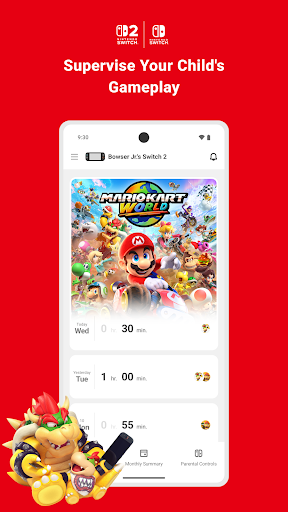
■ View your child's play activity
You can easily check which games your child plays and for how long. You'll also get a monthly overview of their gameplay activity.
■ Set restrictions based on your child's age
You can set up age-based restrictions on the games your child can play and the features they can use.
Attention:
● To use the Nintendo Switch Parental Controls app, a parent or guardian (aged 18 or above) will need to have a Nintendo Account.
● Purchasing restrictions, including restrictions on purchasing products and services in Nintendo eShop, can be set up in the Nintendo Account settings.
● To make use of all of the features and settings available in the Nintendo Switch Parental Controls app, all linked Nintendo Switch 2 and Nintendo Switch systems need to be using the latest system version.
● For details about the GameChat feature, please visit support.nintendo.com.
◆ A Nintendo Switch 2 or Nintendo Switch system is required to use this app.
■ Set a daily play-time limit
You can set a timer for how long your child can play for each day. You can select different settings for each day of the week, and even set it so that the game is suspended on the system as soon as the play-time limit is reached.
■ Manage your child's GameChat settings
If you allow your child to use GameChat, you can manage which friends they're approved to chat with and decide when they can use video chat.
◆ The GameChat feature can only be used on Nintendo Switch 2 systems.
■ View your child's play activity
You can easily check which games your child plays and for how long. You'll also get a monthly overview of their gameplay activity.
■ Set restrictions based on your child's age
You can set up age-based restrictions on the games your child can play and the features they can use.
Attention:
● To use the Nintendo Switch Parental Controls app, a parent or guardian (aged 18 or above) will need to have a Nintendo Account.
● Purchasing restrictions, including restrictions on purchasing products and services in Nintendo eShop, can be set up in the Nintendo Account settings.
● To make use of all of the features and settings available in the Nintendo Switch Parental Controls app, all linked Nintendo Switch 2 and Nintendo Switch systems need to be using the latest system version.
● For details about the GameChat feature, please visit support.nintendo.com.
What's New
Some small adjustments have been made.
App Information
Version Name
1.20.0
Version Code
282
File Size
20.2 MB
Minimum OS
Android 8.0+
Target SDK
Android 33
Developer
Nintendo Co., Ltd.
Contact
Website
Content Rating
Everyone
Package Name
com.nintendo.znmaPermissions Required
This app may request the following permissions:
Recent Reviews

Erika Do
3.0★
Really bare bones controls. You can set hourly limits on a console, and you can set an alarm for bedtime, and you can see a general idea of how much of each game was played each day, but that's it. It's unclear how well these settings work. For example, I set bedtime at 8pm, but when I look at the time played, it has red text saying the game was played past the set time. It doesn't say when the hours happened, so I can't know if she went over by five seconds or somehow kept playing for an hour.

Chaim S
2.0★
I'm absolutely shocked at how bad this app is. I understand the people who say they use it to limit their own screen time, but for a parent? It's almost useless. Yes you can limit screen time, but not to zero, and only in the amount and increments they say - there's no way to give , say, 7 minutes. there's also no way to set a bedtime that isn't one of the ones Nintendo chooses to give you. and limiting games? there's no way to pick what games they can or cannot play, no allow or block lists.

Kristopher Wise
3.0★
It works. It can set a time limit but ultimately it could be much more robust. Primarily I would like to set blocks of time that a user would be allowed to play and a bank of time available. ie. I would like to make 30 mins available in the morning and 30 mins available in the evening but have larger windows of where those 30 mins could be played with hard cut off times (like going to school or getting ready for bed) also why is this a separate app from the Nintendo Switch App? combine them.

Christopher Galan
3.0★
This app works great for setting a time limit for my kid's switches, HOWEVER, I wish there was an option to add bonus time to their limit for the day. I don't want to have to always change limits. Bonus time works great for rewarding them for chores and other things. I also wish I was able to select a time for the switch to unlock in the morning, I don't like it being automatically unlocked at 6 a.m..

Michael Johnsen
2.0★
A lazy attempt at controls. There is so much missing and Nintendo should be disappointed at their attempt. Things such as limited single session screen time. They have a bedtime setting but no morning setting. The device is for a user not a family so having pins for other users isn't an option. You cannot limit store access for a young one. Those are just a few at a minimum. They have a long way to go for being what's know as a kid friendly platform.

Raenell Sollers
2.0★
I wish I could set controls for each profile individually. It's very frustrating that the timers are for the console as a whole - just because I don't want my kid staying up playing till all hours of the night doesn't mean I'm not going to. Also, being able to set certain times on the profiles so that they can't be played would be nice (like 8 pm to 8 am for example.) (Think Amazon fire tablet style parental controls. You can control everything down to the max volume level.)
Ad slot: In-Content