
n-Track Studio DAW: Make Music
com.ntrack.studio.demo
by n-Track
Screenshots


Ad slot: Top Leaderboard
About this app
Turn your Android device into a powerful Music Production Studio.
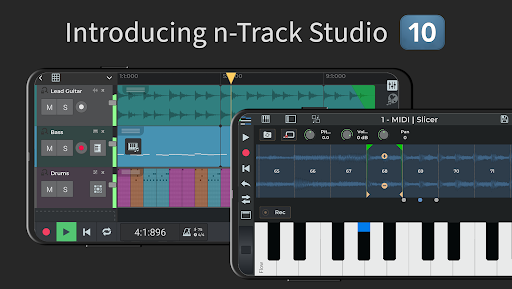
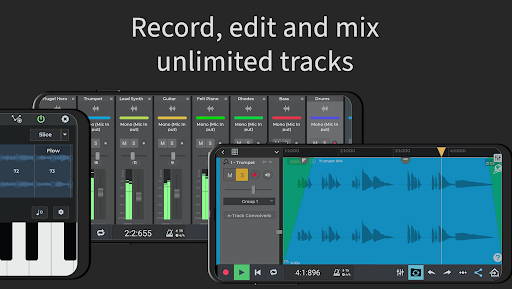
Record an unlimited number of Audio, Instrument & Beat Tracks, mix and add effects: from Guitar Amps, to VocalTune & Reverb. Then edit your songs, share them online & join the Songtree community to collaborate with other artists.
Check out n-Track Studio Tutorials for Android https://ntrack.com/video-tutorials/android
Try n-Track Studio for free: if you like it you can subscribe & unlock standard or advanced features*
HOW IT WORKS:
• Record a track with the built-in mic or an external USB audio interface
• Add & edit audio tracks using our Loop Browser & royalty-free sample packs
• Import grooves & create beats using our Step Sequencer Beat Maker
• Create melodies using the internal keyboard with built-in virtual instruments. (You can connect external MIDI keyboards too)
• Use the mixer to adjust volumes, pan, EQ & add effects
• Save or Share the recording directly from your device
MAIN FEATURES:
• Record & edit audio tracks
• Step Sequencer Beat Maker
• Instrument tracks
• Loop Browser & royalty-free sounds
• Unlimited number of tracks (max 8 tracks without subscription)
• Group & Aux channels
• Piano-roll MIDI Editor
• On-screen keyboard
• EQ with 2D & 3D Spectrum analyzer + chromatic tuner*
• VocalTune* pitch correction: automatically correct pitch imperfections on vocals and melodic parts
• Guitar & Bass Amp plugins
• Reverb, Echo, Chorus, Tremolo, Pitch Shift, Phaser, Distortion, Compressor, Denoiser, Lo-Fi, DynamicEQ, Arpeggiator & Convolution reverb effects
• Built-in Metronome
• Import tracks from your music library
• Automate volumes, pan and effects using envelopes
• Collaborate with other musicians using the built-in Songtree music making community
• Languages included: English, Spanish, French, German, Italian, Portuguese, Russian, Indonesian
ADVANCED FEATURES:
• 64 bit audio engine*
• Set sampling frequency up to 192 kHz (frequencies above 48 kHz require an external audio device)
• Export 16, 24 or 32 bit audio files*
• Live input monitoring
• Follow Song Tempo & Pitch Shift dropdown menu on Audio Loops
• Record 4+ tracks simultaneously from USB pro-audio devices such as Focusrite, M-Audio, Apogee etc*
• Support for multiple audio output when using compatible USB devices*
*Some features require one of the three available in-app subscription levels:
FREE edition
What you get:
• Up to 8 tracks
• Up to 2 effects per track / channel
• Save your song online with the option to collaborate with other musicians NOTE: Saving to WAV/MP3 on your local device storage requires a purchase
STANDARD subscription ($1.49/month)
What you get:
• Unlimited audio & MIDI tracks (Free edition is limited to 8 tracks)
• Unlocks all the available effects (Free Edition has Reverb, Compression, Echo and Chorus)
• Unlimited number of effects per channel (Free Edition has up to 2)
• Export to WAV or MP3
EXTENDED subscription ($2.99/month)
Everything in Standard edition, plus:
• 64 bit audio engine
• Multichannel USB class-compliant audio interfaces
• Export in 24, 32 and 64 bit uncompressed (WAV) format (Standard Edition is limited to 16 bit WAV)
• 3D frequency spectrum view
SUITE subscription ($5.99/month)
Everything in Extended edition, plus:
• 10GB+ of Premium Royalty-Free WAV Loops & One-Shots
• Exclusive release-ready Beats & editable n-Track Studio Projects
• 400+ Sample Instruments
Record an unlimited number of Audio, Instrument & Beat Tracks, mix and add effects: from Guitar Amps, to VocalTune & Reverb. Then edit your songs, share them online & join the Songtree community to collaborate with other artists.
Check out n-Track Studio Tutorials for Android https://ntrack.com/video-tutorials/android
Try n-Track Studio for free: if you like it you can subscribe & unlock standard or advanced features*
HOW IT WORKS:
• Record a track with the built-in mic or an external USB audio interface
• Add & edit audio tracks using our Loop Browser & royalty-free sample packs
• Import grooves & create beats using our Step Sequencer Beat Maker
• Create melodies using the internal keyboard with built-in virtual instruments. (You can connect external MIDI keyboards too)
• Use the mixer to adjust volumes, pan, EQ & add effects
• Save or Share the recording directly from your device
MAIN FEATURES:
• Record & edit audio tracks
• Step Sequencer Beat Maker
• Instrument tracks
• Loop Browser & royalty-free sounds
• Unlimited number of tracks (max 8 tracks without subscription)
• Group & Aux channels
• Piano-roll MIDI Editor
• On-screen keyboard
• EQ with 2D & 3D Spectrum analyzer + chromatic tuner*
• VocalTune* pitch correction: automatically correct pitch imperfections on vocals and melodic parts
• Guitar & Bass Amp plugins
• Reverb, Echo, Chorus, Tremolo, Pitch Shift, Phaser, Distortion, Compressor, Denoiser, Lo-Fi, DynamicEQ, Arpeggiator & Convolution reverb effects
• Built-in Metronome
• Import tracks from your music library
• Automate volumes, pan and effects using envelopes
• Collaborate with other musicians using the built-in Songtree music making community
• Languages included: English, Spanish, French, German, Italian, Portuguese, Russian, Indonesian
ADVANCED FEATURES:
• 64 bit audio engine*
• Set sampling frequency up to 192 kHz (frequencies above 48 kHz require an external audio device)
• Export 16, 24 or 32 bit audio files*
• Live input monitoring
• Follow Song Tempo & Pitch Shift dropdown menu on Audio Loops
• Record 4+ tracks simultaneously from USB pro-audio devices such as Focusrite, M-Audio, Apogee etc*
• Support for multiple audio output when using compatible USB devices*
*Some features require one of the three available in-app subscription levels:
FREE edition
What you get:
• Up to 8 tracks
• Up to 2 effects per track / channel
• Save your song online with the option to collaborate with other musicians NOTE: Saving to WAV/MP3 on your local device storage requires a purchase
STANDARD subscription ($1.49/month)
What you get:
• Unlimited audio & MIDI tracks (Free edition is limited to 8 tracks)
• Unlocks all the available effects (Free Edition has Reverb, Compression, Echo and Chorus)
• Unlimited number of effects per channel (Free Edition has up to 2)
• Export to WAV or MP3
EXTENDED subscription ($2.99/month)
Everything in Standard edition, plus:
• 64 bit audio engine
• Multichannel USB class-compliant audio interfaces
• Export in 24, 32 and 64 bit uncompressed (WAV) format (Standard Edition is limited to 16 bit WAV)
• 3D frequency spectrum view
SUITE subscription ($5.99/month)
Everything in Extended edition, plus:
• 10GB+ of Premium Royalty-Free WAV Loops & One-Shots
• Exclusive release-ready Beats & editable n-Track Studio Projects
• 400+ Sample Instruments
What's New
• Screen keyboard simple mode shows only white keys, or grays out the keys not in the musical current scale.
• MIDI harmonizer effect
• Import and export DAWProject files to/from other DAWs
• Support for MPE keyboards and controllers.
Like n-Track Studio? Please leave a review & help us keep improving the app for you.
If you have found a problem with the app please use the Report Problem button in the Settings box.
Thank you for using n-Track Studio!
• MIDI harmonizer effect
• Import and export DAWProject files to/from other DAWs
• Support for MPE keyboards and controllers.
Like n-Track Studio? Please leave a review & help us keep improving the app for you.
If you have found a problem with the app please use the Report Problem button in the Settings box.
Thank you for using n-Track Studio!
App Information
Version Name
10.1.41
Version Code
910108674
File Size
545.5 MB
Minimum OS
Android 5.0+
Target SDK
Android 33
Developer
n-Track
Contact
Website
Content Rating
Everyone
Package Name
com.ntrack.studio.demoPermissions Required
This app may request the following permissions:
Recent Reviews

Jim Culbert
5.0★
This was the very first DAW I ever downloaded back in high school, over 20 years ago! With DAWN'S like Pro Tools and Ableton sarurating the market, I honestly didn't think it would still be around. When I discovered that not only was it still around but available as a mobile app, it felt like reconnecting with a long-lost best friend you hadn't seen in decades. The only thing left to do is import all my files from Ableton Live. I'm hoping the files will be compatible. Fingers crossed.

Jesse James
1.0★
It's now 2 years later. I'm back to check this app out to see if it's improved at all and I see that it requires a subscription, like everything else nowadays. Who wants to pay a subscription for everything that you want to do? Especially for a mobile recording program on your phone. I am more than willing to pay for this product, but not for a subscription. Subscription fees are taken over and no one likes it. This can't compete with cubasis 3 while requiring a subscription...sorry!

Underhillジン
5.0★
I went through a lot of DAWs. I tried Reaper, ProTools, FL, Ableton etc. For PC and for Android. As a classical composer, a songwriter and someone who just likes to make all kinds of different music I found n-track to be by far the best designed ui/ux of any of them by a long shot. I don't want my DAW getting in the way of my process. I only wish they had more plugins for things like notation. Regardless, a huge bravo and a relief to find!

Unknown
3.0★
I like the editing features, how its designed, but i cannot rate above 3 stars due to not being able to save as mp3 with out voice stamping applied. Thats just stupid. I can understand need to purchase premium features (more editing tools) but not being able to save the track freely, is bull. I know of no other audio editing app that does this. So no.. not worth paying for if being pushed for premium that hard.

Kacy Chicoine
5.0★
Great recording, so easy to use, and has a plethora of basic effects to really enhance your simple recordings. With Bluetooth headphones, the latency was terrible no matter what I tried. As soon as I switched to a cheapo wired pair of earbuds, the latency was gone. For a free app, it's amazing. Makes mixing multiple tracks so quick. With limited knowledge of DAWs you can easily enhance your songs compared to a simple recording app. Highly recommended!

A Google user
3.0★
It's the perfect app when I'm actually in the app, but I wanted to use my song as a backing track for a video and when I saved the song and exported it to mp3 (after paying for a months subscription) I closed out of the app to find the mp3 and it was not saved as an audio file onto my phone. When I went back into the app all of my audio tracks were deleted and that kinda sucks because I put a lot of time into it. It has really nice audio for a free app and makes it easy to layer your voice, but maybe I'm just not understanding: how do I get my music onto my device?
Ad slot: In-Content