

Okta Verify
com.okta.android.auth
by Okta Inc.
Screenshots

Ad slot: Top Leaderboard
About this app
Okta Verify is a lightweight app that allows you to securely access your apps via 2-step verification, ensuring that you, and only you, can access your app accounts.
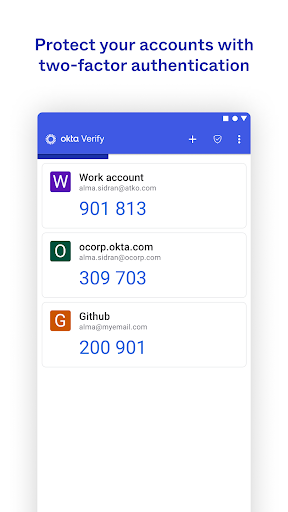
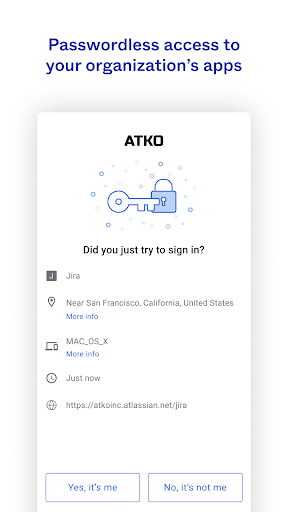
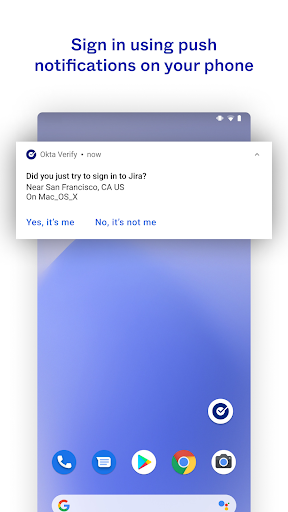
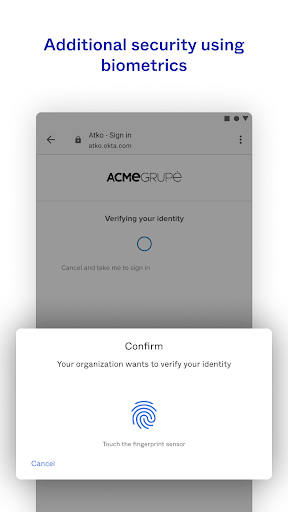
While you access your apps, you'll choose a 2-step verification method provided by Okta Verify to finish signing in. You can verify your identity using a push notification sent to your device (if enabled by your organization), a temporary 6-digit code, or biometrics (if enabled by your organization).
We do request permission to use your device camera so that you can scan a QR code when you enroll your device with Okta.
Terms of Service: https://www.okta.com/sites/default/files/ORDERFORMSUPPLEMENT_OktaVerifyforAndroid_June2017.pdf
While you access your apps, you'll choose a 2-step verification method provided by Okta Verify to finish signing in. You can verify your identity using a push notification sent to your device (if enabled by your organization), a temporary 6-digit code, or biometrics (if enabled by your organization).
We do request permission to use your device camera so that you can scan a QR code when you enroll your device with Okta.
Terms of Service: https://www.okta.com/sites/default/files/ORDERFORMSUPPLEMENT_OktaVerifyforAndroid_June2017.pdf
What's New
*This release includes internal improvements and fixes.
App Information
Version Name
7.36.0
Version Code
50002580
File Size
71.8 MB
Min SDK
Android 29+
Target SDK
Android 34
Developer
Okta Inc.
Contact
Website
Content Rating
Everyone
Package Name
com.okta.android.authPermissions Required
This app may request the following permissions:
Recent Reviews

Neeks
1.0★
Inconsistent push notifications, inability to edit saved accounts, and a new permanent notification that advertises Okta FastPass make this app more annoying than it is convenient. If I wasn't forced to use it for work, this would have been gone from my phone within a month of installation. Once implemented, you can't log in without it, and it constantly begs you to enable biometric verification. I can't even log in using it right now. Yikes.

Vincent Castilow
1.0★
Horrific. This app makes the only thing worse than 2fa with a phone true. It makes it so that if you ever lose the phone you use this app with FIRST you can never ever recover any of your accounts. Same for a new ROM or anything that happens. it creates the ultimate single point of failure. Perfect for losing data, access important accounts and making your life inaccessible. If you're in charge of IT and they suggest this app, get them fired at any cost. I wish I could give negative stars.

Amy Thompson
1.0★
horrible app. it worked for months then wouldn't send push notifications or when you go to the app it's a black screen. I got it to work by deleting reading and clearing the cache and data, it worked for a week and now it's not even working by clearing the cache. I hope my company goes away from this app and goes to a better one. it makes it hard to do work.

SteelersFANinMA
2.0★
7-13/25: Push notifications are unstable. Update 7/10/25: push notifications are working again. 7/8/25: Push notifications haven't been working properly for about a week now. The app wouldn't open but I was able to fix that by restarting my phone. That's whe I found that the push notifications would go through if the app was open. However, that's not how it's supposed to work and us very inconvenient.

Claudine Niski
2.0★
Worked great for several months, now it won't open on Mondays after I haven't used it for two days. Push notifications won't send from my laptop to my phone. Every Monday I have to forceclose the app, uninstall it, then reinstall and go through all the steps reintroduce it to the app on the laptop. It's such a hassle! Sometimes that doesn't even work and I go several days not being about to use the phone app at all. What changes created this situation? When will it be fixed?

dashielle98
2.0★
Not great. Why do updates always make things worse instead of better? Sometimes the push notifications just don't work. Or I have to manually open the app to make them work. Multiple times a week. It will many at a time when I only hit it once, or when it fails to send them, once it works again, it sends all the failed useless attempts along with the 1 new. I've only used 1 device ever for it for years, the only 1, and since the last update, it is now permanently "unrecognized". Every time.
Ad slot: In-Content