

PagerDuty
com.pagerduty.android
by PagerDuty, Inc.
Screenshots


Ad slot: Top Leaderboard
About this app
PagerDuty turns any signal into insight and action to improve agility and visibility across organizations. Through its SaaS-based platform, PagerDuty arms developers, IT operations, support, security, and business leaders to prevent and resolve incidents for exceptional customer experiences. As revenue and brand reputation depends on customer satisfaction, more than 9,000 small, mid-size and enterprise global customers such as Comcast, Lululemon, Slack, IBM and Panasonic use and trust PagerDuty to maximize their time and increase their business response and efficiency.
PagerDuty for Android enables the following:
FLEXIBILITY OF NOTIFICATIONS
Receive unlimited push notification alerts and set custom sounds for alerts.
TAKE ACTION FAST
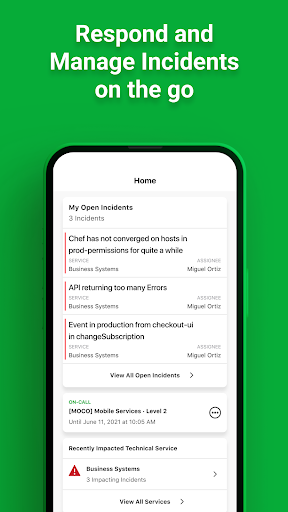
Easily access and respond to open incidents (acknowledge, resolve, or reassign).
You can also create new incidents directly from the mobile app.
THE INCIDENT DETAILS YOU NEED
View incident details, grouped alerts, and resolution timelines at a glance.
MANAGE ON-CALL SCHEDULES
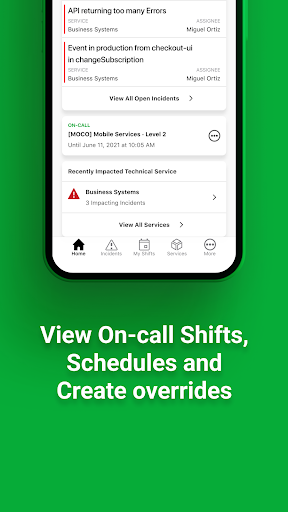
View your on-call shifts and team schedules. Book overrides for yourself or your teammates.
RECRUIT THE RIGHT PEOPLE
View user directory for user on-call schedules and contact information.
Easily loop in responders for additional help with a single tap.
REMEDIATE FROM MOBILE
Execute custom actions (like restarting servers, running diagnostics, etc.) on incidents.
*A PagerDuty user account is required to use this application.
PagerDuty for Android enables the following:
FLEXIBILITY OF NOTIFICATIONS
Receive unlimited push notification alerts and set custom sounds for alerts.
TAKE ACTION FAST
Easily access and respond to open incidents (acknowledge, resolve, or reassign).
You can also create new incidents directly from the mobile app.
THE INCIDENT DETAILS YOU NEED
View incident details, grouped alerts, and resolution timelines at a glance.
MANAGE ON-CALL SCHEDULES
View your on-call shifts and team schedules. Book overrides for yourself or your teammates.
RECRUIT THE RIGHT PEOPLE
View user directory for user on-call schedules and contact information.
Easily loop in responders for additional help with a single tap.
REMEDIATE FROM MOBILE
Execute custom actions (like restarting servers, running diagnostics, etc.) on incidents.
*A PagerDuty user account is required to use this application.
What's New
What's new in version 8.33:
You can now edit incident custom fields on the Mobile app
Send feedback to [email protected]
You can now edit incident custom fields on the Mobile app
Send feedback to [email protected]
App Information
Version Name
4.9
Version Code
95
File Size
9.4 MB
Minimum OS
Android 12+
Target SDK
Android 23
Developer
PagerDuty, Inc.
Contact
Website
Content Rating
Everyone
Package Name
com.pagerduty.androidPermissions Required
This app may request the following permissions:
Recent Reviews

Timothy Lyon (AshTR)
1.0★
Woke up and found out I'd been paged but the alert was cut off by Android's own system notification immediately after, it's like the app is notifying on two different notification channels. Not sure what's going on with this app anymore, used to not have an issue but seems to be having more problems in recent months.

Braden Tibbles
1.0★
Not sure if it is just my org but there are constant issues since moving to PagerDuty. Recently I accepted pages via this android app and nothing occurred on the alerts timeline.. if you click accept / acknowledge and the notification goes away or gets greyed out.. how am I supposed to know it didn't actually acknowledge it. Now I am forced to set up multiple backup alerts.

Thomas Walker
1.0★
Ever since my phone updated to Android 16, PagerDuty has become convinced that my device is rooted (it is not and has never been) and automatically closes itself, making it impossible to use. Edit: PagerDuty claims that my phone is "rooted" because their "Security Provider" thinks that having busybox installed equals "root". Strangely my employer's MDM and Google's own safety checks disagree. Guess which of these two applications I will be uninstalling?

Steven Kiehl
4.0★
I don't see PagerDuty in the list of apps that I can configure for "Do Not Disturb", so it's unclear whether I'll get alerted after hours when my DnD is automatically turned on.

M C
1.0★
Hate this app gives too much info that is not relavent and too little for me to actually do the job I have been paged to do.. Furthermore the web site specifically regarding the scheduling is clumsy... I would not recommend and if I could give it negative stars I would...

Jakob
3.0★
My biggest issue with the app is that it's actually comical how bad the UX is. I want to change my rules for notifications to custom from the presets. 1. completely impossible to find this. In my settings? No. In my profile? No. Even though I have actually managed to do it, I would never be able to replicate 2. When I'm done changing the notifications, what should I do? Certainly not save as that is not an option. Cancel or go back I guess then? 3. Were my rules saved? No idea, I can't show it
Ad slot: In-Content