
Parallel Space Lite-Dual App
com.parallel.space.lite
by LBE Tech
Screenshots



Ad slot: Top Leaderboard
About this app
Introducing Parallel Space Lite, the lightweight version of LBE Tech's signature app. With the Lite edition, manage two accounts seamlessly across a variety of social and gaming apps, eliminating the hassle of constant account switching!
Product Highlights
☆ Powered by the unique MultiDroid technology, it stands as the pioneering application virtualization engine on the Android platform
Features
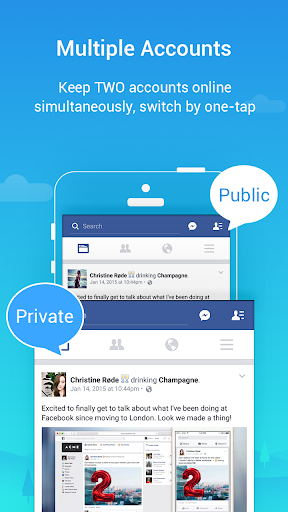
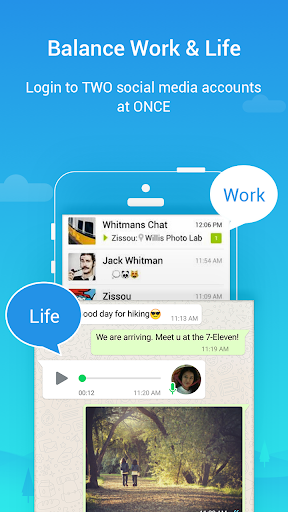
► Run Two Accounts Simultaneously on One Device
• Keep business and private accounts separate
• Enhance gaming and social experiences with dual accounts
• Receive messages from two accounts simultaneously
► Security Lock
• Set a password lock to secure your data and maintain your privacy
Notes:
• Limitation: Due to policy or technical limitations, some apps are not supported in Parallel Space Lite, such as apps that declare the REQUIRE_SECURE_ENV flag.
• Permissions: Parallel Space Lite may request your permission to use necessary information from the apps you add, ensuring the cloned apps function seamlessly. This may include accessing and processing location data if required by the cloned app for normal usage, even when Parallel Space Lite is running in the background.
• Consumptions: While Parallel Space Lite itself is lightweight, the apps running within it may consume memory, battery, and data. Check “Settings” in Parallel Space Lite for more details.
• Notifications: To receive notifications from cloned apps, especially social networking apps, add Parallel Space Lite to the whitelist in third-party boost apps.
• Conflict: Some social networking apps may not allow running two accounts with the same mobile number. In such cases, use a different mobile number for your second account in the cloned app and ensure it's active for receiving verification messages.
Copyright Notice:
• This app includes software developed by the microG Project.
Copyright © 2017 microG Team
Licensed under the Apache License, Version 2.0.
• Link to the Apache License 2.0: http://www.apache.org/licenses/LICENSE-2.0
Product Highlights
☆ Powered by the unique MultiDroid technology, it stands as the pioneering application virtualization engine on the Android platform
Features
► Run Two Accounts Simultaneously on One Device
• Keep business and private accounts separate
• Enhance gaming and social experiences with dual accounts
• Receive messages from two accounts simultaneously
► Security Lock
• Set a password lock to secure your data and maintain your privacy
Notes:
• Limitation: Due to policy or technical limitations, some apps are not supported in Parallel Space Lite, such as apps that declare the REQUIRE_SECURE_ENV flag.
• Permissions: Parallel Space Lite may request your permission to use necessary information from the apps you add, ensuring the cloned apps function seamlessly. This may include accessing and processing location data if required by the cloned app for normal usage, even when Parallel Space Lite is running in the background.
• Consumptions: While Parallel Space Lite itself is lightweight, the apps running within it may consume memory, battery, and data. Check “Settings” in Parallel Space Lite for more details.
• Notifications: To receive notifications from cloned apps, especially social networking apps, add Parallel Space Lite to the whitelist in third-party boost apps.
• Conflict: Some social networking apps may not allow running two accounts with the same mobile number. In such cases, use a different mobile number for your second account in the cloned app and ensure it's active for receiving verification messages.
Copyright Notice:
• This app includes software developed by the microG Project.
Copyright © 2017 microG Team
Licensed under the Apache License, Version 2.0.
• Link to the Apache License 2.0: http://www.apache.org/licenses/LICENSE-2.0
What's New
What's New:
1. Fixed known bugs and improved app stability.
2. Discontinued support for app cloning for apps that declare the REQUIRE_SECURE_ENV flag.
1. Fixed known bugs and improved app stability.
2. Discontinued support for app cloning for apps that declare the REQUIRE_SECURE_ENV flag.
App Information
Version Name
4.0.9463
Version Code
10902
File Size
34.4 MB
Minimum OS
Android 7.0+
Target SDK
Android 33
Developer
LBE Tech
Contact
Website
Content Rating
Everyone
Package Name
com.parallel.space.litePermissions Required
This app may request the following permissions:
Recent Reviews

A Google user
2.0★
I have been using Parallel Space for a long tme now and haven't had any issues. Works smoothly and I was able tu use my accounts easily without having to sign out on just one app. However recently it started to bug out so I tried uninstalling and reinstalled. No change, so I got this lite version. It would allow sign in but after a couple of minutes it would freeze and say it's not responding so it closes. I don't know what's wrong and this is the 3rd time I had to reinstall the app.

Hosea
2.0★
I really want to use this app, but it keeps crashing frequently, which makes it frustrating to use. The crashes happen when I open the app to enter another app in it, I have tried restarting my device and reinstalling the app, but the problem remains. Please fix these stability issues so the app can work smoothly. Thanks!"

Guxtone M
1.0★
my WhatsApp crashed with unread texts,I'm very disappointed...kindly assist.
Connie Emerson
1.0★
I updated this app and now it doesn't even load. What gives? Each new update makes the app worse instead of better.

L Vining
5.0★
I love all of the cloning apps that I have used and I've used quite a bunch parallel space light is probably the easiest and most convenient one to use the ads that it has built into it are not that bad I have a scale of 1 to 10 I give it a 9 and a half just for the fact is there are some ads on it but they're not that big of a deal parallel space light does everything I needed to do

Melissa
1.0★
I normally don't write reviews, but this app is so disappointing that it made me write this, if i am on this app for a good half an hour (lets say), 29 minutes would be in trying to open the app you chose to clone, i have updated the app, tried un-installing and re-installing it but nothing works, takes every ounce of patience you possess trying to get this app to work properly and you get constant pop ups saying that the app has stopped working.
Ad slot: In-Content