

Kidgy - GPS Tracker
com.parental.control.kidgy
by Kidgy
Screenshots


Ad slot: Top Leaderboard
About this app
Kidgy - GPS Tracker
Monitor kid's location. Functions for parental control, live phone geolocation
Kidgy is a parental control app that allows you to monitor the location of your сhildren. Our app shows you precise geolocation data using cutting-edge GPS technology. Easy to use: just install Kidgy on your сhild’s device
Our app covers the needs of MOST PARENTS. Install "Kidgy: Find my child GPS location" app and start tracking with GPS Phone Tracker now!
Location tracker works both on Android and iOS. Parental control App can link Android device and will provide you with the tools to track and monitor kids device.
Kidgy app cannot be installed on the phone without your child’s knowledge, the use is available only with the explicit consent of the child. Personal data is stored in strict accordance with legislation and GDPR policies.
As one of the most reliable parental control apps, Kidgy has the following features:
📗 GPS Phone Tracker and Geo-Fencing
Track your child’s location on the map and the history of movements for the day.
Set the virtual fences (safety zones like home, school, park, hospital) on your device and get informed when your Kid enters or leaves them.
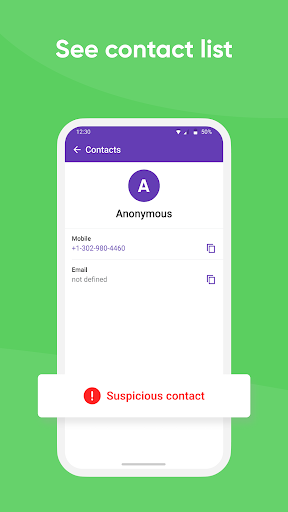
📗 View contacts
Kidgy tracking app provides you with the contacts, names, numbers on your kid’s phone.
📗 View Apps Installed on the phone
Parental control app helps you know the sort of apps on your kid’s device. You get access to all apps installed on their phones. Games not suiting their age? Dating websites for kids below 13? Knowing this you can have a conversation with your kids.
📗 Set daily tasks for your kids remotely
Say your kid has to clean the room when he's back from school? Kidgy is not only a parental control app and phone locator (phone tracker). With Kidgy you can now set up a list of tasks for your kid and get their progress status in real time.
📗 Panic Button
Adding an alarm button to your child’s phone provides them with the option to contact you in emergencies in one touch. In panic mode, app will show the current GPS position and real-time location trace until you disable panic mode.
How does our app work?
1. Install our phone locator from Google Play (or install from other App's Store on kid's device).
2. Set up Parent profile
3. Install our phone locator on kid's phone. Please note that access to geo location and contacts requires kid's consent in order to avoid the disclosure of personal privacy.
4. Set up Child profile
3. Get updates to your Kidgy app on your phone
App asks for the following permissions:
– access to the camera – to scan QR code to simplify setup process;
– access to contacts - on kid's device, please allow access with kid's consent only;
Having technical difficulties? You can always contact us via email [email protected]
Privacy Policy: https://kidgy.com/privacy
Terms of use: https://kidgy.com/terms
Monitor kid's location. Functions for parental control, live phone geolocation
Kidgy is a parental control app that allows you to monitor the location of your сhildren. Our app shows you precise geolocation data using cutting-edge GPS technology. Easy to use: just install Kidgy on your сhild’s device
Our app covers the needs of MOST PARENTS. Install "Kidgy: Find my child GPS location" app and start tracking with GPS Phone Tracker now!
Location tracker works both on Android and iOS. Parental control App can link Android device and will provide you with the tools to track and monitor kids device.
Kidgy app cannot be installed on the phone without your child’s knowledge, the use is available only with the explicit consent of the child. Personal data is stored in strict accordance with legislation and GDPR policies.
As one of the most reliable parental control apps, Kidgy has the following features:
📗 GPS Phone Tracker and Geo-Fencing
Track your child’s location on the map and the history of movements for the day.
Set the virtual fences (safety zones like home, school, park, hospital) on your device and get informed when your Kid enters or leaves them.
📗 View contacts
Kidgy tracking app provides you with the contacts, names, numbers on your kid’s phone.
📗 View Apps Installed on the phone
Parental control app helps you know the sort of apps on your kid’s device. You get access to all apps installed on their phones. Games not suiting their age? Dating websites for kids below 13? Knowing this you can have a conversation with your kids.
📗 Set daily tasks for your kids remotely
Say your kid has to clean the room when he's back from school? Kidgy is not only a parental control app and phone locator (phone tracker). With Kidgy you can now set up a list of tasks for your kid and get their progress status in real time.
📗 Panic Button
Adding an alarm button to your child’s phone provides them with the option to contact you in emergencies in one touch. In panic mode, app will show the current GPS position and real-time location trace until you disable panic mode.
How does our app work?
1. Install our phone locator from Google Play (or install from other App's Store on kid's device).
2. Set up Parent profile
3. Install our phone locator on kid's phone. Please note that access to geo location and contacts requires kid's consent in order to avoid the disclosure of personal privacy.
4. Set up Child profile
3. Get updates to your Kidgy app on your phone
App asks for the following permissions:
– access to the camera – to scan QR code to simplify setup process;
– access to contacts - on kid's device, please allow access with kid's consent only;
Having technical difficulties? You can always contact us via email [email protected]
Privacy Policy: https://kidgy.com/privacy
Terms of use: https://kidgy.com/terms
App Information
Version Name
1.1.6
Version Code
2023070419
File Size
17.7 MB
Minimum OS
Android 8.0+
Target SDK
Android 33
Developer
Kidgy
Contact
Website
Content Rating
Everyone
Package Name
com.parental.control.kidgyPermissions Required
This app may request the following permissions:
Recent Reviews

kryke09
1.0★
This app sucks. It doesn't tell you where your kids are unless they hit the panic button. I even set up zones. They don't work. I'm glad I cancelled before the free trial ends.

Albert Benaglio
1.0★
cannot access site I paid for

Steve Malone
1.0★
I accidentally ordered this app. They will not refund my $ Started requesting my refund as soon as I realized this app was accidentally purchased.

Norma Lamica
2.0★
No control over location. Can be turned off too easily

Alfered Glass
1.0★
Pathetic app doesn't even let you try it without giving credit card info.

Anna Christiansen
3.0★
I downloaded this app. And I think it will be good. My only question is how does the panic button work? I tried it out to see if it would work but I didn't get a notification or anything on my phone. .. did I do something wrong?
Ad slot: In-Content