

Remote for Philips TV
com.phil.tv.view
by AppAgency Labs
Screenshots



Ad slot: Top Leaderboard
About this app
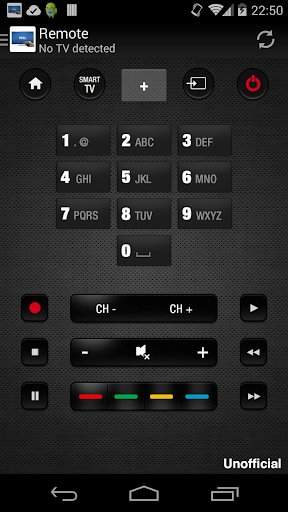
"Remote for Philips TV" is a virtual remote control that allows you to connect your TV from your smartphone . The application is completely free and can replace your standard remote control of your TV .
To use the remote control, you must have your mobile / tablet is on the same wifi network as your TV . Detection of your TV will automatically and according to the model of your TV, you have to accept the message that appears on your TV. As the application runs on your home network, it is not necessary to be near to the TV .
In addition to a careful representation of the remote control , you can use all the functionality of the remote real easily.
Here is the list of features :
- Increase / decrease the volume
- Changing Channels
- Use the navigation pad
- Use the media player functions
- Smart TV function , info , guide, return
- And more ...
"Remote for Philips TV" works with the free Smart TV 2k11 ( xxPFL5xx6 to xxPFL9xx6 ) model.
DISCLAIMER
This app is neither an official Philips product, nor are we affiliated with the Philips company.
To use the remote control, you must have your mobile / tablet is on the same wifi network as your TV . Detection of your TV will automatically and according to the model of your TV, you have to accept the message that appears on your TV. As the application runs on your home network, it is not necessary to be near to the TV .
In addition to a careful representation of the remote control , you can use all the functionality of the remote real easily.
Here is the list of features :
- Increase / decrease the volume
- Changing Channels
- Use the navigation pad
- Use the media player functions
- Smart TV function , info , guide, return
- And more ...
"Remote for Philips TV" works with the free Smart TV 2k11 ( xxPFL5xx6 to xxPFL9xx6 ) model.
DISCLAIMER
This app is neither an official Philips product, nor are we affiliated with the Philips company.
What's New
Updated SDKs for security, performance and stability improvements.
App Information
Version Name
5.0.0
Version Code
500
File Size
9.5 MB
Min SDK
Android 19+
Target SDK
Android 33
Developer
AppAgency Labs
Contact
Website
Content Rating
Everyone
Package Name
com.phil.tv.viewPermissions Required
This app may request the following permissions:
Recent Reviews

Vendel Vandál (biowiet)
1.0★
It was working perfectly until the last update [06/06/2021] but now it doesn't connect automatically on startup even if I manually set the IP. Every time I open the app even if it was already open just been in the background for 5 seconds, I have to manually search and select the TV to make it work, regardless the correct IP is set manually. It's ruined the app totally.

A Google user
1.0★
These televisions are trash. Always having connection problems, the app won't detect the TV, and customer service was trash. I've never experienced such terrible tech support. She offered absolutely no help, not even one attempt at troubleshooting, not one procedure, and basically said that without the remote, I'm stuck, since there's no way to switch from letters to numbers to input the wifi password, and the password unfortunately must contain numbers, otherwise I would have changed it.
A Google user
1.0★
My TV wasn't detected on the WiFi network shared by my phone and my TV automatically, so I had to enter my IP address manually. But that wasn't a problem, and the app popped right up and across the top of the graphic (of the remote) was the msg: [TV]Phil TV detected However, any button pressed on the remote returned the same error msg: Your TV was not detected. Your smart TV and your tablet/phone must be connected to the same WiFi network. 1 word description: FAIL
A Google user
1.0★
Absolutely useless. I checked my TVs wifi IP address and its connected as is my phone. The app won't find it on the network. So I manually type in the Tv IP. The TV name populates in the top of the app. But when I use any key on said app I get the same prompt that the phone and TV need to be on the same network. So how pray tell does this app know what to call my TV after I've connected it but it somehow still isnt on the same network??? Garbage app to just give you adds. Keep searching.
A Google user
3.0★
would have been really good except for too much ads... if it's just ads at the bottom, it would be tolerable... but full screen ads after every 2 or 3 clicks? That's really annoying - especially the ads that come with audio. Functionally, it's good, except it can't find the tv at times. No tv guide button, too. And, did I say full screen ads after every 2 or 3 button clicks?
A Google user
1.0★
App wouldn't connect to my Philips smart TV no matter how many times I tried. reset the TV, reconnected to wifi multiple times and even put in the ip and it just says I have to be on the same network as my phone for my TV and I've reconnected my phone as well to the 1 wifi we have. not worth the trouble even installing.
Ad slot: In-Content