

Contacts
com.phone.contact.call.phonecontact
by Zed UK
Screenshots


Ad slot: Top Leaderboard
About this app
Upgrade Your Calling Experience with Samsung's Phone Dialer & Contacts! 📲
Transform your phone experience with Samsung’s official Phone Dialer & Contacts app. Embrace speed, style, and simplicity in managing your contacts and making calls.
Effortless Contact & Call Management:
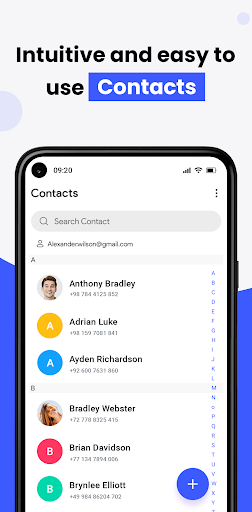
All-in-one contact tool: View, edit, call, and save contacts effortlessly within your dialer.
Smart suggestions: Keep your contacts list clean and updated.
Seamless connection: Connect and communicate with your phone contacts instantly.
Merge & clean: Remove duplicate contacts and keep your call log tidy.
Backup & sync: Protect your contacts with secure sync through your phone and Google account.
Easy transfer: Import/export contacts across devices with ease.
Caller ID & Spam Protection:
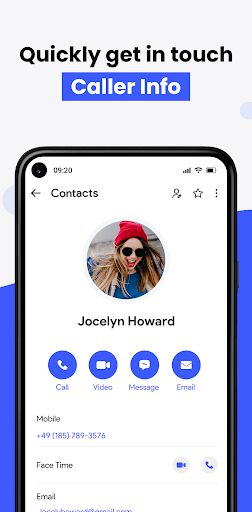
Identify incoming calls, block spam numbers, and protect your phone privacy—online or offline.
Call History & Favorite Contacts:
Speed dial: Tap once to call your top contacts.
Smart log: Access recent calls instantly, grouped and labeled.
Home screen widgets: Add contacts or a direct dialer to your main screen.
Next-Level T9 Dialer Experience:
Search contacts fast using our intuitive T9 dialer.
Group calls and organize them by recency.
Supports multiple languages and smooth dialer navigation.
Modern, Customizable Design:
Clean interface focused on calls and contacts.
Personalize your dialer with vibrant themes.
Dual SIM support lets you manage two lines from one phone.
Key Features:
Smart Phone Dialer Manager: Create groups, delete duplicates, recover lost contacts.
Get Connect Call Screen: Customize the phone dialer look with iOS-inspired design.
Easy One-Handed Dialer: Access calls and contacts quickly with a modern theme engine.
Join the Revolution in Contact & Call Management:
Samsung's Phone Dialer & Contacts app isn’t just a tool—it's your ultimate mobile calling companion. Start managing your calls, contacts, and dialer with elegance and power. Download now and take full control of your phone!
Transform your phone experience with Samsung’s official Phone Dialer & Contacts app. Embrace speed, style, and simplicity in managing your contacts and making calls.
Effortless Contact & Call Management:
All-in-one contact tool: View, edit, call, and save contacts effortlessly within your dialer.
Smart suggestions: Keep your contacts list clean and updated.
Seamless connection: Connect and communicate with your phone contacts instantly.
Merge & clean: Remove duplicate contacts and keep your call log tidy.
Backup & sync: Protect your contacts with secure sync through your phone and Google account.
Easy transfer: Import/export contacts across devices with ease.
Caller ID & Spam Protection:
Identify incoming calls, block spam numbers, and protect your phone privacy—online or offline.
Call History & Favorite Contacts:
Speed dial: Tap once to call your top contacts.
Smart log: Access recent calls instantly, grouped and labeled.
Home screen widgets: Add contacts or a direct dialer to your main screen.
Next-Level T9 Dialer Experience:
Search contacts fast using our intuitive T9 dialer.
Group calls and organize them by recency.
Supports multiple languages and smooth dialer navigation.
Modern, Customizable Design:
Clean interface focused on calls and contacts.
Personalize your dialer with vibrant themes.
Dual SIM support lets you manage two lines from one phone.
Key Features:
Smart Phone Dialer Manager: Create groups, delete duplicates, recover lost contacts.
Get Connect Call Screen: Customize the phone dialer look with iOS-inspired design.
Easy One-Handed Dialer: Access calls and contacts quickly with a modern theme engine.
Join the Revolution in Contact & Call Management:
Samsung's Phone Dialer & Contacts app isn’t just a tool—it's your ultimate mobile calling companion. Start managing your calls, contacts, and dialer with elegance and power. Download now and take full control of your phone!
App Information
Version Name
3.3.7.3
Version Code
3373
File Size
16.7 MB
Minimum OS
Android 7.0+
Target SDK
Android 33
Developer
Zed UK
Contact
Website
Content Rating
Everyone
Package Name
com.phone.contact.call.phonecontactPermissions Required
This app may request the following permissions:
Recent Reviews

Robbie Shand
1.0★
Yes, you have to grant permission for it to use your contacts and call logs, however this makes sense so you can import your current contacts and make calls from the app. What doesn't make sense to me is that it won't work unless you grant permission to send you notifications. Why does it need this?? I deliberately want as few apps as possible buzzing me with notifications but the app locks you out if you choose this. For me that's a deal-breaker.

John Whyno
4.0★
The app is awesome and works good. Easy to use. The problem I have, which has nothing to do with this app. I didn't know that the phone number(SIM) is a like a blow up phone. It's not a valid number. Number pops up as spam or gets blocked. It can't be used as a recovery account back up. I couldn't even add it to my main number for Boost. I also had to purchase WIFI from Xfinity to use outside my house. It's just as it's for backup.

Beverly Patrick
1.0★
Fastest uninstall ever. App overlayed ads over the exit button and when I refused initially to leave a review (after less than a minute trying it out it wants me to leave a review???) It then blocked my exit button again with ads and another review request. I had to hard reset to escape the app without clicking on their ads. NOW I'm leaving a review.

John S
1.0★
Shady developer, initially this was with very few permission and no internet and now silently takes a tone of unnecessary permissions

Charles C. MacDowell
1.0★
Real.... I'm in a bad mood yall. Don't consider this comment 100% right as rain. I just barely started using it. It started on its own I never opened it after downlding from the playstore. It looks completely devoid of features. I mean it says call blocker but I've gotten more stunt calls than ever hackers and scamers its totally been just spam to death. No way to block em at least I can't find it. Yeah... I've gotten madder writing this review so You don't have to respond. -deleted

Holly Cook
3.0★
Does really well on the keeping track of phone history but it could be more user friendly and put together. The screen that pops up after Every Single Call, is very disruptive and doesn't Even show any information.
Ad slot: In-Content