

Cupace - Cut Paste Face Photo
com.picmax.cupace
by Picmax
Screenshots


Ad slot: Top Leaderboard
About this app
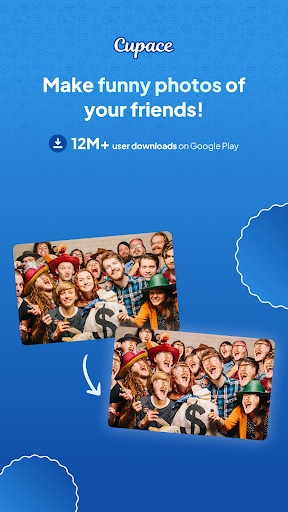
Cupace - a simple photo editor app to cut and paste face in a photo. You can create meme, funny photos and swap faces in a photo by Cut a face or a part of a photos and paste it to another photo. And you can add text and stickers to photos.
Features :
Cut Face
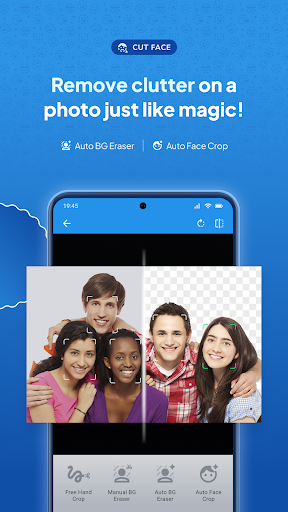
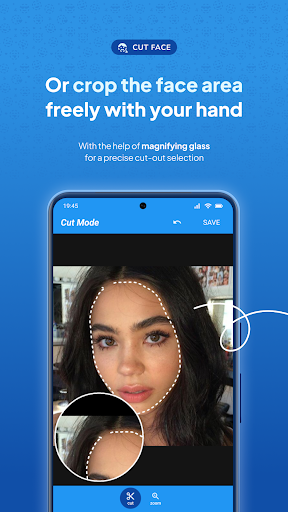
1. Cut mode : Cut a face by drawing a path on a face in a photos with magnifying glass support.
2. Zoom mode : Zoom in the face you want to cut in a photos.
Face Gallery
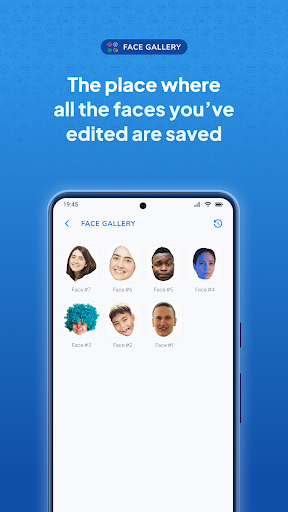
All of the face that you has been cropped will be saved in Face Gallery, and you can re-use it on multiple photos without need to cut it again from its original photo.
Paste Face
1. Faces : All face in the Face Gallery will be shown here. You just need to tap it to paste to the current photos. And you can add same face multiple times in a photo.
2. Photo : you event can add a photo inside a photo.
3. Sticker : There are many sticker / emoji's that you can add to your photo.
4. Text : Add text to your photo.
Finally, you can save your photo and share it to social media like Instagram, Path, Facebook, LINE, Whatsapp, Telegram, SnapChat, WeeChat, BBM, 9gag, etc.
Features :
Cut Face
1. Cut mode : Cut a face by drawing a path on a face in a photos with magnifying glass support.
2. Zoom mode : Zoom in the face you want to cut in a photos.
Face Gallery
All of the face that you has been cropped will be saved in Face Gallery, and you can re-use it on multiple photos without need to cut it again from its original photo.
Paste Face
1. Faces : All face in the Face Gallery will be shown here. You just need to tap it to paste to the current photos. And you can add same face multiple times in a photo.
2. Photo : you event can add a photo inside a photo.
3. Sticker : There are many sticker / emoji's that you can add to your photo.
4. Text : Add text to your photo.
Finally, you can save your photo and share it to social media like Instagram, Path, Facebook, LINE, Whatsapp, Telegram, SnapChat, WeeChat, BBM, 9gag, etc.
What's New
Fixed Bugs :
- Failed to import backup file
- Failed to import backup file
App Information
Version Name
1.5.0
Version Code
150
File Size
22.1 MB
Minimum OS
Android 5.0+
Target SDK
Android 33
Developer
Picmax
Contact
Website
Content Rating
Everyone
Package Name
com.picmax.cupacePermissions Required
This app may request the following permissions:
Recent Reviews

John Koenig
3.0★
Kinda sort works. Face selection is by manually drawing a dotted line around the face to crop it. Takes a steady hand and no editing capability once cropped. Lots of rough edges to the app. Documentation is minimal and what's there is weak. Gives the appearance of a pre-release version 0.8 or so. Ads are constant and intrusive. With patience and trial and error you can sort of do what it promises. Not worth the effort to figure out what they could have told you in the first place..

A Google user
3.0★
It's really excellent for swapping faces in photos, honestly the best I've found - BUT, it needs two very important functions added. First, let me zoom in on the photo I'm adding the face to. Seriously - it's impossible to line up a face perfectly right when I can't zoom in and see exactly what I'm dealing with. Second, how is there not an "undo" option? I can stretch the face in any direction, but there's no other option than to just delete it and start over? C'mon. It just needs those 2 things.

Patrick Costello
4.0★
This is a pretty basic cut and paste app but it's effective and easy to use. It's a good tool to augment other more complex apps. It can be used to cut/paste anything; not just faces. Minus one star because it doesn't have an erase function. There is no way to fine-tune the pasted layer after it's pasted by erasing parts that interfere with the background. You have to get your cut right without seeing the background. I get the ads for a free app but they're loud! I'd pay but there's no paid app.
A Google user
2.0★
Not very good. The cutting part is okay, except that you can't erase, only undo. When pasting onto a new photo, there's no editing features at all, so you can't adjust brightness, contrast, color, etc. So there's no way to make the cut face blend better if the skin color isn't exactly the same.

Seaka
4.0★
Easy way to crop photos, not just faces either. Allows you to add in pictures as well as what you cropped. Not a lot of editing options and you have to play around with the settings/features to figure them out, but otherwise a decent, if basic, app. There are ads that pop up when saving, but so far they have been short.

Scotty Bryczek
5.0★
I just finished my first cut and paste photo. I love it. Exactly what I was looking for. I spent about 3 hours researching apps. In the end they were all pay apps. Simple cut and paste app was all I needed. So far so good. You can save all ur pics. Share them and even save cuts to use on other pics. And it's free. The adds aren't bad maybe 15 secs. So far I'm happy. Thanks to the developers for a simple but useful app. 5 stars all the way
Ad slot: In-Content