

Polnav mobile Navigation
com.polstargps.polnav.mobile
by POLSTAR Technologies Inc.
Screenshots



Ad slot: Top Leaderboard
About this app
Polnav mobile Navigation, The New GPS Navigation App, Download it NOW!
Complete Navigation Functions.
More premium functions are available by in-app purchase. Get the Text-to-Speech Guidance (TTS), Speed Camera, Junction View, and Advanced mode by In-App Purchase.
Overview
◎ Built-in accurate real voice guidance.
◎ Ultra-fast navigation engine offers efficient rerouting rapidly.
◎ Intuitive user interface. Easy to get started!
◎ High-performance graphics engine drags the map quickly and operates smoothly.
◎ Unique Keyword Fuzzy Search allows you to search for your destination easily.
◎ Extra functions: Overlapped Road and Viaduct Indication.
Features
◎ Accurate Guidance. Never miss your turn again.
- Accurate voice guidance reminds you of the distance to the next turn and provides the turn-by-turn voice instructions.
- The simple and neat display lets you catch the instructions at one glance.
•Destination Information - It displays the remaining time, remaining distance, and arrival time to your destination.
•Next Turn Information - It displays the direction symbol and road name of your next turn in advance.
•Serial Turn Symbol - It displays the direction symbol of the serial turn in advance.
•Highway Information.
•Lane Marking - It allows you to get in the appropriate lane by displaying the arrows indicating the correct lane before the upcoming maneuver.
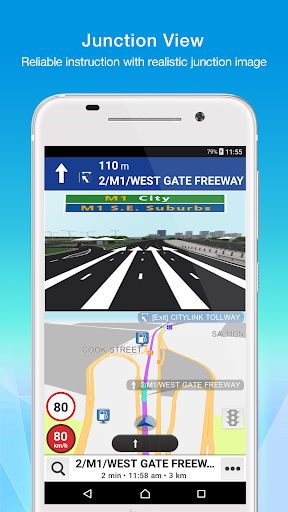
•Junction View (In-App Purchase) - It assists you to drive in the correct lane by displaying the real view of the intersection in a pop-up image automatically while you are moving toward the highway exits and intersections.
- Text-to-Speech (TTS) Guidance (In-App Purchase) - It speaks out the road names, interchanges, highway names and provides the turn-by-turn voice instructions.
- Overlapped Road and Viaduct Manual Indication - When you are approaching a viaduct, it can be identified that you are on or under the viaduct, though can accurately be switched manually and thus navigating to the correct route.
◎Intelligent Search.
- Keyword Fuzzy Search - Simply enter the partial name of the roads or locations you like, abundant optional points of interest are ready for you to choose from.
◎Rapid Route Computing
- Ultra-fast navigation engine offers efficient rerouting rapidly.
- Route Simulation.
- Turn List - It allows you to check the route planning and the list of every turn symbol and road name in the itinerary.
- Best Fit - It brings you immediately to a driving path full view on the map.
◎Easy to Find Your Destination
- Keyword Search (POI, Road, Address, and Intersection)
- Nearby POI Search
- Recent Search
- Phone Number Search
- GPS Photo Search
- My Favorite Search
- Emergency Services Search
- Coordinates Search
◎Speed Camera/ Limit Alert (In-App Purchase)
- Over Speed Alert
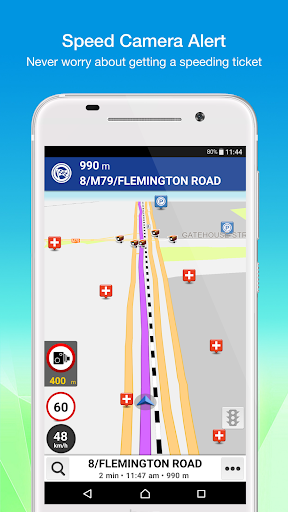
- Speed Camera Alert
◎Navigation Map Update
◎Get the Advanced Navigation Functions by In-App Purchase
- Advanced mode: includes
•Itinerary management and navigation
•Multi-waypoints (up to 20 destinations ) routing
•Route options : Faster/ Shorter (distance)/ Avoid minor road/ Avoid ferry/ Avoid toll road/ Avoid highway…
•Along way POI search
•Quick menu on-demand setting
•Car icon on-demand setting
•Map scheme on-demand setting
•Over Speed Alert
•Easy mode & Advanced mode are manually switchable in the upper right of setting page
...
◎Supports the Android Auto function. (OS 9 or above) Please download a FREE Map by pressing the In-App purchase->Map button in this App on the mobile phone before operating on Android Auto device.
◎Supports Wear OS function. The phone should be OS 9 or above, and the watch is Wear OS 2.0 or above. Please download a FREE Map by pressing the In-App purchase->Map button in this App on the mobile phone before operating on Wear OS device.
(Polstar Technologies Inc. reserves the right to adjust the price at any time.)
Customer Service:[email protected]
Complete Navigation Functions.
More premium functions are available by in-app purchase. Get the Text-to-Speech Guidance (TTS), Speed Camera, Junction View, and Advanced mode by In-App Purchase.
Overview
◎ Built-in accurate real voice guidance.
◎ Ultra-fast navigation engine offers efficient rerouting rapidly.
◎ Intuitive user interface. Easy to get started!
◎ High-performance graphics engine drags the map quickly and operates smoothly.
◎ Unique Keyword Fuzzy Search allows you to search for your destination easily.
◎ Extra functions: Overlapped Road and Viaduct Indication.
Features
◎ Accurate Guidance. Never miss your turn again.
- Accurate voice guidance reminds you of the distance to the next turn and provides the turn-by-turn voice instructions.
- The simple and neat display lets you catch the instructions at one glance.
•Destination Information - It displays the remaining time, remaining distance, and arrival time to your destination.
•Next Turn Information - It displays the direction symbol and road name of your next turn in advance.
•Serial Turn Symbol - It displays the direction symbol of the serial turn in advance.
•Highway Information.
•Lane Marking - It allows you to get in the appropriate lane by displaying the arrows indicating the correct lane before the upcoming maneuver.
•Junction View (In-App Purchase) - It assists you to drive in the correct lane by displaying the real view of the intersection in a pop-up image automatically while you are moving toward the highway exits and intersections.
- Text-to-Speech (TTS) Guidance (In-App Purchase) - It speaks out the road names, interchanges, highway names and provides the turn-by-turn voice instructions.
- Overlapped Road and Viaduct Manual Indication - When you are approaching a viaduct, it can be identified that you are on or under the viaduct, though can accurately be switched manually and thus navigating to the correct route.
◎Intelligent Search.
- Keyword Fuzzy Search - Simply enter the partial name of the roads or locations you like, abundant optional points of interest are ready for you to choose from.
◎Rapid Route Computing
- Ultra-fast navigation engine offers efficient rerouting rapidly.
- Route Simulation.
- Turn List - It allows you to check the route planning and the list of every turn symbol and road name in the itinerary.
- Best Fit - It brings you immediately to a driving path full view on the map.
◎Easy to Find Your Destination
- Keyword Search (POI, Road, Address, and Intersection)
- Nearby POI Search
- Recent Search
- Phone Number Search
- GPS Photo Search
- My Favorite Search
- Emergency Services Search
- Coordinates Search
◎Speed Camera/ Limit Alert (In-App Purchase)
- Over Speed Alert
- Speed Camera Alert
◎Navigation Map Update
◎Get the Advanced Navigation Functions by In-App Purchase
- Advanced mode: includes
•Itinerary management and navigation
•Multi-waypoints (up to 20 destinations ) routing
•Route options : Faster/ Shorter (distance)/ Avoid minor road/ Avoid ferry/ Avoid toll road/ Avoid highway…
•Along way POI search
•Quick menu on-demand setting
•Car icon on-demand setting
•Map scheme on-demand setting
•Over Speed Alert
•Easy mode & Advanced mode are manually switchable in the upper right of setting page
...
◎Supports the Android Auto function. (OS 9 or above) Please download a FREE Map by pressing the In-App purchase->Map button in this App on the mobile phone before operating on Android Auto device.
◎Supports Wear OS function. The phone should be OS 9 or above, and the watch is Wear OS 2.0 or above. Please download a FREE Map by pressing the In-App purchase->Map button in this App on the mobile phone before operating on Wear OS device.
(Polstar Technologies Inc. reserves the right to adjust the price at any time.)
Customer Service:[email protected]
What's New
1. Optimized the Chinese TTS voice.
2. Fixed bugs and optimized performance.
2. Fixed bugs and optimized performance.
App Information
Version Name
4.1.4
Version Code
428
File Size
184.4 MB
Min SDK
Android 23+
Target SDK
Android 34
Developer
POLSTAR Technologies Inc.
Contact
Website
Content Rating
Everyone
Package Name
com.polstargps.polnav.mobilePermissions Required
This app may request the following permissions:
Recent Reviews

A Google user
5.0★
My humble suggestions: (1). 'Voice Language' could be added with more other languages or even allowing the users to record our own voices to be used for this feature. (2). More routes to the destination could be added rather then 1 fixed route now.

Puncak Nusa
1.0★
Support email add don't exist. Purchased map but account say not valid. Scam company who do this app. Becareful. Do not pay anything. I have never owned an IOS phone in my entire life. My account was disabled and payment was dismissed. Was asked to add account but I am talking about logging in and your app told me account do not exist.
A Google user
1.0★
Not free at all. You can download it, but if you're not in NY or LA, you have to pay for the maps. 20 bucks is way too much. Also, all the options it mentions are pay to use.

Edward Charn
5.0★
I'd like to give thumbs-up rating on the brand-new map improvement from the textures to the user friendly interfaces that was recently be done by August, 2023.
A Google user
1.0★
There's community maps in Indonesia that cover most of Island, when will support it? Just coming soon but never happen. Why your Polnav CE version support Indonesia comuni tu Maps but Android version not? 2014 maps for Jakarta only? It's rubbish. Or any guide to make CE version maps compatible with Android version?
A Google user
1.0★
Indonesia map still in 2018, i think it stop update, very funny, this is navigation app but not focus on map update, wasting my money, im sorry, i uninstalled. Thanks.
Ad slot: In-Content