

Prezi Viewer
com.prezi.android
by Prezi
Screenshots








Ad slot: Top Leaderboard
About this app
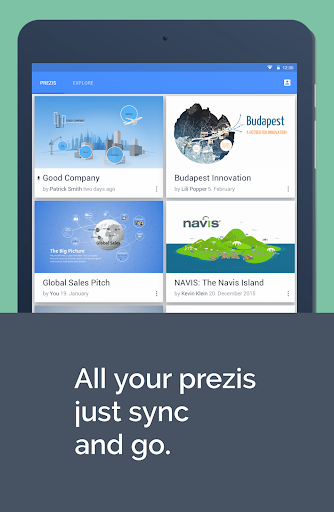
Presentation coming up but no time to practice? Prezi Viewer for Android is a free app that lets you view, practice, and present on the go.
When you’re traveling to a big pitch or meeting, you can use the transit time to run through your presentation on your phone or tablet. Once you arrive, connect via bluetooth to your PC or Mac and present on the big screen.
Let’s say you’re seated next to a killer prospect on the flight home. You can present your saved presentations offline, so you’ll never miss a connection. Prezi Viewer for Android means you’re always ready to deliver.
View, practice, or present, wherever life takes you
* Access and view all your presentations online or offline
* Enjoy the same smooth rendering you get with your computer
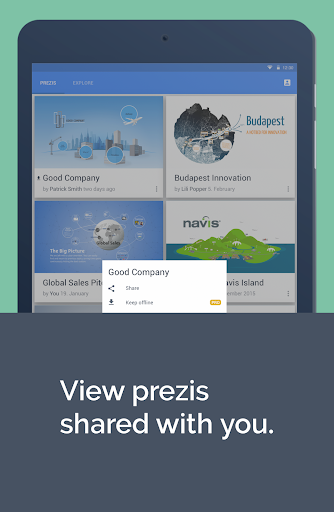
* Share your presentations via a link over email, messaging, or social media
* Leave feedback and comments on collaborative presentations
* Use intuitive touch gestures—pinch to zoom, and drag to pan around your canvas
* Connect your Android device to present on the big screen
Discover how Prezi makes you a better presenter
* Make messages more engaging and persuasive with visual storytelling
* Adapt your presentation on the fly with the flow of conversation
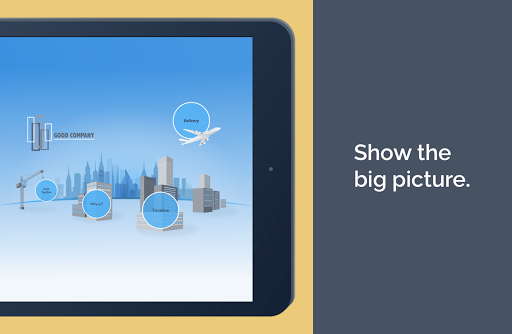
* Zoom in on details and pan to reveal the big picture in context
* Be confident knowing audiences prefer Prezi to slides
Language support for English, Spanish, French, German, Portuguese, Italian, Korean, Japanese, and Hungarian.
When you’re traveling to a big pitch or meeting, you can use the transit time to run through your presentation on your phone or tablet. Once you arrive, connect via bluetooth to your PC or Mac and present on the big screen.
Let’s say you’re seated next to a killer prospect on the flight home. You can present your saved presentations offline, so you’ll never miss a connection. Prezi Viewer for Android means you’re always ready to deliver.
View, practice, or present, wherever life takes you
* Access and view all your presentations online or offline
* Enjoy the same smooth rendering you get with your computer
* Share your presentations via a link over email, messaging, or social media
* Leave feedback and comments on collaborative presentations
* Use intuitive touch gestures—pinch to zoom, and drag to pan around your canvas
* Connect your Android device to present on the big screen
Discover how Prezi makes you a better presenter
* Make messages more engaging and persuasive with visual storytelling
* Adapt your presentation on the fly with the flow of conversation
* Zoom in on details and pan to reveal the big picture in context
* Be confident knowing audiences prefer Prezi to slides
Language support for English, Spanish, French, German, Portuguese, Italian, Korean, Japanese, and Hungarian.
What's New
Improved: We upgraded our engine and did some fine tuning to make sure the app keeps running smoothly and efficiently
App Information
Version Name
2.29.0-13775
Version Code
13775
File Size
28.5 MB
Minimum OS
Android 5.0+
Target SDK
Android 33
Developer
Prezi
Contact
Website
Content Rating
Everyone
Package Name
com.prezi.androidPermissions Required
This app may request the following permissions:
Recent Reviews

Mel Meller
5.0★
The problem is with how they advertise this app. I used to think it's useless, until today, when I figured out it can be used an a Prezi remote. Holy smokes it works well! For that alone it deserves 5 stars.. but you would never know about this functionality because the word Remote is not clearly advertised here.
Phil Lim
4.0★
As an instructor, I find this platform quite useful. It efficiently generates presentation slides, especially if one is familiar with its functionalities. Upgrading seems worthwhile for those who frequently create presentations or wish to update outdated PowerPoint slides from textbooks. The ability to edit each slide on a computer to modify text or images is also beneficial. The only limitation appears to be the inability to edit or create presentations on a mobile device.

Luke Porter
3.0★
The concept is cool. But I'm having real trouble with the Prezi Remote feature. The mobile device connects to the desktop and allows you to click once or twice through a slide or two, then the connectivity seems to drop as its saying "device reconnecting". Doesn't matter how many times I've tried it, how many times I've cycled the bluetooth or power cycled the devices. Same problem every time...

steve act
5.0★
super useful app for teachers makes presentation so appealing and engaging pls make it free for educators

Abdullahi Sidi Aliyu
5.0★
Awesome tool for making presentations.

Thomas Simmons
5.0★
Prezi is user-friendly, and has taken my presentation construction to the next-level!
Ad slot: In-Content