

Video Merge Video Joiner
com.psma.videomerge
by photoshop mobile apps
Screenshots









Ad slot: Top Leaderboard
About this app
Video Merge Video Joiner allows you to easily join videos and merge video's in different styles.
Want to merge or join two videos together?
Merge/Join your favorite videos together into a single video and make it even more appealing.
You don't need to rely on any complex software to merge your videos. Video Merge allows you to merge your videos right from your phone.
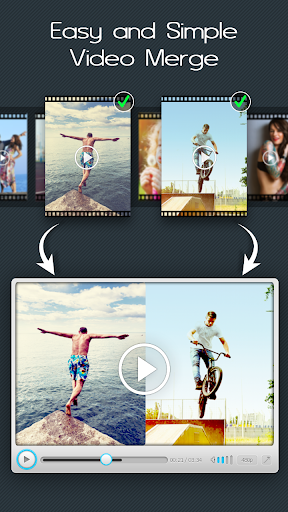
Video Merge is a simple app to merge and join video files into one file. It supports different video formats with different frame rate, same frame size and same audio rate. Video Merge - Side By Side is a unique app which lets you make creative videos. Take two videos and merge them into one video and see them playing side by side.
By using Video Merge you can:
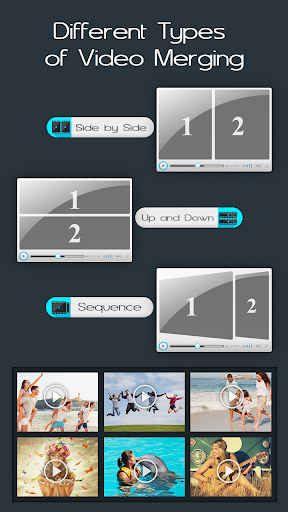
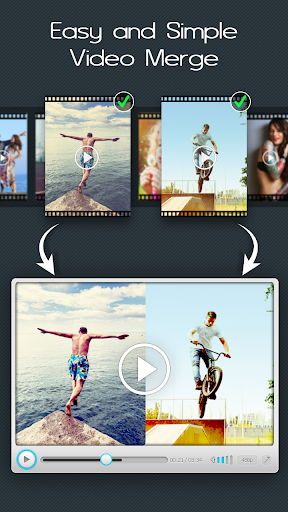
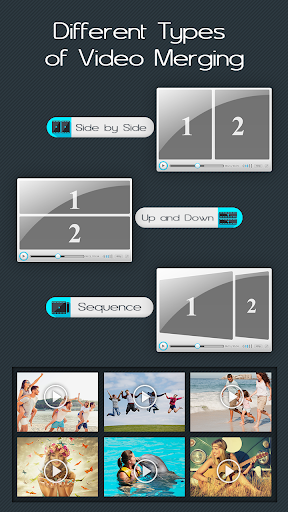
- Video Merge Side by Side: Select two videos and the videos will merge in side by side style.
- Video Merge Up Down: Select two videos and the videos will merge in up down style.
- Video Merge Sequentially: Select two or more videos and the videos will merge one after one style.
Video Merge works in background and let you do other things while your video is processing.
Key features:
✔ Simple, smart and powerful.
✔ Easy to use with user friendly UI.
✔ High Quality video generated(also depends on quality of videos processing).
✔ Supports MP4 and major format in Videos
✔ Merge two videos into one file.
✔ Join videos in one place.
✔ Join different frame rate, same frame size and same audio rate video files.
✔ Easy mode selection i.e. Video Merge Side by Side, Video Merge Up and Down or Video Merge Sequentially.
✔ Runs merging background process feature
✔ Access from notification, when completed it notify you.
✔ Share your Merged Video with your friends or on social media directly from app.
✔ Delete or View Merged Video directly from app.
✔ No Watermark on video.
Video Merge is a very powerful video merging app however very easy to use. Try Now!!
Want to merge or join two videos together?
Merge/Join your favorite videos together into a single video and make it even more appealing.
You don't need to rely on any complex software to merge your videos. Video Merge allows you to merge your videos right from your phone.
Video Merge is a simple app to merge and join video files into one file. It supports different video formats with different frame rate, same frame size and same audio rate. Video Merge - Side By Side is a unique app which lets you make creative videos. Take two videos and merge them into one video and see them playing side by side.
By using Video Merge you can:
- Video Merge Side by Side: Select two videos and the videos will merge in side by side style.
- Video Merge Up Down: Select two videos and the videos will merge in up down style.
- Video Merge Sequentially: Select two or more videos and the videos will merge one after one style.
Video Merge works in background and let you do other things while your video is processing.
Key features:
✔ Simple, smart and powerful.
✔ Easy to use with user friendly UI.
✔ High Quality video generated(also depends on quality of videos processing).
✔ Supports MP4 and major format in Videos
✔ Merge two videos into one file.
✔ Join videos in one place.
✔ Join different frame rate, same frame size and same audio rate video files.
✔ Easy mode selection i.e. Video Merge Side by Side, Video Merge Up and Down or Video Merge Sequentially.
✔ Runs merging background process feature
✔ Access from notification, when completed it notify you.
✔ Share your Merged Video with your friends or on social media directly from app.
✔ Delete or View Merged Video directly from app.
✔ No Watermark on video.
Video Merge is a very powerful video merging app however very easy to use. Try Now!!
What's New
🔧 Boosted app performance and resolved Firebase issues for smoother usage.
App Information
Version Name
2.5
Version Code
17
File Size
182.6 MB
Minimum OS
Android 7.0+
Target SDK
Android 33
Developer
photoshop mobile apps
Contact
Website
Content Rating
Everyone
Package Name
com.psma.videomergePermissions Required
This app may request the following permissions:
Recent Reviews

Jon Whitacre
2.0★
Very easy to join 2 videos Side by Side, and they play very well! And although the app shows the new video is saved, it cannot be found on/in the phone (or computer) using (the latest edition of) Windows 10. And therefore, cannot be downloaded, backed up, or joined to a third video - with the add supported version. Maybe this will work if you buy it; maybe not. I have no idea! Your choice. Take a chance or forget it and move on. It's not the only ship in the sea.

Its Ky'Ahla
5.0★
App is amazing I used the sequence for my intro and my video. It was amazing one thing I do not like is that you can't do 3 videos at once, so I can not connect my outro, so that's one thing, I hope they can update or add, but overall, it's amazing. I love how my video turned out. If you're doing an intro, and video. I recommend using sequence.

A Google user
4.0★
This app does exactly what the title suggests: it merges videos. I would give it 5 stars except that you can't mix audio. So if one video is louder than the other, there's nothing you can do to change it through the app, you have to use another app for that. Then when you merge the two, for some reason Video Merge automatically makes one louder. Ugh. Also you can only merge two videos at a time and you cannot pick a frame or border style to separate the videos.

Benjamin Say
4.0★
This app is useful for doing simple video combinations. I use the "one after the other" feature and it has worked great. Two features I would like to see done, which would take this to 5 stars: 1) Improve speed. Merging two 5 minute videos takes hours. I can play the videos back to back in a capture program and have them merged real time. 2) Be able to merge more than two at a time. You can merge the merged video to another, so not a huge problem. Overall great for what I use it for.

Paul
5.0★
So far so good, I had two little videos that I wanted to link together I opened the app added one added the next It gave me options to have them play one after another or on top of each other or simultaneously it was very cool but I just went with standard one after another and gave me a bunch of aspect ratios If I wanted to change that, I went with a default and everything looked and sounded great. some ads popped up here and there but it didn't make me wait to do something 👍

Jen Lennard
5.0★
This is the best video merger I have found. It saves merged videos in a good quality. I was looking for about App that could split and insert video, then merger the original split video with the inserted video. I guess this is called splicing. That would be a feature that would make this app so much better.
Ad slot: In-Content