
WiFi Analyzer
com.pzolee.wifiinfo
by Zoltán Pallagi
Screenshots






Ad slot: Top Leaderboard
About this app
Transform your device into a professional WiFi network scanner and analyzer. Unlike basic wifi analyzers, our app combines multiple network tools in one powerful solution - perfect for IT professionals, network administrators, and tech-savvy users who need comprehensive WiFi analysis.
Key features
Next-Generation WiFi Support:
- WiFi 6E & 6GHz band analysis - Future-ready technology
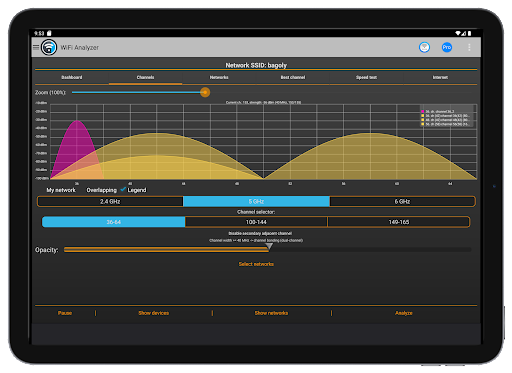
- 2.4GHz, 5GHz, and 6GHz comprehensive scanning
- WiFi 6/WiFi 7 compatibility with 320MHz channel width support
Professional Network Analysis Tools:
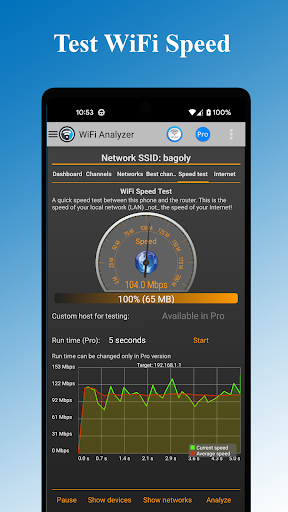
- Real-time throughput meter to your router (unique feature)
- Multi-target ping testing to popular internet addresses
- Latency analysis for gaming and streaming optimization
- DNS verification and network troubleshooting
Network Security & Management:
- Detect unauthorized users on your WiFi network
- Security analysis: WEP, WPA, WPA2, WPA3 support
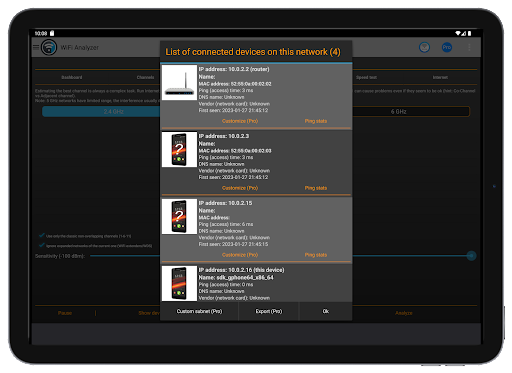
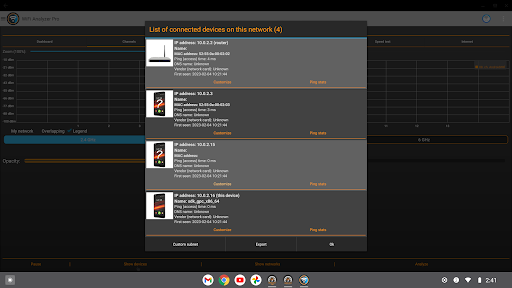
- Connected device scanner with device type detection
- Network vulnerability assessment
Advanced Visualization & Analytics:
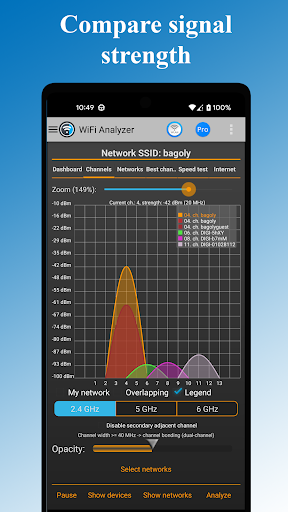
- Signal strength heatmaps and channel congestion charts
- Optimal channel recommendations based on interference analysis
- Historical data tracking and network performance trends
- Export capabilities for professional reporting
Smart Optimization Features
- Automatic router placement suggestions for maximum coverage
- Channel overlap detection and interference mitigation
- WiFi band recommendations (2.4GHz vs 5GHz vs 6GHz)
- Router configuration access for quick settings changes
Perfect For:
Home Users: Optimize your WiFi for streaming, gaming, and remote work
IT Professionals: Comprehensive network analysis and troubleshooting
Network Administrators: Enterprise-level WiFi planning and management
Tech Enthusiasts: Advanced features and detailed network insights
Advanced Capabilities:
- DHCP information analysis and IP configuration details
- Frequency and channel width detection (20/40/80/160/320 MHz)
- Access point discovery with distance estimation
- Raw data access for technical analysis beyond charts
Themes & Customization
- Dark and Light themes for comfortable viewing
- Customizable filters: SSID, WiFi band, signal strength, security type
- Flexible display options: Complete or compact access point view
- Export functionality for data analysis and reporting
Key features
Next-Generation WiFi Support:
- WiFi 6E & 6GHz band analysis - Future-ready technology
- 2.4GHz, 5GHz, and 6GHz comprehensive scanning
- WiFi 6/WiFi 7 compatibility with 320MHz channel width support
Professional Network Analysis Tools:
- Real-time throughput meter to your router (unique feature)
- Multi-target ping testing to popular internet addresses
- Latency analysis for gaming and streaming optimization
- DNS verification and network troubleshooting
Network Security & Management:
- Detect unauthorized users on your WiFi network
- Security analysis: WEP, WPA, WPA2, WPA3 support
- Connected device scanner with device type detection
- Network vulnerability assessment
Advanced Visualization & Analytics:
- Signal strength heatmaps and channel congestion charts
- Optimal channel recommendations based on interference analysis
- Historical data tracking and network performance trends
- Export capabilities for professional reporting
Smart Optimization Features
- Automatic router placement suggestions for maximum coverage
- Channel overlap detection and interference mitigation
- WiFi band recommendations (2.4GHz vs 5GHz vs 6GHz)
- Router configuration access for quick settings changes
Perfect For:
Home Users: Optimize your WiFi for streaming, gaming, and remote work
IT Professionals: Comprehensive network analysis and troubleshooting
Network Administrators: Enterprise-level WiFi planning and management
Tech Enthusiasts: Advanced features and detailed network insights
Advanced Capabilities:
- DHCP information analysis and IP configuration details
- Frequency and channel width detection (20/40/80/160/320 MHz)
- Access point discovery with distance estimation
- Raw data access for technical analysis beyond charts
Themes & Customization
- Dark and Light themes for comfortable viewing
- Customizable filters: SSID, WiFi band, signal strength, security type
- Flexible display options: Complete or compact access point view
- Export functionality for data analysis and reporting
What's New
Removed ads
App Information
Version Name
1.4.5
Version Code
34
File Size
5.1 MB
Minimum OS
Android 9+
Target SDK
Android 11
Developer
Zoltán Pallagi
Contact
Website
Content Rating
Everyone
Package Name
com.pzolee.wifiinfoPermissions Required
This app may request the following permissions:
Recent Reviews

Matt Qualls
5.0★
I love this app. The way it shows which networks are overlapping, what channel they are on, and their signal strength all laid out so plain that a 5 year old could understand it. It should be in your collection of network apps if you are into those. Also noticed there's a speed test you can do between your device and the router. Not sure how it does it, as I'm used to needing to set up an iPerf3 server on my PC/ phone and testing that way.. so I found that to be neat.

Brian Simms
5.0★
This app gives the same functionality as most wifi analyzers, but it adds more. The throughput meter to the router and multiple ping response to popular internet addresses are features you don't see often. There is raw data if you want to look past the charts and graphs. The ads are not intrusive as some have mentioned. It has the features of multiple apps all in one and I'm talking about the free version. Nice work dev team.

Peter MacIver
5.0★
The app does what is sets out to do. BUT........ the Yellow alphanumerics on a Black background makes it very hard to read on a 6" phone screen even inside in a dark area. Not a hope if you're outside. Pity, so only 4 stars overall. 20/12/23. Edit. Thanks for the reply Matey. Changed to "Light" Theme and everything is hunky-dory. Would give it 10 if possible. LOL!

A Google user
5.0★
I'm an IT network specialist - this tool is by far one of the best and most useful wifi tools I've used. Great for troubleshooting and the ability to login directly to the router makes it a must have app for everyone - even inexperienced users will find the interface easy to use and very informative.

Matt Reineman
3.0★
I tested six of the top Wi-Fi analyzers. I'm trying to find the best app to help me determine an optimal channel in the 5 GHz band. This was the second to get uninstalled. The first problem is that the Networks tab cannot be filtered by band, so the 5 GHz networks that I'm interested in get watered down by a couple dozen 2.4 GHz networks. If more than a couple dozen networks are visible, the optional legend on the Networks tab gets truncated, and there's no way to scroll. Since it sorts by channel number (instead of the more logical choice of signal strength), only networks on the lowest numbered channels will have their colors defined in the legend. The list of available networks (under Show Networks) is likewise sorted by channel number, and there is no way to filter by band. I have to scroll through a bunch of 2.4 GHz networks to get to the 5 GHz ones that I'm interested in. The channel numbers in the 5 GHz band are wrong. The developer needs to study how 5 GHz channels are numbered (hint: see "List of WLAN channels" on Wikipedia). The bandwidth actually affects the channel number, despite whatever the access point (AP) advertises. Unlike other apps, this one doesn't even list the bandwidth (e.g. 20, 40, 80, or 160 MHz)! Only the center frequency of the AP's advertised channel number is given. Again, the developer did not account for the actual bandwidth nor the fact that channels consist of frequency ranges, rather than singular frequencies like analog radio.
A Google user
5.0★
This is a pretty good app. However, when connectivity is restored after a signal dropout, “BSSID: not connected” notification still remains. Note: If you want to uncheck the 5 Ghz channels check box, you have to ensure both the My network and the Overlapping check boxes are unchecked first.
Ad slot: In-Content