

RealMax Scientific Calculator
com.realmax.calc
by RealMax LK
Screenshots


Ad slot: Top Leaderboard
About this app
This scientific calculator is a comprehensive tool designed for academic, engineering, and scientific use. Whether you're solving complex equations, plotting graphs, or performing unit conversions, this scientific calculator app offers the accuracy and flexibility required by students, educators, and professionals. With features similar to the fx-991 series, this app meets the demands of advanced calculations in various fields.
Key Features of the Scientific Calculator:
* Perform all basic arithmetic and percentage operations.
* Full support for trigonometric and hyperbolic functions.
* Logarithmic and exponential calculations.
* Complex number support with this scientific calculator.
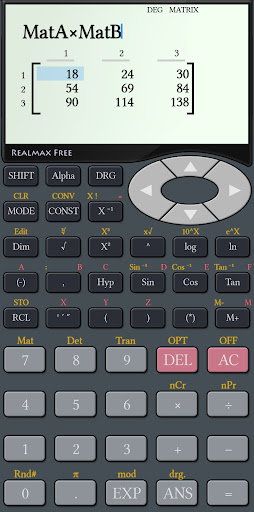
* Matrix operations including addition, multiplication, and inversion.
* Graph plotting – use as a graphing scientific calculator.
* Solve linear and polynomial equations with ease.
* Use as a fraction calculator with intuitive 'ab/c' input.
* Base-n support for HEX, DEC, OCT, BIN number systems.
* Convert between scientific and engineering units.
* Access to predefined scientific constants.
* Degree, Minute, Second (DMS) calculations.
* Choose between Degrees, Radians, and Gradians.
* Review previous results using the calculator history feature.
* Samsung Multi-Window support for multitasking.
* Store and work with up to 10 user-defined variables.
This scientific calculator app is perfect for high school and university students, engineers, scientists, and anyone who needs a reliable and advanced scientific calculator on the go. Whether you're in a classroom, laboratory, or office, this calculator delivers the power and precision required for all your technical tasks.
We are continuously improving the scientific calculator experience based on user feedback. For suggestions or support, please contact us at [email protected].
Key Features of the Scientific Calculator:
* Perform all basic arithmetic and percentage operations.
* Full support for trigonometric and hyperbolic functions.
* Logarithmic and exponential calculations.
* Complex number support with this scientific calculator.
* Matrix operations including addition, multiplication, and inversion.
* Graph plotting – use as a graphing scientific calculator.
* Solve linear and polynomial equations with ease.
* Use as a fraction calculator with intuitive 'ab/c' input.
* Base-n support for HEX, DEC, OCT, BIN number systems.
* Convert between scientific and engineering units.
* Access to predefined scientific constants.
* Degree, Minute, Second (DMS) calculations.
* Choose between Degrees, Radians, and Gradians.
* Review previous results using the calculator history feature.
* Samsung Multi-Window support for multitasking.
* Store and work with up to 10 user-defined variables.
This scientific calculator app is perfect for high school and university students, engineers, scientists, and anyone who needs a reliable and advanced scientific calculator on the go. Whether you're in a classroom, laboratory, or office, this calculator delivers the power and precision required for all your technical tasks.
We are continuously improving the scientific calculator experience based on user feedback. For suggestions or support, please contact us at [email protected].
What's New
Bug Fixes
App Information
Version Name
2.6.2
Version Code
262
File Size
3.3 MB
Minimum OS
Android 5.0+
Target SDK
Android 21
Developer
RealMax LK
Contact
Website
Content Rating
Everyone
Package Name
com.realmax.calcPermissions Required
This app may request the following permissions:
Recent Reviews

Paul Rhodes
5.0★
Very nice to use, and very similar in layout to the Casio Scientific calculators from 1980 to 2010, but with the addition of 5 or 6 extra independent memories, and an undo key! A big improvement on so many of the orher "micky mouse" calculator apps available. Adverts do pop up occasionally after pressing the equals key, but they can be swiftly dismissed by pressing the back key.

A Google user
4.0★
it's a good calculator. I had uninstalled it because of the fullscreen ads in the middle of calculations. I just learned from the developers that these ads are only three times per day and I think I can live with that.. I really like the style (calculation on the top - result at the bottom). I just reinstalled it!
A Google user
5.0★
The best calculator app I have used so far. But in the recent update there's a problem. While pressing and holding the 'DEL' key to delete multiple digits, the settings menu pops up. Settings menu should only appear while pressing SHIFT+ DEL keys. Anyway still 5 stars for this highly functional calculator.

Israel Schechter
1.0★
Practically unusable, because of the ads! We understand that 'free' apps show occasional ads, but not in the middle of the operation. The ads are full screen, and such that you cannot get rid of. You have to wait a minute until you can close them. You forget what you originality wanted to calculate. 'Only 3 per day', but I olny open the app 3 times per day. So every time I have to waste a minute on ads. Doesn't make sense to me.
A Google user
5.0★
Very fast and reliable calculator, touch screen is a big plus. The help menu is a great guide and the conversion features is very helpful. Ads can be annoying but they don't pop up offline. One thing it is missing is a button to find the 'n' th root of a number, other than that it has pretty much everything. Edit: it does have an 'n' th root! I was blind

Keval Parmar (KNP)
4.0★
Best for engineering students. However if you want to improve it then provide facility to make it floating over another app. In addition to calculator function it can be improved by providing another facilities like area, volume, weight calculator. Thank you.
Ad slot: In-Content