

realme Link
com.realme.link
by realme Ltd.
Screenshots


Ad slot: Top Leaderboard
About this app
Manage and communicate to devices:
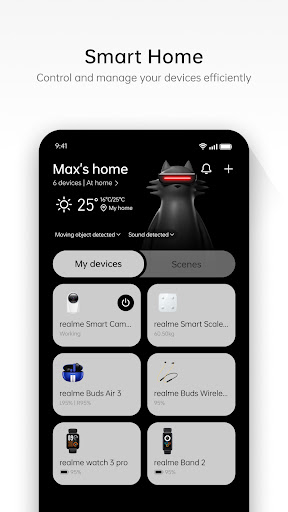
realme Link provides users with device management services for realme Watch and realme Band.
Connect devices to each other:
After binding the watch, realme Link can push call and SMS notification to bind devices, and then know who is calling or the SMS content.
Activity fitness:
After binding the watch, The activity data such as the steps, calories, exercise time etc can be viewed at the realme Link App health page. The users can also initiate exercise such as outdoor running, outdoor riding, indoor running etc, and the exercise data will be displayed on the realme Link.
Sleep management:
Wear the watch to sleep, You can synchronize the time you go to sleep, exit sleep, deep sleep, and light sleep to the realme Link APP to view your sleep details.
realme Link provides users with device management services for realme Watch and realme Band.
Connect devices to each other:
After binding the watch, realme Link can push call and SMS notification to bind devices, and then know who is calling or the SMS content.
Activity fitness:
After binding the watch, The activity data such as the steps, calories, exercise time etc can be viewed at the realme Link App health page. The users can also initiate exercise such as outdoor running, outdoor riding, indoor running etc, and the exercise data will be displayed on the realme Link.
Sleep management:
Wear the watch to sleep, You can synchronize the time you go to sleep, exit sleep, deep sleep, and light sleep to the realme Link APP to view your sleep details.
What's New
1、Support more devices
2、Problem repair and improvement
2、Problem repair and improvement
App Information
Version Name
3.14.219.3605
Version Code
213505
File Size
170.5 MB
Minimum OS
Android 7.0+
Target SDK
Android 33
Developer
realme Ltd.
Contact
Content Rating
Everyone
Package Name
com.realme.linkPermissions Required
This app may request the following permissions:
Recent Reviews

Kevin Bourgault
1.0★
This app is absolutely terrible. I had it working, and several RealMe robot vacuums paired. Then one day they're all gone. I can only get it to log me in using my email and OTP. , and it says logged in, but then if I try to do anything, I'm prompted that it will share my phone number and sent to teh login page again. It has the wrong phone number for me, and I can't figure out how to change it, or how to create a real password login. This is one of the worst app experiences I've ever had.

siri
1.0★
i love the interface of the app, it's so easy to track my workouts but lately I've been facing an issue that doesn't sync data to the application from my watch. I've tried to reset the watch, I've tried uninstalling and reinstalling the application. I've even tried switching my phone off and on. this error with the data sync has made tracking progress very hard as I've lost data on at least fifteen days. i want to know what the issue is and how to resolve it.
Isabella Del Gaiso
1.0★
I've used this app for my smartwatch many times but it won't connect anymore. Despite saying it's connected, the data visible on my smartwatch won't sync on the app. And when i try to sync the data manually, the smartwatch looses connection and i can never reconnect it unless i reset the smartwatch and delete and redownload the app. What's the point of having this app in the first place if i can't connect anything??

Евгений Чучкалов
1.0★
Doesn't work. To pair a device, you need to log in. Doesn't let me sign up, giving an error saying "device environment not secure". Baseus earphones didn't require a login to pair and configure a similar device, so this is just non functional for no reason. Garbage, in other words.

Bernadette Yeo
1.0★
After the latest update the app won't sync my activities and my workouts and gets stuck at "Syncing data ... 100%" and only my sleep data is recorded. I have uninstalled and reinstalled, unpaired and paired, turned off/on my devices countless times but nothing works. Help!

VLADIMIRS KIESNERS
1.0★
worst user experience ever. I have realme gt 7t and realme buds air7 pro. to control buds I was forced to install app, register phone, email, etc. I do not ask for "smart home" app to control buds. I do not need to give my personal data to realme. OnePlus lived without my info, so can you also. I started to regret switching from OnePlus to realme. btw, to show two different links to one working app and for not compatible app on buds connect is top of integration for your brand staff.
Ad slot: In-Content