

My Backup Pro
com.rerware.android.MyBackupPro
by Rerware, LLC
Screenshots







Ad slot: Top Leaderboard
About this app
MyBackup Pro is the easiest, most reliable, and feature packed Android backup solution available.
Supporting the most content, and the most Android devices.
Find out why over 5 million people have chosen MyBackup as their secure source for a Backup Solution.
FEATURES:
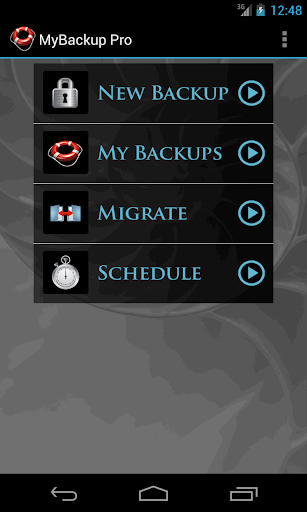
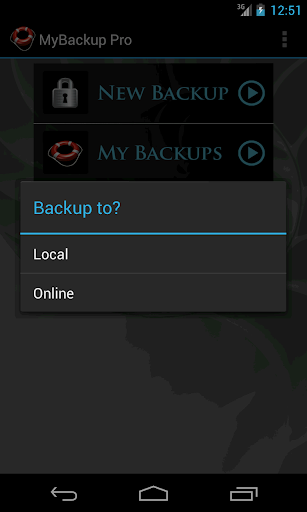
- Backup and Restore using your local device or SD card
* Backup and Restore using an On The Go (OTG) USB card
- Cloud backup to our online secure servers, or use your Dropbox account
- Cloud backup to your personal Google Drive Cloud account
- Migrate information directly between 2 devices
- Backup directly to your computer over the Internet!
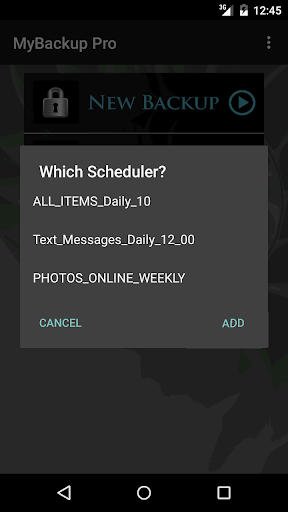
- Schedule multiple different backups to multiple locations
- Restore to an existing or new Android device
- View the backup in detail without having to restore
- All Android 1.6+ devices supported!
- Available in 16 languages
- Super easy backup with advanced features and settings
- BETA: Trigger a backup to begin on your device remotely from our website
SUPPORTED CONTENT:
- Applications (Including Data if Rooted)
- Photos
- Music
- Videos
- Contacts
- Call log
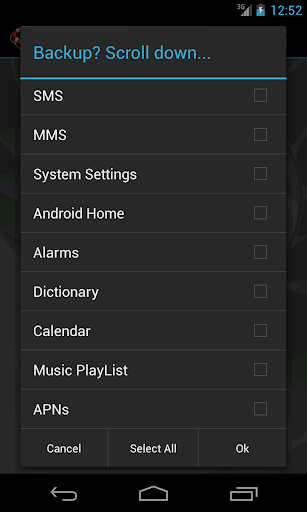
- Text messages (SMS)
- Message attachments (MMS)
- Browser Bookmarks
- Home Screen Shortcuts and Wallpaper (Pre Android 4.4 KitKat)
- System Settings
- Calendar events
- Alarms
- Dictionary
- Music Playlists
- APN settings
- And much more...
NEWS AND REVIEWS:
CNET TV recommends Android users to use MyBackup Pro to backup their personal data.
T-Mobile highlights MyBackup Pro in their quarterly magazine as "an application to have For the Security Minded."
TechHive (PCWorld) gives MyBackup Pro 4.5 stars and recommends Android users to use MyBackup Pro to backup and secure their phones.
HIGHLIGHTS:
Cloud Backup (RerWare Cloud, Dropbox, Google Drive) or local backups to your device/SD card.
Supporting the most content including your Applications, Photos, Music, Videos, Contacts, Call log, Browser Bookmarks, SMS (text messages), MMS (message attachments), Calendar, System Settings, Home Screens (including shortcut positions), Alarms, Dictionary, Music Playlists, APNs, and more...
Restore your backup onto the same or new Android device.
Migrate feature allows you to move any and all supported content directly from one Device to another over WiFi.
View your Data, Apps and Media backups online by logging into the Web Viewer at the RerWare website.
MyBackup Pro will work on all Android mobile devices, regardless if they have root access or not.
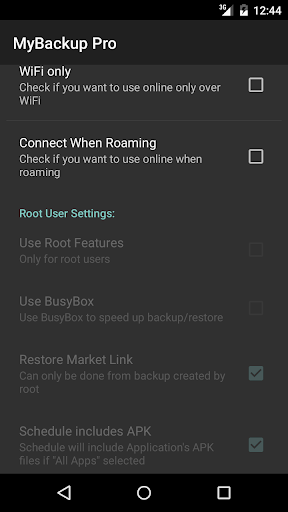
Users who have a rooted phone can backup APK and the Data/Setting of all applications
__ ROOT ONLY PHONE FEATURES BELOW __
MyBackup Pro now comes with all MyToolbox features for Free.
This application will allow Root users to select multiple applications and perform the following functions with batch operations:
- Freeze bloatware and system apps
- Defrost frozen applications
- Wipe Cache of applications
- Wipe Data of applications
- Uninstall applications
- Break the Link to Apps
- Link Apps
- Force Close applications
_______________________________
If you should have any questions or support needs, please do not hesitate to contact us using the support Email provided. We will get back to you as soon as we can.
We appreciate your business.
Supporting the most content, and the most Android devices.
Find out why over 5 million people have chosen MyBackup as their secure source for a Backup Solution.
FEATURES:
- Backup and Restore using your local device or SD card
* Backup and Restore using an On The Go (OTG) USB card
- Cloud backup to our online secure servers, or use your Dropbox account
- Cloud backup to your personal Google Drive Cloud account
- Migrate information directly between 2 devices
- Backup directly to your computer over the Internet!
- Schedule multiple different backups to multiple locations
- Restore to an existing or new Android device
- View the backup in detail without having to restore
- All Android 1.6+ devices supported!
- Available in 16 languages
- Super easy backup with advanced features and settings
- BETA: Trigger a backup to begin on your device remotely from our website
SUPPORTED CONTENT:
- Applications (Including Data if Rooted)
- Photos
- Music
- Videos
- Contacts
- Call log
- Text messages (SMS)
- Message attachments (MMS)
- Browser Bookmarks
- Home Screen Shortcuts and Wallpaper (Pre Android 4.4 KitKat)
- System Settings
- Calendar events
- Alarms
- Dictionary
- Music Playlists
- APN settings
- And much more...
NEWS AND REVIEWS:
CNET TV recommends Android users to use MyBackup Pro to backup their personal data.
T-Mobile highlights MyBackup Pro in their quarterly magazine as "an application to have For the Security Minded."
TechHive (PCWorld) gives MyBackup Pro 4.5 stars and recommends Android users to use MyBackup Pro to backup and secure their phones.
HIGHLIGHTS:
Cloud Backup (RerWare Cloud, Dropbox, Google Drive) or local backups to your device/SD card.
Supporting the most content including your Applications, Photos, Music, Videos, Contacts, Call log, Browser Bookmarks, SMS (text messages), MMS (message attachments), Calendar, System Settings, Home Screens (including shortcut positions), Alarms, Dictionary, Music Playlists, APNs, and more...
Restore your backup onto the same or new Android device.
Migrate feature allows you to move any and all supported content directly from one Device to another over WiFi.
View your Data, Apps and Media backups online by logging into the Web Viewer at the RerWare website.
MyBackup Pro will work on all Android mobile devices, regardless if they have root access or not.
Users who have a rooted phone can backup APK and the Data/Setting of all applications
__ ROOT ONLY PHONE FEATURES BELOW __
MyBackup Pro now comes with all MyToolbox features for Free.
This application will allow Root users to select multiple applications and perform the following functions with batch operations:
- Freeze bloatware and system apps
- Defrost frozen applications
- Wipe Cache of applications
- Wipe Data of applications
- Uninstall applications
- Break the Link to Apps
- Link Apps
- Force Close applications
_______________________________
If you should have any questions or support needs, please do not hesitate to contact us using the support Email provided. We will get back to you as soon as we can.
We appreciate your business.
What's New
v4.8.4
- Fixed Android 12+ issues
v4.8.0
- Fixed apps backup on Android 11+
v4.7.8
- Fixed Android 11+ issues
v4.7.7
- Fixed Dropbox issue
- Fixed Google Drive issue
v4.7.6
- Fixed SMS/MMS restore on Android 10
v4.7.4
- Fixed intent redirection vulnerability
v4.7.3
- Fixed Google Drive issues and Misc fixes.
v4.7.1
- Fixed Google Drive and Dropbox.
v4.7.0
- Misc fixes for Android 10.
v4.6.6
- Fixed device id on some devices.
- Misc fixes.
- Fixed Android 12+ issues
v4.8.0
- Fixed apps backup on Android 11+
v4.7.8
- Fixed Android 11+ issues
v4.7.7
- Fixed Dropbox issue
- Fixed Google Drive issue
v4.7.6
- Fixed SMS/MMS restore on Android 10
v4.7.4
- Fixed intent redirection vulnerability
v4.7.3
- Fixed Google Drive issues and Misc fixes.
v4.7.1
- Fixed Google Drive and Dropbox.
v4.7.0
- Misc fixes for Android 10.
v4.6.6
- Fixed device id on some devices.
- Misc fixes.
App Information
Version Name
4.0.0
Version Code
400
File Size
2.4 MB
Minimum OS
Android 4.1+
Target SDK
Android 17
Developer
Rerware, LLC
Contact
Website
Content Rating
Everyone
Package Name
com.rerware.android.MyBackupProPermissions Required
This app may request the following permissions:
Recent Reviews

A Google user
1.0★
Wish I could somehow retrieve my data *sigh* Once upon a time ... this was a very good app. Too bad it didn't take. Once I purchased the paid version it went downhill from there. I paid to add more space, but couldn't add to existing account & had all sorts of fun determining which account I was using, now can't find any files from either account. Paid 10x+ what is now being charged & no updates in over a year. Can't get the data lost, back again .... expen$ive lesson.
A Google user
5.0★
I've owned Backup Pro since 2015. During those years, I have reliable assistance when it comes time to switch smartphones. Never ONCE have the application given me a problem. It keeps your phone awake the whole time, yet it dims the screen (NICE!) and I can choose backing up onto my clouds, my actual computer via USB, or computer via Wi-Fi. It's so easy to use as well. Pick the things most relevant to you. If time has come to buy a new SD card, or NEW phone. Well, voila you're good to go!
Richard Hartman
5.0★
Exceptional! There are more migration apps now than there used to be, but this was one of the originals, and it still beats most for flexibility and ease of use. Plus, most of the others still don't handle MMS/SMS messages. One minor issue: device-to-device transfer is still not possible. You have to back up to the cloud, or your local computer from one phone, then restore to the new device from that. Still, other apps take a lot of fiddling about, and this one just works.

Tyler Henry
1.0★
Terrible app, you have to pay for cloud storage... after already purchasing the app. The app also offers a little bit of free cloud storage if you leave a good review so I imagine that's where most of these reviews come from. When I tried to backup my info to my SD card it failed for a lot of things, and what it did back up didn't actually go to the SD card, but to local phone storage.

Hello Kitty
5.0★
This is a great product! I wish the schedules could be edited. For clarification, I mean, if I set a time daily, I'd like it to just be calls and sms and weekly, all items. The saved data takes up a lot of space. Otherwise, it's easy and takes 5 mins to set up 1 time. Easy Peasy. And you can open your backups to say, find a specific text/sms and/or restore the backup. Also, I appreciate how it doesn't rewrite already backed up text/sms messages & there is a transfer to a new phone option! ❤

Igor Steel
5.0★
Been using it for years and swear by it. Easy to use, reliable, and does what it's supposed to. It's saved me on more occasions than I can remember and has faithfully stored contacts and other valuable data from phones long dead, data that Google didn't faithfully back up or restore. In comparison to the loss of data, the nearly in significant cost of the Pro version is just that, insignificant
Ad slot: In-Content