

myAir™ by Resmed
com.resmed.myair
by ResMed
Screenshots


Ad slot: Top Leaderboard
About this app
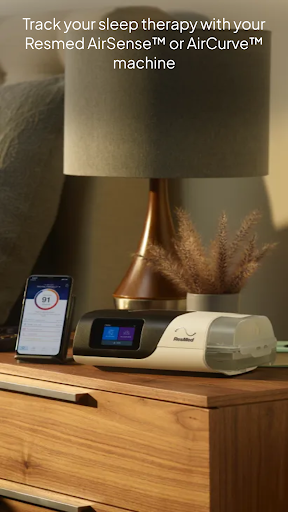
Take charge of your sleep therapy success with myAir™, an exclusive app available to Resmed AirSense™ and AirCurve™ users.
GUIDED SETUP
Whether you set up your equipment at home or in person, myAir helps you get started with confidence and ease. The Personal Therapy Assistant* feature provides interactive voice-guided instructions to help you set up your equipment and fit your mask. myAir's Test Drive* feature helps you get comfortable with therapy using your machine at different levels of air pressure. The app also offers a Library of helpful videos and guides that show you how to set up your specific AirSense or AirCurve machine and Resmed mask, as well as how to get comfortable on therapy.
PERSONALIZED SUPPORT
Getting used to therapy can take a little time, but with the right support you can enjoy a great night's sleep. myAir acts like your personal sleep coach. It guides you through therapy and connects you to the support you need, when you need it.
myAir offers tailored coaching, tips and videos to increase your comfort and success. For example, if you have problems with your mask seal, myAir will provide tips about how to fix it. The app also offers a full Library of helpful videos and guides to answer common questions.
Along the way, you'll get email and push notifications that encourage and support you. With regular check-ins*, myAir proactively prompts you to see how your therapy is going and provides coaching if you have problems. With your prior consent, myAir also shares your therapy insights with your healthcare team* so they can be more connected to your care.
SLEEP THERAPY TRACKING
With myAir, you can easily access your daily sleep therapy data to monitor your therapy progress. Simply log in to see your nightly myAir score, which shows how well you slept on therapy at a glance. Detailed metrics help you track your therapy progress over time. You can also download a therapy summary report to keep for your records or share with your healthcare provider.
INTEGRATED WITH HEALTH APPLICATIONS
myAir integrates with Apple Health and Health Connect to display the health data you track alongside your Resmed therapy data. Within the Trends feature, myAir can read and display the following data types (if you choose to share them): steps, active calories, exercise, weight, sleep, heart rate variability, oxygen saturation, and resting heart rate.
Learn more at Resmed.com/myAir.
myAir Wear OS smartwatch app now available
If you have a myAir account, and a compatible Samsung® Galaxy™ Watch, you can install the myAir smartwatch app to see your myAir data.
*Feature available only with an AirSense 11 machine. Not available with AirSense 10 or AirCurve 10.
Note: myAir is available only for Resmed AirSense and AirCurve machines with built-in wireless connectivity. For the AirMini™ machine, please download the AirMini by Resmed app.
GUIDED SETUP
Whether you set up your equipment at home or in person, myAir helps you get started with confidence and ease. The Personal Therapy Assistant* feature provides interactive voice-guided instructions to help you set up your equipment and fit your mask. myAir's Test Drive* feature helps you get comfortable with therapy using your machine at different levels of air pressure. The app also offers a Library of helpful videos and guides that show you how to set up your specific AirSense or AirCurve machine and Resmed mask, as well as how to get comfortable on therapy.
PERSONALIZED SUPPORT
Getting used to therapy can take a little time, but with the right support you can enjoy a great night's sleep. myAir acts like your personal sleep coach. It guides you through therapy and connects you to the support you need, when you need it.
myAir offers tailored coaching, tips and videos to increase your comfort and success. For example, if you have problems with your mask seal, myAir will provide tips about how to fix it. The app also offers a full Library of helpful videos and guides to answer common questions.
Along the way, you'll get email and push notifications that encourage and support you. With regular check-ins*, myAir proactively prompts you to see how your therapy is going and provides coaching if you have problems. With your prior consent, myAir also shares your therapy insights with your healthcare team* so they can be more connected to your care.
SLEEP THERAPY TRACKING
With myAir, you can easily access your daily sleep therapy data to monitor your therapy progress. Simply log in to see your nightly myAir score, which shows how well you slept on therapy at a glance. Detailed metrics help you track your therapy progress over time. You can also download a therapy summary report to keep for your records or share with your healthcare provider.
INTEGRATED WITH HEALTH APPLICATIONS
myAir integrates with Apple Health and Health Connect to display the health data you track alongside your Resmed therapy data. Within the Trends feature, myAir can read and display the following data types (if you choose to share them): steps, active calories, exercise, weight, sleep, heart rate variability, oxygen saturation, and resting heart rate.
Learn more at Resmed.com/myAir.
myAir Wear OS smartwatch app now available
If you have a myAir account, and a compatible Samsung® Galaxy™ Watch, you can install the myAir smartwatch app to see your myAir data.
*Feature available only with an AirSense 11 machine. Not available with AirSense 10 or AirCurve 10.
Note: myAir is available only for Resmed AirSense and AirCurve machines with built-in wireless connectivity. For the AirMini™ machine, please download the AirMini by Resmed app.
What's New
We’re always trying to improve your experience with myAir™.
You can now view your usage streaks and streak details when you complete goal tracking in myAir.
This release also contains minor bug fixes and performance improvements.
You can now view your usage streaks and streak details when you complete goal tracking in myAir.
This release also contains minor bug fixes and performance improvements.
App Information
Version Name
2.19.0.443.6
Version Code
207
File Size
112.2 MB
Minimum OS
Android 9+
Target SDK
Android 34
Developer
ResMed
Contact
Website
Content Rating
Everyone
Package Name
com.resmed.myairPermissions Required
This app may request the following permissions:
Recent Reviews

James Greer
2.0★
Pretty app, but has issues connecting with Bluetooth... it does eventually, but not immediately (a synch button maybe?). It doesn't want to synch with Samsung health after setup... not sure what value it would add. it would be nice if it could work with that app to tell me when I am having my breathing issues. Not sure why 'Mask off' is tracked, especially as part of a sleep score. 'My Air Score' indicates effective use of the device. 'Mask off' is irrelevant in my opinion.

CJ F
3.0★
Mostly very useful. It doesn't always line up with my sleep quality. Nights with lots of insomnia can still get scores in the high 90s. The inability to screenshot in the app is frustrating. Sometimes I want to share my score, or trend, with my wife and the app doesn't allow it for some inexplicable reason(s). Regardless of the explanation, it lessens the sense of "ownership" of the app and data. Fix those things and we're in the 4 star range.

E P
1.0★
Installed app 01/21/2025. when I finish entering personal data and agreeing to terms of use, the app tells me it has experienced an error and is shutting down. No cache or data clears or reloads make a difference. App isn't smart enough to tell me why it has an error. UPDATE: I found that the app doesn't like my Yahoo email address. Gmail fixed that issue, but now I can't get it to take the serial or model number. I stand by my original review. Not ready for prime time app.

LoLo Hanna
1.0★
It was working fine until the last update. This is the second time that it does not show where I used my machine. I am always 100% compliant, but it didn't register last night's data. I tried clearing cache, uninstalled and re-installed, unplugged and plugged back up. Are the servers down? 3/13/25 3/14/25 - I am still missing a whole day of data. (3/13/25)

Alyssa Teague Allen
1.0★
Only had it about a week, but that's long enough to show how terrible it is. It has only functioned successfully once (i.e. it opened right up & showed my history, let me use the controls for the machine, etc.). Other than that, it always spins & spins, then tells me there's an error so I can't use it or it finally comes up, then tells me it's not connected via Bluetooth even though the machine itself says it is connecyted so I can't use it.

Roddy Howsley
1.0★
One star is too many for the app I installed the app on my android tablet and went through the set up procedure. I entered my personal information as requested, checking the necessary boxes and hit continue. the app did not indicate an error, but neither would it advance to the next page. It returned to the same data page with no explanation. The app would not advance past that page. At that point, I gave up and wrote my review.
Ad slot: In-Content