

Pulsar Music Player
com.rhmsoft.pulsar
by Rhythm Software
Screenshots




Ad slot: Top Leaderboard
About this app
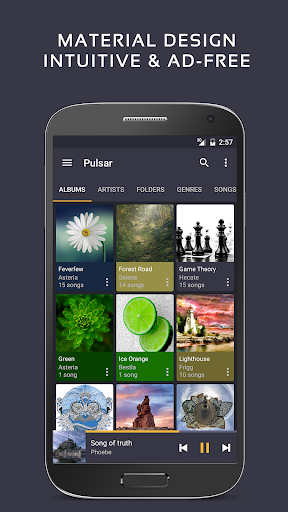
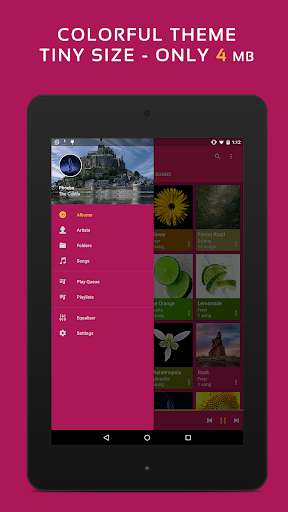
Pulsar Music Player has long been one of the best music players on Android. It is an offline audio player without advertisements. Its gorgeous user interface matches every single detail of the material design guidelines.
Pulsar contains almost every necessary feature to fulfill all of your musical needs including: gapless playback, lyrics display, crossfade, play speed adjustment, tag editing, last.fm scrobbling, Chromecast, voice command, Android Auto, equalizer, music visualizer, audio balance, ReplayGain, sleep timer, etc.
Pulsar is the ultimate audio player on Android, with millions of downloads. It has been translated into 36 different languages.
Key Features:
✓ Gorgeous user interface and animation with material design.
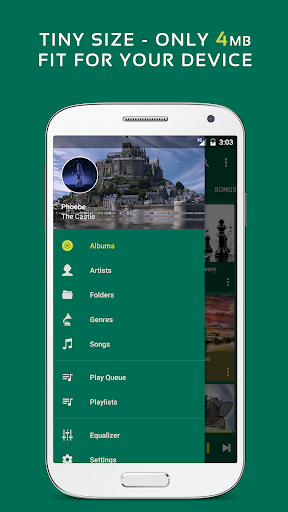
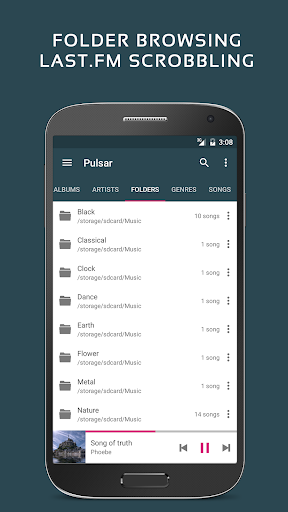
✓ Manage and play music by album, artist, folder, and genre.
✓ Smart playlists with most played, recently played, and newly added tracks.
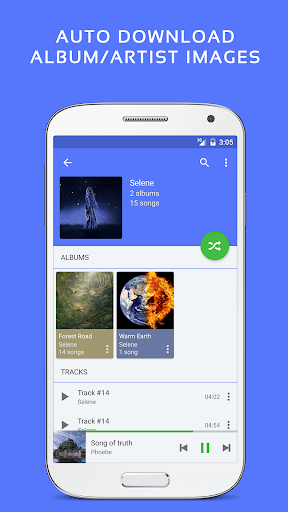
✓ Automatic sync missing album/artist images.
✓ Fast search across albums, artists, and songs.
✓ Resizable home screen widget.
✓ Gapless playback support.
✓ Play speed adjustment.
✓ Crossfade support.
✓ Replay gain volume normalization.
✓ Built-in metadata tag editor (mp3 and more).
✓ Display lyrics (embedded and lrc file).
✓ Sava/restore playback position (useful for podcast and audiobook).
✓ Music visualizer rendering.
✓ Chromecast (Google Cast) support.
✓ Google voice commands support.
✓ Android Auto support.
✓ Disable car auto play on Bluetooth.
✓ Sound balance adjustment.
✓ Last.fm scrobbling.
✓ Various colorful themes.
✓ Free of advertisements.
✓ Sleep timer.
Pulsar supports standard music file types including mp3, aac, flac, ogg, wav and etc.
If you cannot find your music in Pulsar, please click the “rescan library” menu item from the action bar to rescan your device.
Pulsar audio player has a complete online user manual, click here:
https://rhmsoft.com/pulsar/help/help.html
If you can help to translate this mp3 player to your native language, or there is any mistake in current translation, please contact our email: [email protected].
If you run into any issues or have any suggestions while using this mp3 player, please feel free to contact us: [email protected].
You can also share your comments to the Pulsar audio player thread on xda-developers:
http://forum.xda-developers.com/android/apps-games/app-pulsar-music-player-t3197336
Thanks for using Pulsar Music Player!
Album and artist images used in the screenshots are licensed under Public Domain License:
https://creativecommons.org/publicdomain/zero/1.0/
Pulsar contains almost every necessary feature to fulfill all of your musical needs including: gapless playback, lyrics display, crossfade, play speed adjustment, tag editing, last.fm scrobbling, Chromecast, voice command, Android Auto, equalizer, music visualizer, audio balance, ReplayGain, sleep timer, etc.
Pulsar is the ultimate audio player on Android, with millions of downloads. It has been translated into 36 different languages.
Key Features:
✓ Gorgeous user interface and animation with material design.
✓ Manage and play music by album, artist, folder, and genre.
✓ Smart playlists with most played, recently played, and newly added tracks.
✓ Automatic sync missing album/artist images.
✓ Fast search across albums, artists, and songs.
✓ Resizable home screen widget.
✓ Gapless playback support.
✓ Play speed adjustment.
✓ Crossfade support.
✓ Replay gain volume normalization.
✓ Built-in metadata tag editor (mp3 and more).
✓ Display lyrics (embedded and lrc file).
✓ Sava/restore playback position (useful for podcast and audiobook).
✓ Music visualizer rendering.
✓ Chromecast (Google Cast) support.
✓ Google voice commands support.
✓ Android Auto support.
✓ Disable car auto play on Bluetooth.
✓ Sound balance adjustment.
✓ Last.fm scrobbling.
✓ Various colorful themes.
✓ Free of advertisements.
✓ Sleep timer.
Pulsar supports standard music file types including mp3, aac, flac, ogg, wav and etc.
If you cannot find your music in Pulsar, please click the “rescan library” menu item from the action bar to rescan your device.
Pulsar audio player has a complete online user manual, click here:
https://rhmsoft.com/pulsar/help/help.html
If you can help to translate this mp3 player to your native language, or there is any mistake in current translation, please contact our email: [email protected].
If you run into any issues or have any suggestions while using this mp3 player, please feel free to contact us: [email protected].
You can also share your comments to the Pulsar audio player thread on xda-developers:
http://forum.xda-developers.com/android/apps-games/app-pulsar-music-player-t3197336
Thanks for using Pulsar Music Player!
Album and artist images used in the screenshots are licensed under Public Domain License:
https://creativecommons.org/publicdomain/zero/1.0/
What's New
✓ Fixed audio focus related bugs on some devices.
App Information
Version Name
1.12.5
Version Code
238
File Size
5.9 MB
Minimum OS
Android 5.0+
Target SDK
Android 33
Developer
Rhythm Software
Contact
Website
Content Rating
Everyone
Package Name
com.rhmsoft.pulsarPermissions Required
This app may request the following permissions:
Recent Reviews

GraniteStateColin -
3.0★
Good music player, but incomplete for Windows users. Pulsar supports Windows playlists (WPL) and M3U. However, it can't read music in OneDrive. It also can't understand genres for songs with more than one. For Windows users, these have been features for years and are essential for syncing and enjoying music on both Windows and Android. Would also be nice if it had an option to only list artists that have albums, so, say, every Christmas compilation doesn't spawn 30 artists each with 1 song.

Aquamarine
3.0★
It plays music well, but it has two big problems for me. First is that it doesn't seem to have support for songs with multiple artists. The second, which isn't as important but bothers me much more, is that its ability to auto download album art is very inconsistent. Songs that I had on my old device that showed their album art with no problems aren't showing up now on my newer one, despite being the same app version, and I have no idea how to fix it other than manually, which is annoying.

Michael Novak
2.0★
Tried again - still no better. The app does not list album folders nested within artist folders. You just get a list of thousands of albums. Default choice is to Google search for images, and it fills up with often unrelated pictures. If you switch this off, everything defaults to JaneDoe thumbnails. Despite having "folder.jpg" in each album's folder, it never finds or uses them. I never even used it for music honestly; it didn't last that long.

Bill Tetzeli
5.0★
This is a fantastic music app. The gapless playback is flawless, unlike some apps that claim to play music gapless but really don't. it does a good job loading the album art work that is embedded in the track. The only real fly in the ointment for me is that when you select a particular genre it displays every single album in that genre instead of just listing the artists. it makes it a bit more laborious to find the artist you want when you have to scroll through every single album.

Coral Apples
5.0★
Not sure why phones don't have set media players, I feel like that was pretty common forever with phones from the 2010s. Having looked into different options, a portion of them don't let you play music how you want to. They might force you to shuffle or don't organize music at all. This is a great app, I can choose what artist, album, make playlists etc. I personally have not had any issues with file types or anything and no interruptions from ads or anything. I'm grateful for this app.

Holly Samulcek
3.0★
My main issue with this app is it stops playing about 30 sec after other phone events - like phone alarms, calls, or timer countdowns. This is most frustrating at the gym, when I'm using my phone timer for sets, and then Pulsar stops playing music 30 sec into the set. If it weren't for that, this app would be 5 Star. It's great for organizing my music.
Ad slot: In-Content