

Installer - Install APK
com.rhythm.hexise.inst
by Rhythm Software
Screenshots




Ad slot: Top Leaderboard
About this app
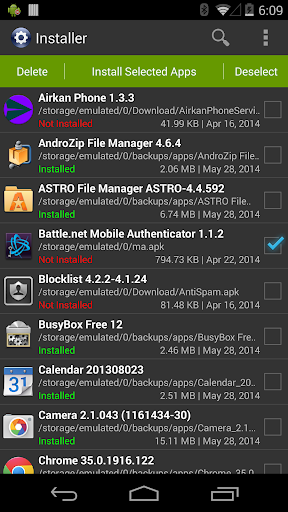
Full featured installer with tiny size, user friendly design and high performance. Scan and install market and non-market apps easily from your SD card.
Features:
* Install and delete applications from SD card.
* Auto-scan all APK files from SD card. Use built-in cache mechanism to improve performance, avoid scan over and over again.
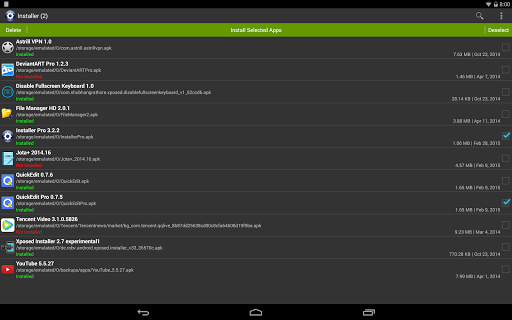
* Support batch mode for multiple APK install and delete.
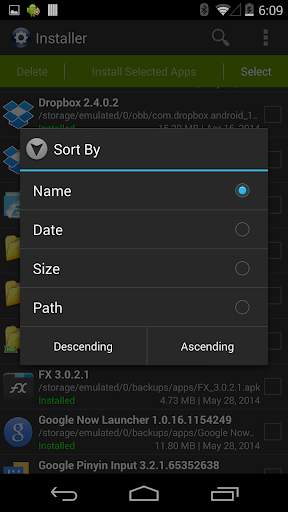
* Show full application information including name, version, path, size and date.
* Instantly search applications by name.
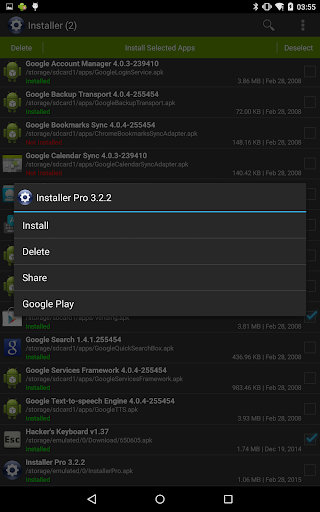
* Share application to friends through multiple ways such as Gmail, Bluetooth, etc.
* Search application information directly from android market.
* Show installation status of each APK file:
- Installed: This APK application has been installed on your device.
- Update: This APK application version is newer than current one on your device.
- Not Installed: This APK application has not been installed on your device.
Usage Guide:
This application is very straight forward. For first launch it will search all APK files which stored on your SD card and display them for you to install. For other launches it will load application information automatically from cache to save plenty of time. Click refresh button in option menu to rebuild the cache if SD card content changed when necessary.
Any comment is welcomed and appreciated, please send to [email protected].
Enjoy it.
Features:
* Install and delete applications from SD card.
* Auto-scan all APK files from SD card. Use built-in cache mechanism to improve performance, avoid scan over and over again.
* Support batch mode for multiple APK install and delete.
* Show full application information including name, version, path, size and date.
* Instantly search applications by name.
* Share application to friends through multiple ways such as Gmail, Bluetooth, etc.
* Search application information directly from android market.
* Show installation status of each APK file:
- Installed: This APK application has been installed on your device.
- Update: This APK application version is newer than current one on your device.
- Not Installed: This APK application has not been installed on your device.
Usage Guide:
This application is very straight forward. For first launch it will search all APK files which stored on your SD card and display them for you to install. For other launches it will load application information automatically from cache to save plenty of time. Click refresh button in option menu to rebuild the cache if SD card content changed when necessary.
Any comment is welcomed and appreciated, please send to [email protected].
Enjoy it.
What's New
* Updated to target Android 14.
App Information
Version Name
3.6.0
Version Code
43
File Size
5.2 MB
Min SDK
Android 16+
Target SDK
Android 29
Developer
Rhythm Software
Contact
Website
Content Rating
Everyone
Package Name
com.rhythm.hexise.instPermissions Required
This app may request the following permissions:
Recent Reviews

Renton Haevin
5.0★
An app on a licensed store that makes file tracking piracy of said store easy. Honestly the greatest thing ever purely out of audacity 😂 but it's dope to have a better way to clear them out than scrolling through chrome downloads. For those saying it doesn't work it requires permission to install unknown apps. This does what it says. But it's honestly best for file tracking. There's no actual piracy in the results.

A Google user
5.0★
It's MAKES up set because some TIME it's stop me and it keeps asking me to put pass words and tell me too sign in or out and my phone number is right but it's get me mad when it doesn't work right. I just want to stay login in and not log out just keep me login so I don't stay up all night trying to get me back in and stay login for ever and that would BE fantastic. Thank you Mary Ann Barnes

JOPI
5.0★
This app is very good very useful too. Can sort apk by different way. Only one thing i ask, on batch install, can you make not ask every app install. I mean, when install 10 apps, only click "install" at begining, and then click "done" after all apps has been installed

Phani
1.0★
app works great 👍🏽 you can install packages without any issues, but major complaint from me is "the purpose of multiple apk install option is, instead of clicking 'install' button x10 times, I want to click once so that it will automatically applies to remaining packages same option", but with your app it's like manual multi package installation only have to click x10 times for every package - not the desired purpose. Thanks anyway for the app.
A Google user
2.0★
i had to refresh to write this, and i am installing this because i cant use network on my device, clearly i cant do that and i also wanted to use amazon apps on this networkless tablet, the name sugjested i could, but the description says otherwise. and i hear it just uses the built-in installers also, this review system SUCKS AND SHOULD BE REPLACED!!!!!!!!!!!!!!!!!!!!!!!!!!!!!!!! i cant use enter,

Kohai ame
2.0★
Worked great at first, but lately it's not doing it's job. I have the permissions allowed, but it's still saying "app not installed" so I'm not sure what the problem is. I really hope that whatever the issue is it can be fixed with an update.
Ad slot: In-Content