

Roborock
com.roborock.smart
by Roborock
Screenshots
Ad slot: Top Leaderboard
About this app
*Feature support varies by product
Cutting-Edge Software and Hardware:
- PreciSense: Precision LIDAR navigation for efficient home cleaning.
- Sensient: A sensor matrix for safer movement around the home.
- OpticEye: Highly accurate vision-based motion control and navigation
- ReactiveAI: Artificial intelligence for recognizing and avoiding common home objects.
- VibraRise: More effective mopping through sonic vibration, with a mop that can be automatically lifted off the floor.
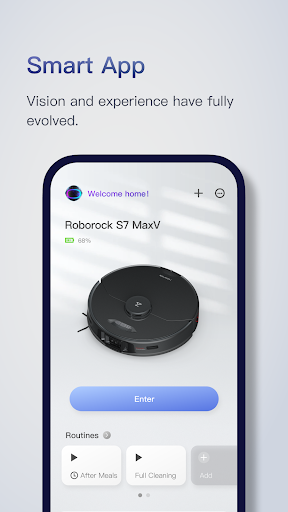
The Roborock app has been designed to give you total control over your Roborock robot, from home layout to cleaning schedules, cleaning strength, and more. Once you've set it up the way you want it, you can leave your robot to work.
---- Feature Highlights ----
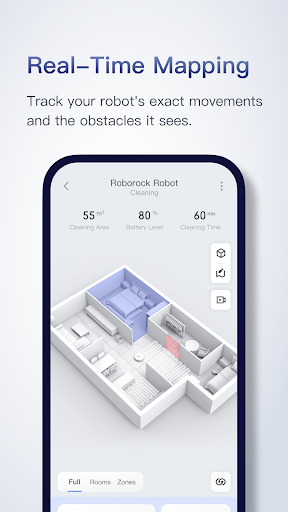
SERIOUSLY SMART MAPPING
After it's first run around your home, your Roborock robot will show you your floorplan and automatically divide your rooms, unlocking a world of customizations.
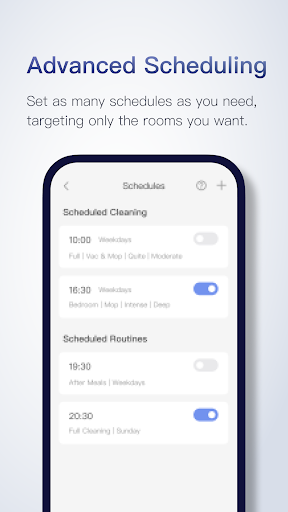
ADVANCED SCHEDULING
Set multiple schedules from hourly to daily to weekly, hitting different rooms with each one. You can clean the kitchen after breakfast and even the whole house when everyone's gone out.
CUSTOMIZABLE CLEANING
Tailor cleaning to the demands of each room. Crank up suction for the nursery, use more water on tiled kitchens, and lower suction when you need things quiet. The control is yours.
ZONE CLEANING
Draw up to five zones, and clean each zone up to three times, for when you want to tackle more stubborn dirt or just don't need entire rooms cleaned.
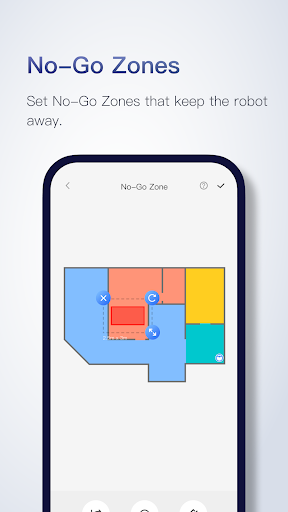
NO-GO ZONES
Use up to 10 No-Go Zones and 10 Invisible Walls to avoid thick carpets, keep robots away from delicate art, and more—all without a single hardware add-on.
MULTI-LEVEL MAPPING
Save up to four maps in your home and tailor cleaning to match each floor. Your robot will recognize the floor it's on automatically, so you can simply watch it work.
REAL-TIME VIEWING
Watch your robot move through your home, seeing the exact route it's taken and any obstacles it has avoided along the way.
Feature Compatibility:
- Multi-Level Mapping is available on [TBC] only
- Obstacle avoidance is available on S6 MaxV only
- Room specific suction scheduling is available on [TBC] only
- Room specific mopping is available on S6 MaxV and S5 Max only.
Contact Us
Customer Service Phone: 400-900-1755 (Chinese Mainland)
E-mail: [email protected] (Chinese Mainland), [email protected] (EU), [email protected] (Other Areas)
Cutting-Edge Software and Hardware:
- PreciSense: Precision LIDAR navigation for efficient home cleaning.
- Sensient: A sensor matrix for safer movement around the home.
- OpticEye: Highly accurate vision-based motion control and navigation
- ReactiveAI: Artificial intelligence for recognizing and avoiding common home objects.
- VibraRise: More effective mopping through sonic vibration, with a mop that can be automatically lifted off the floor.
The Roborock app has been designed to give you total control over your Roborock robot, from home layout to cleaning schedules, cleaning strength, and more. Once you've set it up the way you want it, you can leave your robot to work.
---- Feature Highlights ----
SERIOUSLY SMART MAPPING
After it's first run around your home, your Roborock robot will show you your floorplan and automatically divide your rooms, unlocking a world of customizations.
ADVANCED SCHEDULING
Set multiple schedules from hourly to daily to weekly, hitting different rooms with each one. You can clean the kitchen after breakfast and even the whole house when everyone's gone out.
CUSTOMIZABLE CLEANING
Tailor cleaning to the demands of each room. Crank up suction for the nursery, use more water on tiled kitchens, and lower suction when you need things quiet. The control is yours.
ZONE CLEANING
Draw up to five zones, and clean each zone up to three times, for when you want to tackle more stubborn dirt or just don't need entire rooms cleaned.
NO-GO ZONES
Use up to 10 No-Go Zones and 10 Invisible Walls to avoid thick carpets, keep robots away from delicate art, and more—all without a single hardware add-on.
MULTI-LEVEL MAPPING
Save up to four maps in your home and tailor cleaning to match each floor. Your robot will recognize the floor it's on automatically, so you can simply watch it work.
REAL-TIME VIEWING
Watch your robot move through your home, seeing the exact route it's taken and any obstacles it has avoided along the way.
Feature Compatibility:
- Multi-Level Mapping is available on [TBC] only
- Obstacle avoidance is available on S6 MaxV only
- Room specific suction scheduling is available on [TBC] only
- Room specific mopping is available on S6 MaxV and S5 Max only.
Contact Us
Customer Service Phone: 400-900-1755 (Chinese Mainland)
E-mail: [email protected] (Chinese Mainland), [email protected] (EU), [email protected] (Other Areas)
What's New
What's New:
When logging into your Roborock account with a password, entering the wrong password multiple times will temporarily disable password login to help protect your account.
Improvements:
The Log In and Sign Up pages have been combined for a smoother experience. If the phone number or email address hasn’t been used before and is successfully verified, a new account will be created automatically.
When logging into your Roborock account with a password, entering the wrong password multiple times will temporarily disable password login to help protect your account.
Improvements:
The Log In and Sign Up pages have been combined for a smoother experience. If the phone number or email address hasn’t been used before and is successfully verified, a new account will be created automatically.
App Information
Version Name
4.32.08
Version Code
100564
File Size
43.4 MB
Minimum OS
Android 7.0+
Target SDK
Android 33
Developer
Roborock
Contact
Website
Content Rating
Everyone
Package Name
com.roborock.smartPermissions Required
This app may request the following permissions:
Recent Reviews

Nico Nemec
2.0★
Aaaaggghhhhhh! I really like this little vacuum, and it works well. But about every third time I use it I have to reconnect, and then sometimes when the app updates I have to log in again (who remembers a vacuum password, which isn't auto saved?) and also reconnect. It's a little bit like having to assemble a regular vacuum every time I use it.

Charles Meyer
1.0★
Overall, it's good but with one glaring flaw. It will not let you send it back to the dock to empty, either manually or on a schedule. Defeats half the purpose of an auto empty bin. Oddly, you can control how often it cleans the mop. Why can't they do that for emptying the vacuum? Edit: Just found out that if you manually tell it to empty too often, it will refuse stating "dust bin emptied too often, try again later." I did not pay hundreds of dollars to be told how not to use my device.

Daniel Wong
1.0★
My brand new Roborock Saros 10R has trouble staying connected to the WiFi. When it is connected, it is unable to do a quick map of my house. I have attempted mapping a dozen times and each time it fails. So far I have contacted customer service twice. My experience can best be described as uninspiring. The representatives tried to walk me through the same steps as the app, so I gain no extra insights on how to get the robot to work. I think the unit is either defective or a piece of junk.

scooterbaga
2.0★
EDIT: Can't help but notice you haven't addressed WHY THIS APP IS ASKING FOR ROOT PERMISSIONS EVERY TIME IT RUNS? AND NO ONE FROM EMAIL SUPPORT HAS EVER RESPONDED. REVIEW: May be over-complicated, but works. Took far too long to realize saving favorite routines is "outside" of the vacuums settings. You go "into" the vacuum to get the big Play button and run it. If you want to save a routine it's BEFORE you choose the vacuum, and isn't clearly labeled.

Amanda Halperin
3.0★
This app is a pain in the butt to get working but comes with great tech support that is easy to reach by phone or email and that provides clear step by step instructions. I had to change my freaking IP address for the app to connect. that was a journey. However, the robot works just fine without the app, so it's still a huge improvement over Roombas, which don't work without the app. Still, please fix it so I don't have to ever mess with my IP address again.

Craig
3.0★
I believe the cleaning pattern should be "tightened". The paths are just a little too far apart. especially when considering that the rollers don't reach the outer 3 inches of the unit on both sides. Unit does good job cleaning. And helps with bulk of flooring. Definitely finds pet fur that would've been missed before.
Ad slot: In-Content