

Passwords & Passkeys-Safe
com.safeincloud.free
by SafeInCloud S.A.S.
Screenshots


Ad slot: Top Leaderboard
About this app
This is an ultimate cross-platform password manager app that securely protects your passwords, credit cards, and personal information using strong encryption. You can securely sync your passwords across devices—whether it's your phone, tablet, Mac, or PC—using your own cloud account. Your sensitive data is always securely encrypted—on your devices, in the cloud, and during synchronization—with the military-grade algorithm AES-265 (Advanced Encryption Standard 256-bit).
The password manager not only protects your passwords but also enhances your security with built-in 2FA (Two-Factor Authentication) support, generating one-time passcodes for websites. This means you can secure your accounts without needing an additional 2FA app, consolidating both password protection and multi-factor authentication in one secure tool.
SECURE PASSWORD MANAGER APP
- Simple and Intuitive Password Management
- 256-bit AES Encryption for Maximum Security
- Secure Synchronization (Google Drive, Dropbox, OneDrive, NAS, WebDAV)
- Biometric Authentication for Fast, Secure Access
- Autofill Passwords Across Apps and Browsers
- Integrated 2FA Authenticator for Two-Factor Authentication
- Generate and Use Strong, Unique Passwords Instantly
- Analyze Password Strength for Enhanced Security
- Detect and Replace Compromised Passwords
- Free Desktop App (Windows & Mac) for Secure Access Anywhere
- Effortless Data Import from Other Password Managers
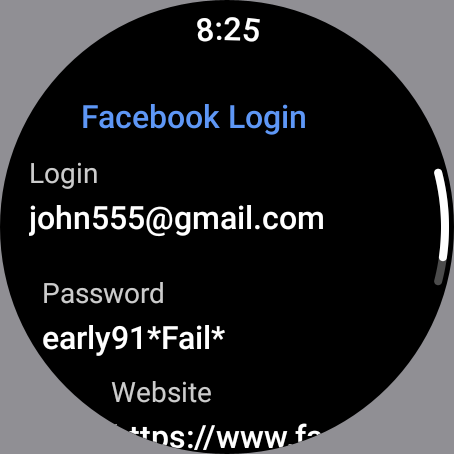
- Wear OS Support for On-the-Go Security
- Multiple Secure Databases for Personal, Family, Work Passwords
Simple and Intuitive Password Management
The password manager offers a simple yet powerful interface that makes managing your passwords hassle-free. Try it yourself and experience how easy it is to securely organize and access your login details.
256-bit AES Encryption for Maximum Security
The password manager employs military-grade 256-bit AES encryption, securing your data locally on your devices, in the cloud, and during synchronization. Whether stored or in transit, your sensitive information remains shielded from potential threats, providing an additional layer of security beyond standard encryption practices.
Biometric Authentication for Fast, Secure Access
The password manager supports biometric login, allowing you to unlock your password vault instantly using your fingerprint. This feature ensures that only you can access your sensitive data, combining strong security with quick, seamless access on devices equipped with a fingerprint sensor.
Autofill Passwords Across Apps and Browsers
The password manager simplifies the login process by allowing you to autofill usernames and passwords directly into any app on your phone. This secure and efficient tool eliminates the need for manual entry, ensuring that your credentials are filled quickly and accurately without exposing them to unnecessary copying and pasting.
Integrated 2FA Authenticator for Two-Factor Authentication
The password manager enhances your account security with built-in two-factor authentication utility (2FA). This feature allows you to generate secure verification codes directly within the app, eliminating the need for a separate 2FA app and streamlining your security process.
Free Desktop App (Windows & Mac) for Secure Access Anywhere
Password Manager SafeInCloud offers a free desktop application for both Windows and Mac, giving you secure access to your passwords directly on your computer. It includes an automatic import utility, allowing you to transfer passwords from other managers like 1Password or LastPass. This ensures a smooth transition while maintaining the highest level of security for your data.
Accessibility API Disclosure: The Accessibility API is used to autofill passwords on web pages in Google Chrome without collecting or sharing any personal data.
The password manager not only protects your passwords but also enhances your security with built-in 2FA (Two-Factor Authentication) support, generating one-time passcodes for websites. This means you can secure your accounts without needing an additional 2FA app, consolidating both password protection and multi-factor authentication in one secure tool.
SECURE PASSWORD MANAGER APP
- Simple and Intuitive Password Management
- 256-bit AES Encryption for Maximum Security
- Secure Synchronization (Google Drive, Dropbox, OneDrive, NAS, WebDAV)
- Biometric Authentication for Fast, Secure Access
- Autofill Passwords Across Apps and Browsers
- Integrated 2FA Authenticator for Two-Factor Authentication
- Generate and Use Strong, Unique Passwords Instantly
- Analyze Password Strength for Enhanced Security
- Detect and Replace Compromised Passwords
- Free Desktop App (Windows & Mac) for Secure Access Anywhere
- Effortless Data Import from Other Password Managers
- Wear OS Support for On-the-Go Security
- Multiple Secure Databases for Personal, Family, Work Passwords
Simple and Intuitive Password Management
The password manager offers a simple yet powerful interface that makes managing your passwords hassle-free. Try it yourself and experience how easy it is to securely organize and access your login details.
256-bit AES Encryption for Maximum Security
The password manager employs military-grade 256-bit AES encryption, securing your data locally on your devices, in the cloud, and during synchronization. Whether stored or in transit, your sensitive information remains shielded from potential threats, providing an additional layer of security beyond standard encryption practices.
Biometric Authentication for Fast, Secure Access
The password manager supports biometric login, allowing you to unlock your password vault instantly using your fingerprint. This feature ensures that only you can access your sensitive data, combining strong security with quick, seamless access on devices equipped with a fingerprint sensor.
Autofill Passwords Across Apps and Browsers
The password manager simplifies the login process by allowing you to autofill usernames and passwords directly into any app on your phone. This secure and efficient tool eliminates the need for manual entry, ensuring that your credentials are filled quickly and accurately without exposing them to unnecessary copying and pasting.
Integrated 2FA Authenticator for Two-Factor Authentication
The password manager enhances your account security with built-in two-factor authentication utility (2FA). This feature allows you to generate secure verification codes directly within the app, eliminating the need for a separate 2FA app and streamlining your security process.
Free Desktop App (Windows & Mac) for Secure Access Anywhere
Password Manager SafeInCloud offers a free desktop application for both Windows and Mac, giving you secure access to your passwords directly on your computer. It includes an automatic import utility, allowing you to transfer passwords from other managers like 1Password or LastPass. This ensures a smooth transition while maintaining the highest level of security for your data.
Accessibility API Disclosure: The Accessibility API is used to autofill passwords on web pages in Google Chrome without collecting or sharing any personal data.
What's New
Improvements and bug fixes
App Information
Version Name
16.1.2
Version Code
160102
File Size
6.0 MB
Min SDK
Android 16+
Target SDK
Android 23
Developer
SafeInCloud S.A.S.
Contact
Website
Content Rating
Everyone
Package Name
com.safeincloud.freePermissions Required
This app may request the following permissions:
Recent Reviews

D.W.
3.0★
With the last update you folks seem to have dumbed down the app. In settings there is no more Appearance selection where "gold theme" can be set and you've gotten rid of the ability to set a lock screen background image or texture. Would be nice to have those choices back but I guess it isn't going to happen. No longer worth the lifetime license I paid for recently. And for now only 3 stars.

Ian
4.0★
I love this app. My only criticism is that there isn't an option to disable to 'nag' to enter your password on your phone. I understand why it is there, but I enter the password often enough on my computer than I won't forget it, so not needing a constant reminder to use the password occasionally on my phone would be a good thing.

Andrea Partner
2.0★
Works great on my phone, but on my tablet not so much. The basic functionality is there, but it's an older version of the app. Fingerprint/ pin login is locked behind the premium paywall and the unclearable premium add banner literally takes up half the screen so I can only see 3 cards at a time. None of these complaints happen on my phone or this would be 1 star. The free version of the app does everything I need it to, if that changes, I'm switching apps.

Alex Temchenko
5.0★
Using the app for a countless number of years. Almost immediately bought the Pro version, and never regret it. Never had a single problem with the app. Stable, reliable, fast, easy to use. Passwords are instantly synced thru a cloud across 6 Androids and 4 Windows computers and immediately available on all of them. There's one weak point though - there's no Linux version. Everything else is just perfect.

Trevor Field
5.0★
I've used this for years - depended on it, more like. It's simple, with options for sorting by category or type, and yet can store a great stack of different passwords or data. Any ads are unobtrusive, and as long as you don't lose the password for THIS app you can relax in knowledge that all your others are safe for years. Fingerprint identity has recently ceased to work, but I love the app so much I won't complain about that!

A Google user
5.0★
It does what it says. I highly recommend you use an actual password to unlock every time, otherwise if your biometric fails and you can't remember your initial password, you'll lose your database and will have to start over. That's happened to me once, pain in the ass but that's what this app is for, security. There's supposed to be a website autofill option, but I've never seen it work, usually my Google Chrome takes over that.
Ad slot: In-Content