
S Secure
com.samsung.android.app.sprotect
by Samsung R&D Institute India Noida
Screenshots

Ad slot: Top Leaderboard
About this app
Protect and secure
your apps, folders, content, and browsing data using below features.
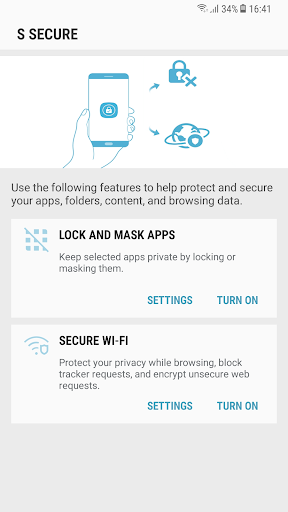
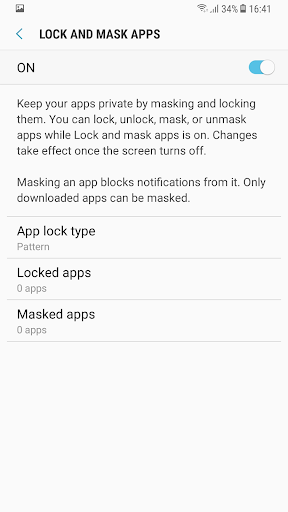
1. Lock and Mask apps:
Keep selected apps and its data private by locking or masking them.
Locking and masking can be done via a pattern, PIN, password, or your fingerprints.
Apps will be locked once the screen turns off. Once apps are unlocked, they will remain unlocked until the screen turns off.
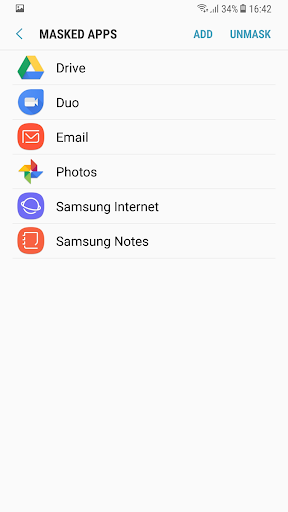
Masking an app will block notifications from it and mask it on your phone. Only downloaded apps can be masked .
2. Secure Wi-Fi
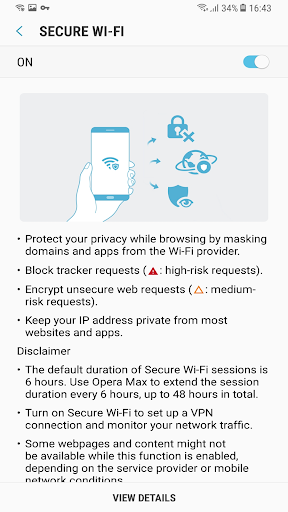
Protect your privacy while browsing by masking domains and apps from the Wi-Fi provider.
Block tracker requests using the Easy privacy list.
Encrypt unsecured web requests Keep your IP address private from most websites and apps.
Disclaimer:
The default duration of Secure Wi-Fi sessions is 6 hours. Opera Max can be used to extend the session duration every 6 hours, up to 48 hours in total.
Turn on Secure Wi-Fi to set up a VPN connection and monitor your network traffic.
Some websites and content might not be available while this function is on, depending on the service provider or mobile network conditions.
Some websites may not be able to locate or track your IP address.
your apps, folders, content, and browsing data using below features.
1. Lock and Mask apps:
Keep selected apps and its data private by locking or masking them.
Locking and masking can be done via a pattern, PIN, password, or your fingerprints.
Apps will be locked once the screen turns off. Once apps are unlocked, they will remain unlocked until the screen turns off.
Masking an app will block notifications from it and mask it on your phone. Only downloaded apps can be masked .
2. Secure Wi-Fi
Protect your privacy while browsing by masking domains and apps from the Wi-Fi provider.
Block tracker requests using the Easy privacy list.
Encrypt unsecured web requests Keep your IP address private from most websites and apps.
Disclaimer:
The default duration of Secure Wi-Fi sessions is 6 hours. Opera Max can be used to extend the session duration every 6 hours, up to 48 hours in total.
Turn on Secure Wi-Fi to set up a VPN connection and monitor your network traffic.
Some websites and content might not be available while this function is on, depending on the service provider or mobile network conditions.
Some websites may not be able to locate or track your IP address.
What's New
Q OS bug fixes
App Information
Version Name
4.0.04
Version Code
400400100
File Size
3.8 MB
Min SDK
Android 28+
Target SDK
Android 28
Developer
Samsung R&D Institute India Noida
Contact
Content Rating
Everyone
Package Name
com.samsung.android.app.sprotectPermissions Required
This app may request the following permissions:
Recent Reviews

A Google user
1.0★
I had enabled this app lock in my Samsung A30. But the problem is that whenever I want to uninstall it, I can uninstall it very easily. That means if someone want to open my locked apps, he/she can just uninstall it and access those apps. Than what's the use of this app. Didn't know if it is a bug or something like that but it is neither useful for me nor for anyone else. I hope developers will look upon this issue.

TheSurajSite Tech
2.0★
The efficiency of the app is good. It open lock screen as soon as i click on the app. But one bug is that if someone don't know the pin/pattern, he can uninstall S Secure app and then all locked apps will be unlocked. But, in Norton App Lock, they ask admin permission so that no one else can uninstall the app without pin/pattern. You should also do that. Moreover, i can't add pin/pattern to my settings. Due to which, anyone can open my settings and do some mischief. Please solve these problems.
A Google user
4.0★
The app is good . But some improvements are needed . I use this app on my Galaxy On6 & I feel lack of a feature . In dark condition, the app should use the front LED flash to detect face for face unlock . Yes , it makes the screen brighter but thats not enough many time . So , when a front flash is available , you should keep the option to enable it . Hope you focus on my suggestion.
A Google user
3.0★
the app is well designed. .. but there are some kinds of improvements it needs... 1. There should be option to be locked or not after getting out/closing app. 2. Needs too many touch to open any masked app. This should be user friendly. 3. if it from samsung it should be robust. Unfortunately it is not. even though I prefer it than other apps. It doesn't collect our datas.

Chintu Garg
1.0★
Does not work on S23Ultra Samsung is has stopped giving access of this app on their new devices they give secure folder instant but secure folder does not lock the dual apps or the main apps. Samsung should give a app locker because otherwise the using 3rd party apps ar risky and not satisfying. I would recommend and request samsung to provide a app locker function on their settings like oneplus. That would give a satisfying results to the user

Sukhveer Yadav
1.0★
The worst app I've ever seen in my life . I forgot the password of s secure in my "samsung galaxy j7 max" and I am unable to open it for 3 years, there must be an option for recovering the password if someone has forgotten . I am extremely requested to the app developers to solve this problem very soon . In my own phone, the app makers are making me feel that I'm using someone else's . I will definitely rate you better if you can solve my problem . Please !, TRY TO UNDERSTAND MY PROBLEM .
Ad slot: In-Content