

Samsung My Files
com.sec.android.app.myfiles
by Samsung Electronics Co., Ltd.
Screenshots
Ad slot: Top Leaderboard
About this app
[Introducing My Files]
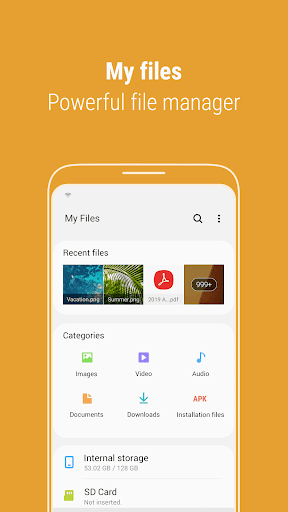
"My Files" manages all the files on your smartphone, just like a file explorer on your computer.
You can also manage files stored on SD cards, USB drives and files in the cloud storage connected with your smartphone at the same time.
Download and experience "My Files" now.
[New features in My Files]
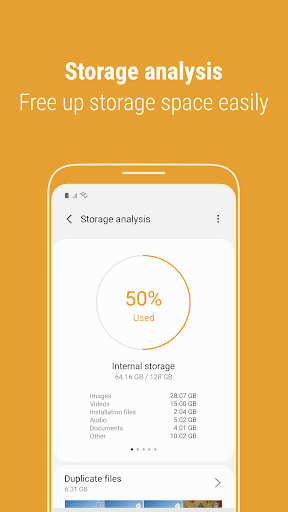
1. Free up storage space easily by tapping the "Storage Analysis" button on the main screen.
2. You can hide any unused storage space from the main screen via the "Edit My Files home".
3. You can view long file names without ellipses using the "Listview" button.
[Key features]
- Browse and manage files stored on your smartphone, SD card, or USB drive conveniently.
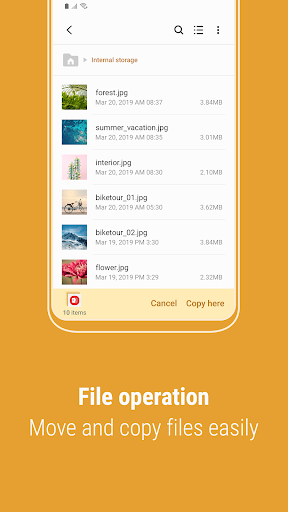
.Users can create folders; move, copy, share, compress, and decompress files; and view file details.
- Try our user-friendly features.
.The Recent Files list: Files the user has downloaded, run, and/or opened
.The Categories list: Types of files, including downloaded, document, image, audio, video, and installation files (.APK)
.Folder and file shortcuts: Show on the device home screen and the My Files main screen
.Provides a function used to analyze and free up storage space.
- Enjoy our convenient Cloud services.
.Google Drive
.OneDrive
※ Supported features may be different depending on models.
The following permissions are required for the app service.
[Required permissions]
-Storage: Used to open, delete, edit, search files and folders on internal / external memory
- Notifications : Used to show the progress of ongoing actions such as moving or copying files and folders
"My Files" manages all the files on your smartphone, just like a file explorer on your computer.
You can also manage files stored on SD cards, USB drives and files in the cloud storage connected with your smartphone at the same time.
Download and experience "My Files" now.
[New features in My Files]
1. Free up storage space easily by tapping the "Storage Analysis" button on the main screen.
2. You can hide any unused storage space from the main screen via the "Edit My Files home".
3. You can view long file names without ellipses using the "Listview" button.
[Key features]
- Browse and manage files stored on your smartphone, SD card, or USB drive conveniently.
.Users can create folders; move, copy, share, compress, and decompress files; and view file details.
- Try our user-friendly features.
.The Recent Files list: Files the user has downloaded, run, and/or opened
.The Categories list: Types of files, including downloaded, document, image, audio, video, and installation files (.APK)
.Folder and file shortcuts: Show on the device home screen and the My Files main screen
.Provides a function used to analyze and free up storage space.
- Enjoy our convenient Cloud services.
.Google Drive
.OneDrive
※ Supported features may be different depending on models.
The following permissions are required for the app service.
[Required permissions]
-Storage: Used to open, delete, edit, search files and folders on internal / external memory
- Notifications : Used to show the progress of ongoing actions such as moving or copying files and folders
App Information
Version Name
15.0.04.5
Version Code
1500405000
File Size
18.3 MB
Min SDK
Android 33+
Target SDK
Android 34
Developer
Samsung Electronics Co., Ltd.
Contact
Content Rating
Everyone
Package Name
com.sec.android.app.myfilesPermissions Required
This app may request the following permissions:
Recent Reviews

Brandi Rubio
2.0★
App doesn't actually do what is claimed. When analyzing Google drive storage, Duplicate files shows up as only 2 FILES. EVERY TIME, LOL. I know for a fact I've got way more than that in my drive. It would be amazing if this really worked to help clean up Google drive, but IT DOESN'T. I've tried all traditional fixes, uninstalled, cleared cache, closed and restarted phone, NOTHING WORKED. App still doesn't function or do what the developer claims it can do. Ugh.

Missing png
2.0★
Files. When you think of files, you think of stored data that can be easily accessed, right? Samsung files provides the most terrible, hard to work with software that makes using files a terrible experience. Trying to access app data is impossible due to app restrictions (which can't be removed) so you need to use another third party app or a pc. The 1 star given is for the GUI, which looks better than the rest, but it doesn't outweigh the horrible access to files given by the app, do not use.

Ashtyon W.
3.0★
Alright, I love My Files, it makes things easier to see and go through, but for some reason, I keep getting the "Storage space running out" notification Sounds normal, except 96% storage used. I delete pictures and go back to the app 97% storage used. This is NOT supposed to go up when you delete files, and I know that this is downright something with Samsung, and not the app itself, but I really wish this could fix.

Colleen Werner
2.0★
I'm usually running low on storage by about 750-1000MB, but lately it's been telling me I've got 250-500MB and I can't update any of my old apps. I've deleted at least five apps, I've manually gone through my folders and emptied caches multiple times and the number doesn't budge! I thought maybe it was a certain app that I'd installed right around the same time this started happening, so I deleted it. No change. It's getting really frustrating. I just want a usable phone.

A Google user
2.0★
Poor app. Every time I open, it keeps begging for permission to access and sync, create and delete files on Google Drive. I dont want to sync anything in the folder. It doesn't appear that there is a way to turn this annoying feature off. So every time I click on anything, I get the nag screen asking for permission. I didnt pay $1000 for a phone that doesn't allow me to thrn off features to avoid constant annoying nag screens. It's why I no longer use the Samsung apps. Tired of nagging.

OriginalsbyItalia
1.0★
Great Update!? Not only am I able to move my files wherever I want but apparently the app will move the files wherever they want too, in any folder they want whenever they want. Unfortunately, I found that out today, what a wonderful surprise that was, so much for having a file system and being organized.
Ad slot: In-Content