

Samsung Calculator
com.sec.android.app.popupcalculator
by Samsung Electronics Co., Ltd.
Screenshots

Ad slot: Top Leaderboard
About this app
[Key features]
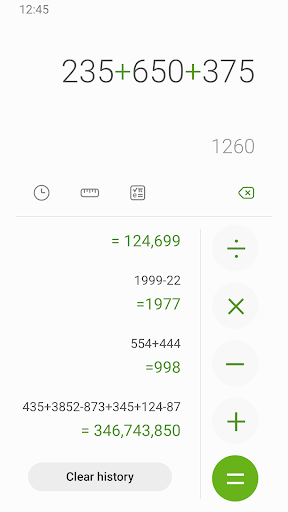
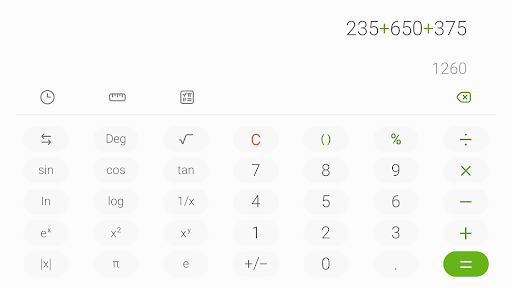
Perform four fundamental operations and engineering calculations.
To start the engineering calculator, tap the engineering calculator icon.
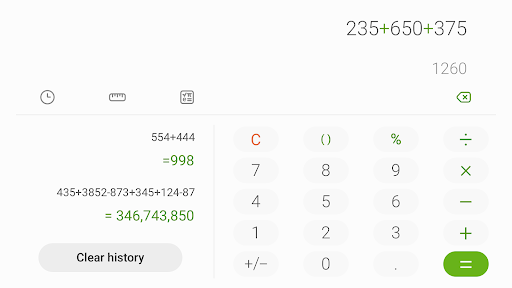
To check the calculation history, tap the calculation history icon. To close the calculation history panel, tap the keypad icon.
You can use the previously inputted formulas. Tap the formula you need from the calculation history.
[Additional features]
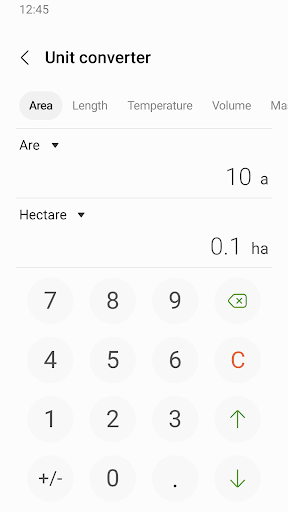
To convert units, tap the unit calculator button. You can easily convert various types of units, such as area, length, and temperature.
This software uses the Apache License 2.0. The details can be found at http://www.apache.org/licenses/LICENSE-2.0.
Perform four fundamental operations and engineering calculations.
To start the engineering calculator, tap the engineering calculator icon.
To check the calculation history, tap the calculation history icon. To close the calculation history panel, tap the keypad icon.
You can use the previously inputted formulas. Tap the formula you need from the calculation history.
[Additional features]
To convert units, tap the unit calculator button. You can easily convert various types of units, such as area, length, and temperature.
This software uses the Apache License 2.0. The details can be found at http://www.apache.org/licenses/LICENSE-2.0.
What's New
A few bugs have been fixed.
App Information
Version Name
12.3.00.1
Version Code
1230001000
File Size
3.7 MB
Min SDK
Android 34+
Target SDK
Android 34
Developer
Samsung Electronics Co., Ltd.
Contact
Content Rating
Everyone
Package Name
com.sec.android.app.popupcalculatorPermissions Required
This app may request the following permissions:
Recent Reviews

J Busa
4.0★
I love the app and use it often. we all know it needs more options in the conversion section, like currency and power/torque, etc. Since my phones last update, my cursor is on the left side of the 0 instead of the right. So, any numbers you type in, that 0 stays there in your calculation unless you clear it every time you use the app. Edit: I just uninstalled and reinstalled it, and it works fine now. I did lose all my recent calculations.

Victoria Burson
5.0★
Wonderful free calculator app, with no ads, and you can use it with no internet connection. I only use it for basic math problems, so if you need to use it for complicated problems, I'm not sure if this will work for you. My favorite part is the memory (history), so you can see what you did previously and recall certain numbers, and can clear it completely and easily whenever you want.

Anthony Capuzo
5.0★
It's a calculator app it does what it's supposed to do without adds or any random issues. These 1 star reviews for cosmetic stuff can't change the color, or you don't know how to turn off that click with each button press, are silly. It takes up minimal storage, opens quickly, and does the math I'm either too lazy to do or don't want to do. And that math teacher kept saying you won't have a calculator in your pocket all the time.

Daemien Loren Moore
3.0★
This app would probably receive 5 stars if it didn't regularly clear the current figures on the screen. I use this app to keep a running tally of my pay over the course of a week. The app randomly erases my current tally. I save my data at the end of each day, so that feature is helpful. But every day, when I add my new data, the app randomly erases what I've added. So, I have to go back to my saved data and start again. It's extremely frustrating. Please fix it!

I am Prosperity
2.0★
Samsung Calculator app has always been my calculator of choice. Had, not it been for the clicking sound that happens with every input, I would have given a higher rating. The clicking is neither customizable nor adjustable. Which means we, the user, aren't given a choice, and that is never a good thing. When the clicking is corrected and adjusted back to its original functionality, I will return with a higher rating.

Peach Miller
1.0★
I've been using this calculator for years! I came here because I thought I had hit a button inadvertently to turn on sounds when touching a button. I couldn't find any settings to turn it off. Lo and behold, I see that the sound was added in the latest update, and there is no way to turn it off without silencing the entire phone. Hoping the sound is removed soon, but I be shopping other calculator apps in the interim.
Ad slot: In-Content