

Samsung Level
com.sec.samsungsoundphone
by Samsung Electronics Co., Ltd.
Screenshots



Ad slot: Top Leaderboard
About this app
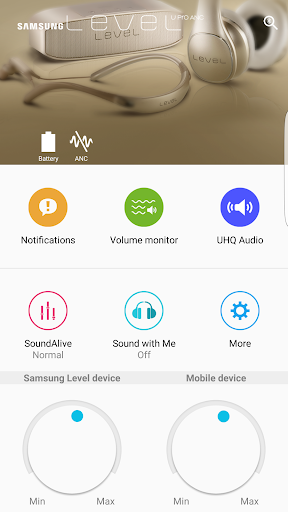
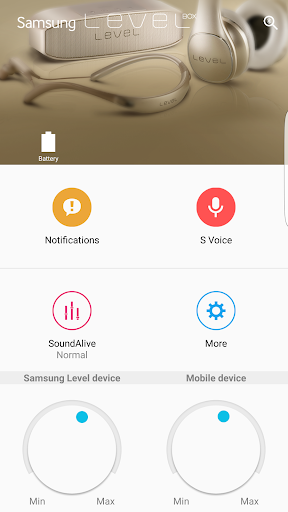
Samsung Level is an exclusive application for Samsung Level products that support Bluetooth.
SoundAlive (sound field effects), volume monitor, voice notification, and other extra features are available.
Features supported may vary depending on the smartphone model or connected Level product. Call notifications and missed call notification features are only available for Samsung smartphones.
Call notifications : Available for Galaxy Note 4 and above
UHQA Bluetooth : Available for Galaxy S6 and above
If you fail to connect after switching models, please try again after checking the pairing mode method below.
1. Level U/Active/Box Pro/Slim : Hold down the product Play/Pause button for about 3 sec.
2. Level U Pro/On Pro/Flex : Hold down the switch on the right hand side of the product (the Bluetooth icon) for about 3 seconds.
3. Level Box/Box Mini : Hold down the Bluetooth button on the back of the product for about 3 seconds.
4. Level Over : Hold down the Bluetooth button on the right hand side of the product for about 3 seconds.
Access authority guide
The following access rights are required for service provisioning.
For optional access permissions, the default functionality of the service is enabled, although not allowed
[Mandatory Access Authority]
- Phone : The purpose for checking the status of the phone for voice call notifications or for volume control
- Location : The purpose for searching connectable devices for Bluetooth connection
- Call log : The purpose for giving the notification of missed call to user
[Optional Access Authority]
- SMS : The purpose for checking the sender and contents of SMS when voice notification function is in operation
- Calendar : The purpose for checking calendar information when voice notification function is in operation
- Contacts : The purpose for checking incoming call information when voice notification function is in operation
If your system software version is lower than Android 6.0, please update the software to configure App permissions.
Previously allowed permissions can be reset on Apps menu in device settings after software update.
Accessibility services can be turned on in this app.
Voice Notification in Samsung Level app is a feature that speaks out the notified message in mobile phone.
To listen to the notified message of mobile phone, accessibility service in Samsung Level app should be enabled.
Support audio device : Level U, Level U Pro, Level U Pro ANC, Level Actvie, Level Box, Level Box Pro, Level Box Mini, Level Box Slim, Level On, Level On Pro, Level Over, Samsung U, Samsung U Flex
SoundAlive (sound field effects), volume monitor, voice notification, and other extra features are available.
Features supported may vary depending on the smartphone model or connected Level product. Call notifications and missed call notification features are only available for Samsung smartphones.
Call notifications : Available for Galaxy Note 4 and above
UHQA Bluetooth : Available for Galaxy S6 and above
If you fail to connect after switching models, please try again after checking the pairing mode method below.
1. Level U/Active/Box Pro/Slim : Hold down the product Play/Pause button for about 3 sec.
2. Level U Pro/On Pro/Flex : Hold down the switch on the right hand side of the product (the Bluetooth icon) for about 3 seconds.
3. Level Box/Box Mini : Hold down the Bluetooth button on the back of the product for about 3 seconds.
4. Level Over : Hold down the Bluetooth button on the right hand side of the product for about 3 seconds.
Access authority guide
The following access rights are required for service provisioning.
For optional access permissions, the default functionality of the service is enabled, although not allowed
[Mandatory Access Authority]
- Phone : The purpose for checking the status of the phone for voice call notifications or for volume control
- Location : The purpose for searching connectable devices for Bluetooth connection
- Call log : The purpose for giving the notification of missed call to user
[Optional Access Authority]
- SMS : The purpose for checking the sender and contents of SMS when voice notification function is in operation
- Calendar : The purpose for checking calendar information when voice notification function is in operation
- Contacts : The purpose for checking incoming call information when voice notification function is in operation
If your system software version is lower than Android 6.0, please update the software to configure App permissions.
Previously allowed permissions can be reset on Apps menu in device settings after software update.
Accessibility services can be turned on in this app.
Voice Notification in Samsung Level app is a feature that speaks out the notified message in mobile phone.
To listen to the notified message of mobile phone, accessibility service in Samsung Level app should be enabled.
Support audio device : Level U, Level U Pro, Level U Pro ANC, Level Actvie, Level Box, Level Box Pro, Level Box Mini, Level Box Slim, Level On, Level On Pro, Level Over, Samsung U, Samsung U Flex
What's New
Fix issue
App Information
Version Name
4.8.7
Version Code
37
File Size
14.9 MB
Minimum OS
Android 4.2+
Target SDK
Android 23
Developer
Samsung Electronics Co., Ltd.
Contact
Content Rating
Everyone
Package Name
com.sec.samsungsoundphonePermissions Required
This app may request the following permissions:
Recent Reviews

A Google user
2.0★
Connection issues: Bluetooth Level headphones worked great for about a month, then app no longer recognized them and wouldnt connect to them. Updates were done, BT working normally, uninstall/reinstall done and nothing. Restarted phone, checked out connections to other BT devices, no problem. Headphones charged up on the appropriate charging cable, indicated full power and working correctly, but app did not engage at all. Otherwise great sound and fit for the month the app DID work.
A Google user
3.0★
Where are the options for separate sound, before there was an option to select from where you want the sound came from (Samsung level or your device) now this option is no more available. Please bring it back. That was a very useful tool, cause some time I don't want to wear the headset but still I want to disconnect it.
A Google user
5.0★
Awesome! Samsung is really better than the rest out there! I'm not sure why there are other reviews stating otherwise but that must be others who are the competition and doesn't want people to know how great this product is! I love that its magnetized on the buds & that it folds. I chose the off white color so that it's easy to find. Its beautiful!
A Google user
1.0★
Seems ok but I'd really like it if it didn't uncheck THE ONE FRIGGIN APP I WANTED IT FOR! Want it to read my messages. It does, once. Maybe twice, before unchecking the app in settings. Little inconvenient. 5/13/19 Here it is almost a year later and guess what? Still does it. I've went thru 3 or 4 different headsets and it does it with ALL OF THEM! Guess it's good this is a free app because it ain't worth paying for! Current headset is the U flex 7DBB. love the headset. HATE THE APP! Uninstalled
A Google user
3.0★
I love these...sound is amazing. Only problem is that when you're connected via Bluetooth it disables the text notification from the phone. You can only hear it via the earbuds. After an online chat with Samsung it's a software issue. The phone rings via earbuds and phone for a call, just buds only for a text. Unless you wear the buds all day, you may get a text and not know it. I hope they come up with a software update to correct that issue. Have to check phone every 5 minutes for a text

J. Hall
1.0★
Fix the connection problems. Has never connected once to either of my Level Bluetooth speakers since buying them almost 2 years ago. Tried again to see if problems were fixed...they weren't. Worthless app. ***Update almost 3 years later after Samsung had previously replied. NOPE! Still doesn't work even when in pairing mode. Samsung Level Box Model# EO-SB330. I have two of those speakers and neither have worked.
Ad slot: In-Content