

WeLove stickers (WASticker)
com.shareitagain.whatslov.wastickerapps
by SiA - Smileys, Stickers, animated GIF & Emoji apps
Screenshots



Ad slot: Top Leaderboard
About this app
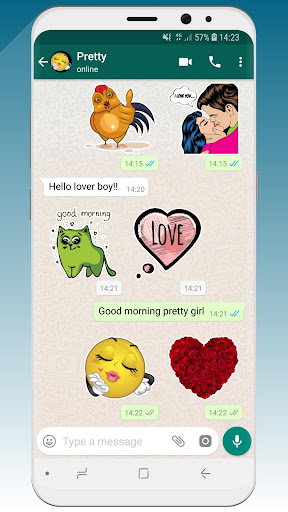
💚 WeLove presents native stickers for chatting in WhatsApp (WASticker).
We selected the best of our love stickers. They are all absolutely free and in high resolution (HD).
Enjoy right now this romantic sticker app !
Our stickers celebrate all the types of love; passionate love, casual love, romantic love, funny love, maternal love, family love ....
So, 💚 WeLove contains 300 love stickers in 10 categories:
1-❤ Hearts
2-😘 Smileys emoji
3-💋 Mouth
4-👫 Cute couples
5-🌹 Flowers & Gifts for all Happy Birthdays, Valentine's Day, Mother's Day,…
6-🐻 Cute animals
7-🏠 Family & wedding
8-💏 Kissing couples
9-💬 Love talks 1
10-💬 Love talks 2
All our love stickers have a great sticker style, fitting nicely on all custom WhatsApp backgrounds.
We’ll update regularly and add new categories soon
How it works?
Add stickers to WhatsApp (WASticker)
★ Open the category you want to add. Tap on “Add to WhatsApp”.
★ Open WhatsApp, tap the smiley icon 😀
★ Tap the stickers icon 🗒 at the bottom.
★ You new sticker category will appear in the list with a small green dot indicating that it is new.
---> Now, you can enjoy and send your new stickers to your WhatsApp friends 👏
Add to / remove from favorites in WhatsApp (WASticker)
★ You can add a sticker to your favorites by long pressing on a sticker
★ You can remove a sticker from your favorites by opening the favorites category and long pressing on the sticker
Share stickers with your WhatsApp friends
- Your friends do not need the app to see your stickers, but we will be happy if you share our app with our friends! 😉
- Your friends can open the app by long pressing on a sticker on their WhatsApp
- You can share the app link in the app via the “Share” menu
Remove stickers from WhatsApp (WASticker)
- Open WhatsApp, tap the smiley 😀icon close to the keyboard, then tap the ✚ icon at the end of the sticker categories tab.
- Tap “My Stickers” tab and remove categories you don’t want anymore. Don’t worry you can add it again later.
My stickers disappeared from WhatsApp (WASticker)
It can be caused by your phone manufacturer that tries to optimize your battery.
To avoid that you can try this solution, go in your device Settings / Battery / 💚 WeLove Stickers and select "Don't optimise" (or equivalent as it depends on the device/manufacturer)
💌 Contact us
📧 [email protected]
🌍 http://www.shareitagain.co
🏃🏃 Follow us
https://www.facebook.com/EmojiShareItAgain
https://www.instagram.com/whatsmiley/
♡☮ App made with love & fun ☮♡
We selected the best of our love stickers. They are all absolutely free and in high resolution (HD).
Enjoy right now this romantic sticker app !
Our stickers celebrate all the types of love; passionate love, casual love, romantic love, funny love, maternal love, family love ....
So, 💚 WeLove contains 300 love stickers in 10 categories:
1-❤ Hearts
2-😘 Smileys emoji
3-💋 Mouth
4-👫 Cute couples
5-🌹 Flowers & Gifts for all Happy Birthdays, Valentine's Day, Mother's Day,…
6-🐻 Cute animals
7-🏠 Family & wedding
8-💏 Kissing couples
9-💬 Love talks 1
10-💬 Love talks 2
All our love stickers have a great sticker style, fitting nicely on all custom WhatsApp backgrounds.
We’ll update regularly and add new categories soon
How it works?
Add stickers to WhatsApp (WASticker)
★ Open the category you want to add. Tap on “Add to WhatsApp”.
★ Open WhatsApp, tap the smiley icon 😀
★ Tap the stickers icon 🗒 at the bottom.
★ You new sticker category will appear in the list with a small green dot indicating that it is new.
---> Now, you can enjoy and send your new stickers to your WhatsApp friends 👏
Add to / remove from favorites in WhatsApp (WASticker)
★ You can add a sticker to your favorites by long pressing on a sticker
★ You can remove a sticker from your favorites by opening the favorites category and long pressing on the sticker
Share stickers with your WhatsApp friends
- Your friends do not need the app to see your stickers, but we will be happy if you share our app with our friends! 😉
- Your friends can open the app by long pressing on a sticker on their WhatsApp
- You can share the app link in the app via the “Share” menu
Remove stickers from WhatsApp (WASticker)
- Open WhatsApp, tap the smiley 😀icon close to the keyboard, then tap the ✚ icon at the end of the sticker categories tab.
- Tap “My Stickers” tab and remove categories you don’t want anymore. Don’t worry you can add it again later.
My stickers disappeared from WhatsApp (WASticker)
It can be caused by your phone manufacturer that tries to optimize your battery.
To avoid that you can try this solution, go in your device Settings / Battery / 💚 WeLove Stickers and select "Don't optimise" (or equivalent as it depends on the device/manufacturer)
💌 Contact us
📧 [email protected]
🌍 http://www.shareitagain.co
🏃🏃 Follow us
https://www.facebook.com/EmojiShareItAgain
https://www.instagram.com/whatsmiley/
♡☮ App made with love & fun ☮♡
What's New
🎄☃️ Christmas is over - Welcome 2024 ! 🎉🥳
⭐️ New 2024 stickers
⭐️ New Happy New Year 2024 package
⭐️ New 2024 stickers
⭐️ New Happy New Year 2024 package
App Information
Version Name
5.0.3
Version Code
52
File Size
17.3 MB
Minimum OS
Android 4.4+
Target SDK
Android 33
Developer
SiA - Smileys, Stickers, animated GIF & Emoji apps
Contact
Website
Content Rating
Teen
Package Name
com.shareitagain.whatslov.wastickerappsPermissions Required
This app may request the following permissions:
Recent Reviews

Peter Johns
4.0★
This like many others doesn't have a view first. With bad eyesight I often send the wrong ones. I love the pics and what it can convey.

A Google user
1.0★
The stickers are great. Just a pity you dont get them after loading. Some just disappear for good. Others like the Mr Bean photo stickers just won't load. Not user friendly

GiGi MeMe
1.0★
I don't know how to add them to my phone to where I can use them I know how to download them but that's as far as it goes how do I freaking use them on my messages it looks like I have to have WhatsApp I cannot stand that app I hate WhatsApp you're so stupid 🙄 I like Hangouts make stickers for Hangouts that would be cool or make stickers that we can use on any Messengers like Facebook Messenger or any app that you're on even in comments
A Google user
4.0★
Great stickers so far, too bad that no more than 3 (select multiple) can be selected at a time. That's a waste of time
A Google user
5.0★
Love the variety of stickers. Great for sending to family and friends and especially on special occasions.

Sue Ann
2.0★
too small to see! sometimes won't go to message to send. emojis t too tiny to choose from. not that great!
Ad slot: In-Content