

Sighthound Video
com.sighthound.app
by Sighthound Inc.
Screenshots







Ad slot: Top Leaderboard
About this app
*** Before you sign into the Sighthound Video app, please make sure you have an IP camera or webcam connected to your computer and download the Sighthound Video desktop software from http://www.sighthound.com/download ***
Get access to Sighthound Video remotely. Sighthound Video is software that has been trained to simulate the human brain’s recognition abilities. It doesn’t just detect motion, like most other security software, it detects and tracks people. With this app you can view your cameras remotely, be alerted to people who have triggered rules you set, and search through clips of camera activity. You must have installed Sighthound Video on a computer connected to your IP cameras before using this app. Get the software at the Sighthound website www.sighthound.com if you haven’t already. You’ll soon see that the software’s ability to detect and differentiate humans from animals or other objects greatly reduces the number of false positives and unnecessary alerts sent to users, which can make even the most modern security cameras unusable.
Sighthound is the first video security software to work seamlessly on your computer, Android phones and Android tablets. After installing the software on your computer, it finds most cameras automatically, and you are using the desktop software in seconds. With the release of the Sighthound Video Android app, users can now benefit from the intelligence of Sighthound away from the home or office.
******* Main Features *******
1. Quick Setup: Installs in seconds and instantly finds your cameras
2. Clip Search: Search days of video in seconds - it’s a search engine for what your cameras have seen.
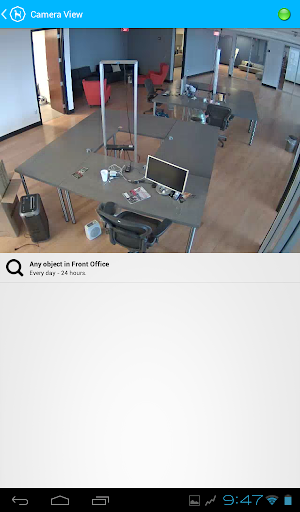
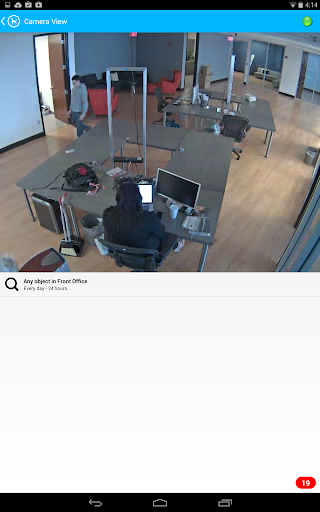
3. Live Feeds: See what’s happening at your place on your Android phone or Android tablet in real-time.
4. Smart Alerts: Receive push notifications of camera activity based on the rules you’ve set
******* Easy Setup *******
Step 1: Make sure you have an IP camera or webcam connected to your computer and download the Sighthound Video desktop software from http://www.sighthound.com/download
Step 2: Enable remote access from Sighthound’s preferences window and create a login user ID and password
Step 3: Download the mobile app and sign in using the login user ID and password you’ve created along with the internal IP address
If you have any questions about setting up Sighthound Video on your mobile device, please visit http://www.sighthound.com/support for details.
Get access to Sighthound Video remotely. Sighthound Video is software that has been trained to simulate the human brain’s recognition abilities. It doesn’t just detect motion, like most other security software, it detects and tracks people. With this app you can view your cameras remotely, be alerted to people who have triggered rules you set, and search through clips of camera activity. You must have installed Sighthound Video on a computer connected to your IP cameras before using this app. Get the software at the Sighthound website www.sighthound.com if you haven’t already. You’ll soon see that the software’s ability to detect and differentiate humans from animals or other objects greatly reduces the number of false positives and unnecessary alerts sent to users, which can make even the most modern security cameras unusable.
Sighthound is the first video security software to work seamlessly on your computer, Android phones and Android tablets. After installing the software on your computer, it finds most cameras automatically, and you are using the desktop software in seconds. With the release of the Sighthound Video Android app, users can now benefit from the intelligence of Sighthound away from the home or office.
******* Main Features *******
1. Quick Setup: Installs in seconds and instantly finds your cameras
2. Clip Search: Search days of video in seconds - it’s a search engine for what your cameras have seen.
3. Live Feeds: See what’s happening at your place on your Android phone or Android tablet in real-time.
4. Smart Alerts: Receive push notifications of camera activity based on the rules you’ve set
******* Easy Setup *******
Step 1: Make sure you have an IP camera or webcam connected to your computer and download the Sighthound Video desktop software from http://www.sighthound.com/download
Step 2: Enable remote access from Sighthound’s preferences window and create a login user ID and password
Step 3: Download the mobile app and sign in using the login user ID and password you’ve created along with the internal IP address
If you have any questions about setting up Sighthound Video on your mobile device, please visit http://www.sighthound.com/support for details.
What's New
This release supports new object types in Sighthound Video - vehicles and animals.
You can also upload videos that seem incorrect: In the list of clips; instead of a tap to play, press the clip for 2 seconds then release to activate the upload option.
You can also upload videos that seem incorrect: In the list of clips; instead of a tap to play, press the clip for 2 seconds then release to activate the upload option.
App Information
Version Name
1.2
Version Code
17
File Size
4.6 MB
Min SDK
Android 14+
Target SDK
Android 20
Developer
Sighthound Inc.
Contact
Website
Content Rating
Everyone
Package Name
com.sighthound.appPermissions Required
This app may request the following permissions:
Recent Reviews

Ryan Davidson
2.0★
At one time this app was pretty great. I've found though over the several years I've been a sighthound customer, the mobile app has changed very little. My biggest issues with the app are the loading issues or failed to load clips when notifications are triggered. Sighthound service is running on a Samsung SSD hard drive, wired 1G LAN, to a 2G fiber internet connection and yet clips don't load or take too long for it to matter. Saving money to buy a dedicated NVR for dependable results.

Arjen K.
1.0★
EDIT: a year has passed, and absolutely nothing has improved. Publisher let's the product die a slow death. good enough featureset for me, and alerts come in within ca. 6s. but it is so incredibly buggy! Reviewing an alert always fails the 1st time, and after that the alert disappears so you have to manually navigate to the correct camera and rule (if you remember!). Then the clip usually fails to load again the first time, but usually the 2nd try it usually works. Caching prob?

A Google user
5.0★
Works well, excellent support, notifications quick. room for improvement .e.g. Export/save clip is a missing feature in app which I would use when I'm away and need to keep certain clips for reference. Plenty of choice with rules on main pc software, need to try different rules to get notifications only when you want them even with the ability to recognise moving objects as people. Switch off HLS live streams in settings and the main video is quick, lower frame rate but fine for checking.
A Google user
3.0★
very useful for an important task which is that I use this for turning on a rule when I leave the house for extended periods, otherwise it's way too slow to use as a viewer even with default settings and fast wifi or cell service. now I use a third party ip cam viewing app when I need to quickly check.
A Google user
1.0★
2019 Update: I guess they're not working on this. Three years after my original review and this app still has the same problems! I still use Sighthound Video on my computer at home for my webcams and it works great but this app, nope! (Original review 2016) 'Server not responding' This is all I get on full wifi connection or 3/4G. Keep working on this guys!
A Google user
4.0★
support is great (and you need it) first of all depending on your version of Android will determine the version of the sighthound app. 1.0.2 does not work it may be the newest available if you have an older phone. 1.6.2 does work but again you only get this if you have a new enough Android os. ip changes? you can use ddns (but must specify the port in thier software) do not use ddns with port forwarding. in any case it works if your technical enough to work through things.
Ad slot: In-Content