

FFmpeg Media Encoder
com.silentlexx.ffmpeggui
by SilentLexx UA
Screenshots




Ad slot: Top Leaderboard
About this app
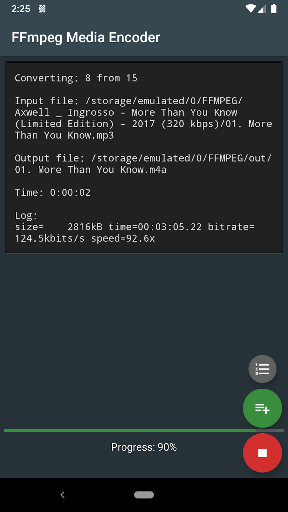
Convert audio and video directly on the device using FFmpeg http://ffmpeg.org/
FFmpeg is a set of open source libraries that allow you to record, convert digital audio and video recordings in various formats. It includes libavcodec, a library for encoding and decoding audio and video, and libavformat, a library for multiplexing and demultiplexing into a media container. The name comes from the name of the MPEG and FF expert group, meaning fast forward.
FFmpeg is already built into the program and does not require downloading additional codecs.
The conversion takes place directly on the device (the Internet is not required), and the conversion speed depends on the processor speed of the device.
Supports: MPEG4, h265, h264, mp3, 3gp, aac, ogg (vorbis and theora), opus, vp8, vp9 and many other formats (you will find the list in the app).
Requirements: Android 4.4 and the availability of the processor ARMv7, ARMv8, x86, x86_64.
FFmpeg with x264, x265, ogg, vorbis, theora, opus, vp8, vp9, mp3lame, libxvid, libfdk_aac, libvo_amrwbenc, libopencore-amr, speex, libsox, libwavpack, libwebp, librtmp
More options can be found in the help pages for FFmpeg.
For Android 11 users: New rules require the application to use more confidential methods of working with files on your device. You will have to copy/move the input files to a shared folder, such as DCIM, Movie, Music, Download. Sorry for the inconvenience
FFmpeg is a set of open source libraries that allow you to record, convert digital audio and video recordings in various formats. It includes libavcodec, a library for encoding and decoding audio and video, and libavformat, a library for multiplexing and demultiplexing into a media container. The name comes from the name of the MPEG and FF expert group, meaning fast forward.
FFmpeg is already built into the program and does not require downloading additional codecs.
The conversion takes place directly on the device (the Internet is not required), and the conversion speed depends on the processor speed of the device.
Supports: MPEG4, h265, h264, mp3, 3gp, aac, ogg (vorbis and theora), opus, vp8, vp9 and many other formats (you will find the list in the app).
Requirements: Android 4.4 and the availability of the processor ARMv7, ARMv8, x86, x86_64.
FFmpeg with x264, x265, ogg, vorbis, theora, opus, vp8, vp9, mp3lame, libxvid, libfdk_aac, libvo_amrwbenc, libopencore-amr, speex, libsox, libwavpack, libwebp, librtmp
More options can be found in the help pages for FFmpeg.
For Android 11 users: New rules require the application to use more confidential methods of working with files on your device. You will have to copy/move the input files to a shared folder, such as DCIM, Movie, Music, Download. Sorry for the inconvenience
What's New
Bugfixes
App Information
Version Name
0.97.3
Version Code
38
File Size
15.6 MB
Minimum OS
Android 6.0+
Target SDK
Android 11
Developer
SilentLexx UA
Contact
Website
Content Rating
Everyone
Package Name
com.silentlexx.ffmpegguiPermissions Required
This app may request the following permissions:
Recent Reviews

JaBBerSmack
2.0★
I'm not sure exactly what this app is doing in the background. I try to input a somewhat large video for a much smaller output, wait the time required, and am left confused when the output video fails to appear anywhere. It's only hours or even a day later when I discover the output video in my photo album. It doesn't appear until way after it is supposedly finished encoding.

Paul Thompson
3.0★
it used to be able to save the output files to an accessible folder but not any more due to security restrictions in later versions of android. so it's not of any use as far as I can see. unless they update it.

Matija Lazić
1.0★
same as others have described - impossible to select files. But this should be easily fixed by the developer. the problem is that this app doesnt even ask for permissions to access files so it can only browse folders. Will change my review if developer actually decides tofix this simple stuff...

Dennis Shia
2.0★
It is acceptable when converting images; however, my concern arises with video conversions, particularly longer videos exceeding four minutes. After FFmpeg completes the conversion, the issue is that the same video is automatically reconverted after approximately four minutes. This bug has persisted since the update to FFmpeg 6.0.0. I sincerely hope this issue can be resolved so that the program no longer reconverts videos automatically after 4–5 minutes.

AFNAN Chowdhury
5.0★
Excellent app! I find it really useful! I can use it to modify images, videos in many ways, extract their frames and more. The command line is also really useful. 10/10 app ✨

Robert
3.0★
App works but UI is terrible — need to manually remove old files every star and in order to execute process you need to click on the file name.
Ad slot: In-Content