

Silhouette Go
com.SilhouetteSoftware.SilhouetteGo
by Silhouette Research & Technology Ltd
Screenshots

Ad slot: Top Leaderboard
About this app
Silhouette Go allows you to be more mobile than ever. Use your Silhouette cutting machine in any room or on the go with just your mobile device. Quickly and easily select designs from your Silhouette Library and send them to a Silhouette cutting machine using a Bluetooth connection.
● SIMPLE FLOW
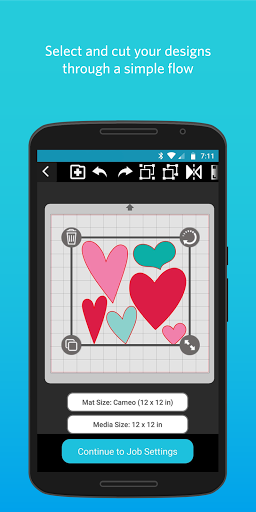
Silhouette Go makes selecting and cutting your jobs easier than ever by walking you through each step. Simply open the application on your mobile device, select your design, select your cut settings, and send the job to your Silhouette machine.
● ACCESS YOUR LIBRARY
Anything you've downloaded from the Silhouette Design Store or synced from Silhouette Studio will show up ready to use.
● OPEN SVG FILES
Silhouette Go gives you the option to open your own SVG files from your phone's storage directly into the app for use.
● PRINT & CUT
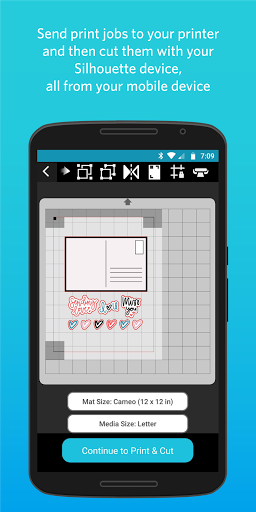
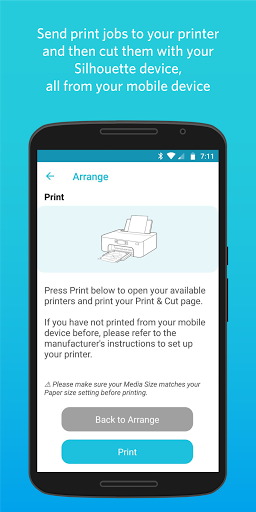
Send print jobs to your printer and then cut them out using your Silhouette cutting machine, all from your mobile device.
● SIMPLE FLOW
Silhouette Go makes selecting and cutting your jobs easier than ever by walking you through each step. Simply open the application on your mobile device, select your design, select your cut settings, and send the job to your Silhouette machine.
● ACCESS YOUR LIBRARY
Anything you've downloaded from the Silhouette Design Store or synced from Silhouette Studio will show up ready to use.
● OPEN SVG FILES
Silhouette Go gives you the option to open your own SVG files from your phone's storage directly into the app for use.
● PRINT & CUT
Send print jobs to your printer and then cut them out using your Silhouette cutting machine, all from your mobile device.
App Information
Version Name
1.1.061
Version Code
1037
File Size
55.2 MB
Minimum OS
Android 5.1+
Target SDK
Android 33
Developer
Silhouette Research & Technology Ltd
Contact
Website
Content Rating
Everyone
Package Name
com.SilhouetteSoftware.SilhouetteGoPermissions Required
This app may request the following permissions:
Recent Reviews

Joe Carroll
1.0★
Not friendly to users who still use navigation buttons instead of gestures. Application and Android controls overlap, making it completely unusable. However, it doesn't sound like I'm missing much. You really need to get it together on the software front - your hardware is awesome, but this is twice now that I've been let down by your software (both this, and Studio on PC - it immediately crashes on one of my installs - luckily I have multiple computers). Please do better.

Leese S
1.0★
Doesn't save machine type so you have to select it every single time. If you click to the three bar menu type thing and then go back to your design, you once again have to select machine type even if you're in the middle of a design. Even if you've watched the whole intro thing, you have to click skip or go through that every single time you open the app also.

Elaine Burton
1.0★
It worked okay for the first few months. Even though its very limited on what you can do. Which is surprising for how much you can do on the desktop version. But suddenly ive realized that now i cant upload files from my phone, only what i have on the silhouette program. Also the app logo is just a blank gray file, not sure what thats about. But if i cant upload my files from my phone to the program, it's honestly kind of useless to me.

Robin N
1.0★
This is the first time I've used this app, bought a portrait 3 only because it had Bluetooth. I paired with the machine using my note 10+, but it will not let me click "continue" to cut. I've Uninstalled and reinstalled. Nothing. Really aggravating as much as you pay for these machines and they advertise they can work with Bluetooth, well yeah they probably can If the app actually worked!

Diana Hill
1.0★
New cameo purchased yesterday, regretting today. This app is one of the worst apps I have had the pleasure of using. Crashes immediately after opening, doesn't recognize my email, can not connect to server, purchase sure took my money but I can't access anything I purchased! You get what you pay for. I will be returning this item and purchasing a cricut. Complete waste of $300.00+

James Gabriel
3.0★
Works well enough to connect to machines using Bluetooth, though not an intuitive process initially. The "design studio" and user interface leaves a lot to be desired. The browser hosted "help" menu leads to a choice between finding answers in a downloaded ebook or youtube search. Save time and just search YouTube first. The app functions, but not really to the standard of Silhouette machines and their potential capabilities.
Ad slot: In-Content