

EPIK - AI Photo & Video Editor
com.snowcorp.epik
by SNOW Corporation
Screenshots



Ad slot: Top Leaderboard
About this app
Use professional editing tools and powerful AI technology to easily and conveniently edit photos. Compatible with RAW files.
[AI tool]
・ Enhance: Improve clarity and resolution! Create high-quality photos
・ AI skin: Perfect your skin by AI correcting blemishes
・ Smart AI cutout: Carefully separate figures, objects, and even animals
・ Remove: Easily remove unwanted parts
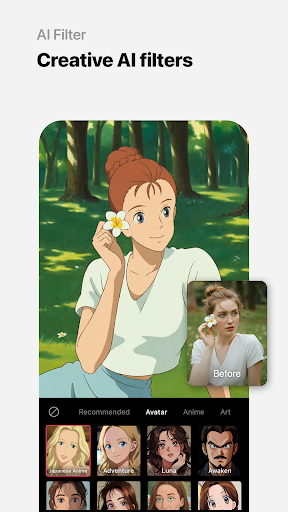
・ AI filter: Create your own characters in different styles
・ Hairstyle and Expression: Create a new look
[Professional photo editing tools]
・ HSL, Curves, Split Tone, Selective: Precise color adjustments
・ Lux, Texture, Grain, Brilliance, Vignette: Create different moods
・ Crop, Rotate, Mirror, Flip, Perspective, Adjust resolution: Set the composition you want
・ Batch: Edit multiple photos at once
・ Patch, Clone: Naturally edit or copy a specific part
[Perfect portraits]
・ Looks: Experience the magic of one-tap beauty with skin retouch, makeup, face tuner, and filters all at once
・ Erase wrinkles, AI Skin, Blemishes : Smooth skin without blemishes
・ Reshape, 3D Face, Mirror correction Individual Left-Right Adjustment, Preset, Perspective: Natural and detailed face correction
・ Style, Paint, Fine tune: Stylish makeup perfect for your face
・ Body,Length: Take perfect full-body photos! Create the body you want
・ Hair Color, Hairstyle: Transform with different hairstyles
[Trendy content]
・ Filters, Effects, Relight: Create a trendy feel
・ Stickers, Text, Paint, Draw shapes: Make your photos more unique
・ Time stamp: Record your special moments
・ Template: Thousands of customizable templates
[Creative Tools]
・ AI Collage: Create unique collages with different photos
・ Spot color: Highlight the color you want
・ Mosaic: Try various mosaic and blur effects
・ Cutout, Separate: Smart cropping
・ Layout: Combine photos in cool arrangements
・ Background, Pattern: Create your own unique backgrounds
・ Custom stickers, create one-of-a-kind filters
[Movie feature]
・ Video mosaic: Easy mosaics with automatic figure tracking
・ Retro Clip: Create vintage videos easily
・ Video Face Edit: Retouch faces naturally in videos
For inquiries about subscriptions,
contact [EPIK > Profile > Settings > Contact].
[AI tool]
・ Enhance: Improve clarity and resolution! Create high-quality photos
・ AI skin: Perfect your skin by AI correcting blemishes
・ Smart AI cutout: Carefully separate figures, objects, and even animals
・ Remove: Easily remove unwanted parts
・ AI filter: Create your own characters in different styles
・ Hairstyle and Expression: Create a new look
[Professional photo editing tools]
・ HSL, Curves, Split Tone, Selective: Precise color adjustments
・ Lux, Texture, Grain, Brilliance, Vignette: Create different moods
・ Crop, Rotate, Mirror, Flip, Perspective, Adjust resolution: Set the composition you want
・ Batch: Edit multiple photos at once
・ Patch, Clone: Naturally edit or copy a specific part
[Perfect portraits]
・ Looks: Experience the magic of one-tap beauty with skin retouch, makeup, face tuner, and filters all at once
・ Erase wrinkles, AI Skin, Blemishes : Smooth skin without blemishes
・ Reshape, 3D Face, Mirror correction Individual Left-Right Adjustment, Preset, Perspective: Natural and detailed face correction
・ Style, Paint, Fine tune: Stylish makeup perfect for your face
・ Body,Length: Take perfect full-body photos! Create the body you want
・ Hair Color, Hairstyle: Transform with different hairstyles
[Trendy content]
・ Filters, Effects, Relight: Create a trendy feel
・ Stickers, Text, Paint, Draw shapes: Make your photos more unique
・ Time stamp: Record your special moments
・ Template: Thousands of customizable templates
[Creative Tools]
・ AI Collage: Create unique collages with different photos
・ Spot color: Highlight the color you want
・ Mosaic: Try various mosaic and blur effects
・ Cutout, Separate: Smart cropping
・ Layout: Combine photos in cool arrangements
・ Background, Pattern: Create your own unique backgrounds
・ Custom stickers, create one-of-a-kind filters
[Movie feature]
・ Video mosaic: Easy mosaics with automatic figure tracking
・ Retro Clip: Create vintage videos easily
・ Video Face Edit: Retouch faces naturally in videos
For inquiries about subscriptions,
contact [EPIK > Profile > Settings > Contact].
What's New
[Live Wallpaper] Only on EPIK! New content updated.
[Remove] Range detection is now easier and more precise.
[Paint] New brush types and colors have been added!
[Remove] Range detection is now easier and more precise.
[Paint] New brush types and colors have been added!
App Information
Version Name
4.5.2
Version Code
158
File Size
169.2 MB
Minimum OS
Android 9+
Target SDK
Android 33
Developer
SNOW Corporation
Contact
Website
Content Rating
Teen
Package Name
com.snowcorp.epikPermissions Required
This app may request the following permissions:
Recent Reviews

Jennifer Conner
2.0★
Used to, I would have given this app FIVE stars! It was just AMAZING! I just noticed, though, that a SHITTON of the effects, filters, stickers, etc that used to be free are, NOW, ONLY in the Pro version! I'm on disability ONLY, which is a VERY fixed income...Half the time, I can barely afford to survive, much less pay for Pro versions of apps. That's not quite a necessity, which is something I have to stick to. I'm very, VERY disappointed with this change, as this app WAS my very FAVORITE app!

Haley Marie
1.0★
I downloaded the app to do the AI yearbook photos, but no matter how "well-lit"/"front-facing" the photos of myself were (with nothing in the background, blocking, or next to my face), the app refused to register my photos as usable. The app eventually refused to even let me open the feature after several minutes of attempts, as there was too much app traffic. Upon reading other reviews, I came to realize that even the most basic version of the feature has to be purchased anyway. Uninstalled :(

Srivatsa V
5.0★
seriously, the best app i found for easy editing on mobile. the tools are amazing just in the free version. the pro version is really worth it if you edit on a daily basis. hats off to the team that works hard on this project. I've been using this app for over 3 years and have no problem.

Oyundari Ganzorig
2.0★
This app has lots of cute and good stuff which I like. But the "Pro" feature js getting out of hand. Almost everything is pro now and there like not much chance of finding an actual good thing without the pro feature. The price of the pro feature is also really expensive. If you're gonna make like everything pro atleast make them a bit cheaper! I actually liked this app till the pro feature.

Riphine Morada
1.0★
I signed up for the 7-day free trial, but I was immediately charged ₱149 on my GCash account on the same day. 😔 I tried requesting a refund through Google Play but it was denied, which is very frustrating especially since I really needed that money for something important. Please fix this trial system so that users are not charged right away when they only intend to try the free trial first. For new users, be careful because this can happen. I hope the Epik team can address this issue and pro

Elizabete Teixeira
1.0★
they say " 7 days for Free' and even if you cancel in the date , the subscription you will need to pay it. so nothing it's for free at all.
Ad slot: In-Content