

myPhonak
com.sonova.phonak.dsapp
by Sonova AG
Screenshots
Ad slot: Top Leaderboard
About this app
The new myPhonak comes with improved functionality and a new design to make your hearing experience as seamless and as tailored to your needs as possible. myPhonak provides you access to enhanced hearing controls and personalization options for your Phonak hearing aid(s) in addition to tracking your health data*.
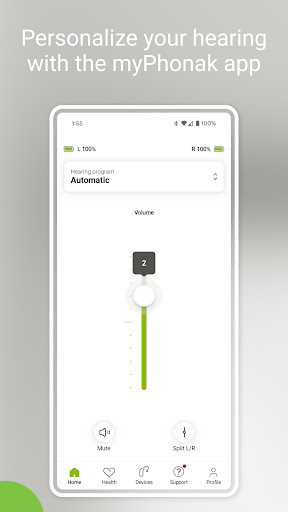
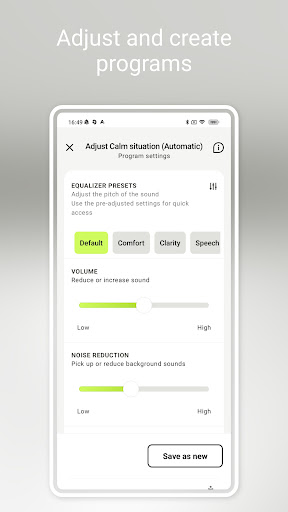
The Remote Control enables you to easily make changes to your hearing aid(s) to suit your personal preferences for various listening situations. You can easily adjust the volume and various hearing aid features (e.g., noise reduction and microphone directionality) or select pre-defined programs according to the different listening situation you are in. Additionally, you can make quick adjustments to the pitch of the sound in the equalizer by using the presets (default, comfort, clarity, softer, etc.) or more personalized adjustments using the sliders (bass, middle, treble).
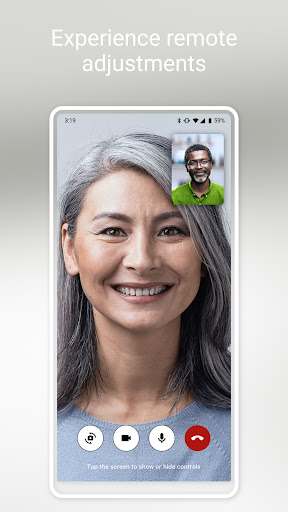
The Remote Support allows you to meet with your hearing care professional through a live video call and have your hearing aids adjusted remotely. (by appointment)
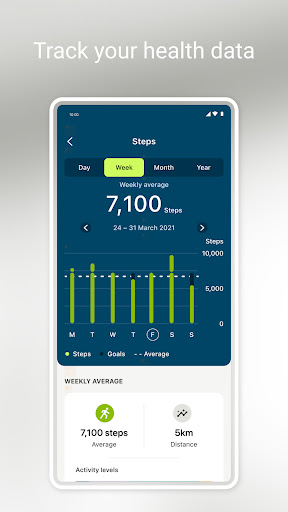
Numerous functions are available within the Health section such as Steps* and Wearing time*, including Optional goal setting*, Activity levels*, Heart rate tracking**, Distance walked and ran***.
* Available on Paradise Rechargeable, Audéo Fit, Lumity and Infinio devices
** Available on Audéo Fit only
***Available on Audéo Fit , Lumity and Infinio devices
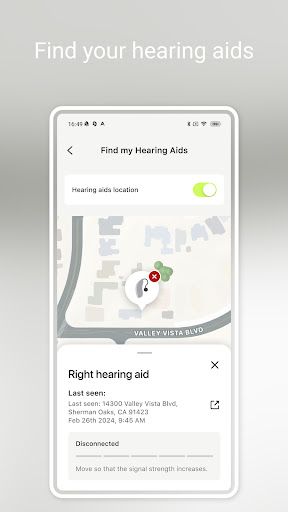
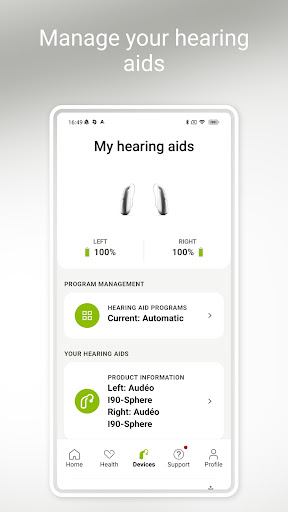
Finally, myPhonak allows for configuration of Tap Control, setting up cleaning reminders and provides additional information, such as battery level and status of connected hearing aids and accessories.
Hearing aid compatibility:
myPhonak is compatible with Phonak hearing aids with Bluetooth® connectivity.
myPhonak can be used with:
Phonak Virto™ I (Infinio)
Phonak Audéo™ I (Infinio)
Phonak CROS™ I (Infinio)
Phonak Sky™ L (Lumity)
Phonak Naída™ L (Lumity)
Phonak Terra™+
Phonak CROS™ L (Lumity)
Phonak Audéo Fit™ (Lumity)
Phonak Slim™ L (Lumity)
Phonak Audéo™ L (Lumity)
Phonak Audéo Life™ (Lumity)
Phonak CROS™ P (Paradise)
Phonak Audéo Fit™ (Paradise)
Phonak Audéo Life™ (Paradise)
Phonak Virto™ P-312 (Paradise)
Phonak Naída™ P (Paradise)
Phonak Audéo™ P (Paradise)
Phonak Audéo™ M (Marvel)
Phonak Bolero™ M (Marvel)
Phonak Virto™ M-312 (Marvel)
Phonak Naída™ M-SP (Marvel)
Phonak Naída™ Link M (Marvel)
Phonak Audéo™ B-Direct***
***Advanced Remote Control and Remote Support not available
Device compatibility:
Google Mobile Services (GMS) certified Android devices supporting Bluetooth 4.2 and Android OS 8.0 or newer. Phones with Bluetooth low energy (BT-LE) capability required.
If you want to check if your smartphone is compatible, please visit our compatibility checker: https://www.phonak.com/en-int/support/compatibility
Please find the Instruction for Use on https://www.phonak.com/en-int/hearing-devices/apps/myphonak.
Android™ is a trademark of Google, Inc.
The Bluetooth® word mark and logos are registered trademarks owned by Bluetooth SIG, Inc. and any use of such marks by Sonova AG is under license.
Always seek the advice of a doctor in addition to using this app and before making any medical decisions.
The app is only available in countries where the compatible hearing instruments have received official approval for distribution.
myPhonak supports integration with Apple Health when connected to a compatible hearing aid such as Phonak Audéo Fit.
The Remote Control enables you to easily make changes to your hearing aid(s) to suit your personal preferences for various listening situations. You can easily adjust the volume and various hearing aid features (e.g., noise reduction and microphone directionality) or select pre-defined programs according to the different listening situation you are in. Additionally, you can make quick adjustments to the pitch of the sound in the equalizer by using the presets (default, comfort, clarity, softer, etc.) or more personalized adjustments using the sliders (bass, middle, treble).
The Remote Support allows you to meet with your hearing care professional through a live video call and have your hearing aids adjusted remotely. (by appointment)
Numerous functions are available within the Health section such as Steps* and Wearing time*, including Optional goal setting*, Activity levels*, Heart rate tracking**, Distance walked and ran***.
* Available on Paradise Rechargeable, Audéo Fit, Lumity and Infinio devices
** Available on Audéo Fit only
***Available on Audéo Fit , Lumity and Infinio devices
Finally, myPhonak allows for configuration of Tap Control, setting up cleaning reminders and provides additional information, such as battery level and status of connected hearing aids and accessories.
Hearing aid compatibility:
myPhonak is compatible with Phonak hearing aids with Bluetooth® connectivity.
myPhonak can be used with:
Phonak Virto™ I (Infinio)
Phonak Audéo™ I (Infinio)
Phonak CROS™ I (Infinio)
Phonak Sky™ L (Lumity)
Phonak Naída™ L (Lumity)
Phonak Terra™+
Phonak CROS™ L (Lumity)
Phonak Audéo Fit™ (Lumity)
Phonak Slim™ L (Lumity)
Phonak Audéo™ L (Lumity)
Phonak Audéo Life™ (Lumity)
Phonak CROS™ P (Paradise)
Phonak Audéo Fit™ (Paradise)
Phonak Audéo Life™ (Paradise)
Phonak Virto™ P-312 (Paradise)
Phonak Naída™ P (Paradise)
Phonak Audéo™ P (Paradise)
Phonak Audéo™ M (Marvel)
Phonak Bolero™ M (Marvel)
Phonak Virto™ M-312 (Marvel)
Phonak Naída™ M-SP (Marvel)
Phonak Naída™ Link M (Marvel)
Phonak Audéo™ B-Direct***
***Advanced Remote Control and Remote Support not available
Device compatibility:
Google Mobile Services (GMS) certified Android devices supporting Bluetooth 4.2 and Android OS 8.0 or newer. Phones with Bluetooth low energy (BT-LE) capability required.
If you want to check if your smartphone is compatible, please visit our compatibility checker: https://www.phonak.com/en-int/support/compatibility
Please find the Instruction for Use on https://www.phonak.com/en-int/hearing-devices/apps/myphonak.
Android™ is a trademark of Google, Inc.
The Bluetooth® word mark and logos are registered trademarks owned by Bluetooth SIG, Inc. and any use of such marks by Sonova AG is under license.
Always seek the advice of a doctor in addition to using this app and before making any medical decisions.
The app is only available in countries where the compatible hearing instruments have received official approval for distribution.
myPhonak supports integration with Apple Health when connected to a compatible hearing aid such as Phonak Audéo Fit.
What's New
New hearing aids supported:
• Phonak Virto™ Infinio
New and improved functions:
• Simplified pairing process
• General bug fixes and performance improvements
Thank you for using myPhonak!
• Phonak Virto™ Infinio
New and improved functions:
• Simplified pairing process
• General bug fixes and performance improvements
Thank you for using myPhonak!
App Information
Version Name
6.7.0
Version Code
1011
File Size
97.6 MB
Minimum OS
Android 8.0+
Target SDK
Android 34
Developer
Sonova AG
Contact
Website
Content Rating
Everyone
Package Name
com.sonova.phonak.dsappPermissions Required
This app may request the following permissions:
Recent Reviews

Laurel Hawkins
3.0★
I use with Samsung Galaxy S25 Ultra. I have one major issue, particularly in summer when I have fans on. If I have an app open, I get very loud static that overrides everything. I have had the app professionally adjusted with my audiologist getting a "fix" from tech support, plus she did an adjustment saved under a different name. This was on my S21, but it didn't work in any case. THIS IS HIGHLY FRUSTRATING! I also agree with another that it would be nice to be able to select your own default

Kenneth Marcotte
3.0★
Overall the app works. However, it always defaults to "Automatic". Automatic sounds awful to me and I must then change it back to my custom program. Please let me set which program I want to use as the default. Every hearing aid is customized so let me pick the custom program that I want and not your "Automatic" program. Let me know if this is something that you are considering.

Gabe
3.0★
The app is ok, it usually stays on the program I choose from it's default setting of automatic. The only issue I have with the app is not having any customization on Bluetooth + Call. I wish I could customize the bass and treble sound of bluetooth streaming and wish the volume setting I choose would not change everytime a new media such as a song or video plays. I have no way to access the bluetooth settings unless I got something playing which is a hassle alot of times for me.

Patty
3.0★
Mix feelings! This is my 3rd digital after analog, and it's the best one ever. Clarity is good. Wind protection is not good but manageable. My problem is the volume will cut off, so then I need to wiggle my aid around to hear again. The aid has been in for repairs. Now I got the problem again so I am going to provider. Provider will sent it in again for 2nd time.

dean hodgkins
1.0★
I spent big money for these (even after insurance - thinking I'll get a really great product. what a rip off. they're difficult to connect, they just make everything louder - none of the so called filtering or focusing stuff does anything, and frequently they lose connection and then you have to try to connect them back up. I've been trying for 40 minutes! giving up. I'll buy a better pair at Walmart! for a tenth of the cost!

John Hosken
1.0★
Over the years, I wasted hours trying to get the app to connect to my hearing aids reliably. Firmware updates made a little difference. App updates made little difference. It won't connect at all under Android 16. August update: Two organizations within Phonak sent procedures different than the one behind the link in the reply, which I had already tried. None worked. I made an educated guess and used "Target" software to switch the primary BT to the newer aid. Now more reliable than before.
Ad slot: In-Content